Quick answer
- What this covers: What is OpenClaw and why are 90,500 people searching for it?
- Who it’s for: People evaluating openclaw.
Two months ago, 10 people per month searched for OpenClaw. Today that number is 90,500. The platform went from unknown to everywhere in 60 days. 176 service agencies now build businesses around it, generating $327K in revenue in the last 30 days alone.
So what is OpenClaw? And more importantly, what does it mean for business owners who want to stop doing everything themselves?
OpenClaw in One Sentence
OpenClaw is an open-source framework that lets you deploy AI agents to handle real business tasks autonomously.
Not chatbots. Not assistants. Agents. The distinction matters. A chatbot answers questions when asked. An assistant generates text when prompted. An agent reads your email at 6 AM, identifies the 3 urgent items, drafts responses to the other 47, updates your CRM, and follows up with leads who went quiet. All before you open your laptop.
That's what OpenClaw makes possible. The question is how you get there.
Why OpenClaw Exploded
Three forces converged.
AI agents became practical. For years, autonomous AI was a research topic. In 2026, it works. Language models got reliable enough to make real decisions, take real actions, and learn from real feedback. OpenClaw built the framework to harness this. The cost of hiring kept climbing. A full-time operations employee costs $65,000 to $130,000 per year including benefits, equipment, and management overhead. An OpenClaw agent does comparable work for $600 to $9,000 per year depending on your setup. The math is irresistible. The U.S. Bureau of Labor Statistics Occupational Outlook Handbook documents median wages for operations and administrative roles that, combined with the BLS employer cost multiplier, confirm total employment costs well above base salary for most business support positions. Business owners hit a wall. Solopreneurs and small teams tried ChatGPT, VAs, freelancers, and Zapier. Each solved a piece. None solved the whole problem. OpenClaw gave them a way to deploy an actual digital employee that handles multiple functions, 24/7, without prompting.| Growth Indicator | Number |
|---|---|
| Monthly searches (Feb 2026) | 10 |
| Monthly searches (Mar 2026) | 90,500 |
| Service agencies deploying OpenClaw | 176 |
| Combined agency revenue (30 days) | $327,000 |
| Pre-built skills available | 400+ |
| Tool integrations | 100+ |
What OpenClaw Actually Does
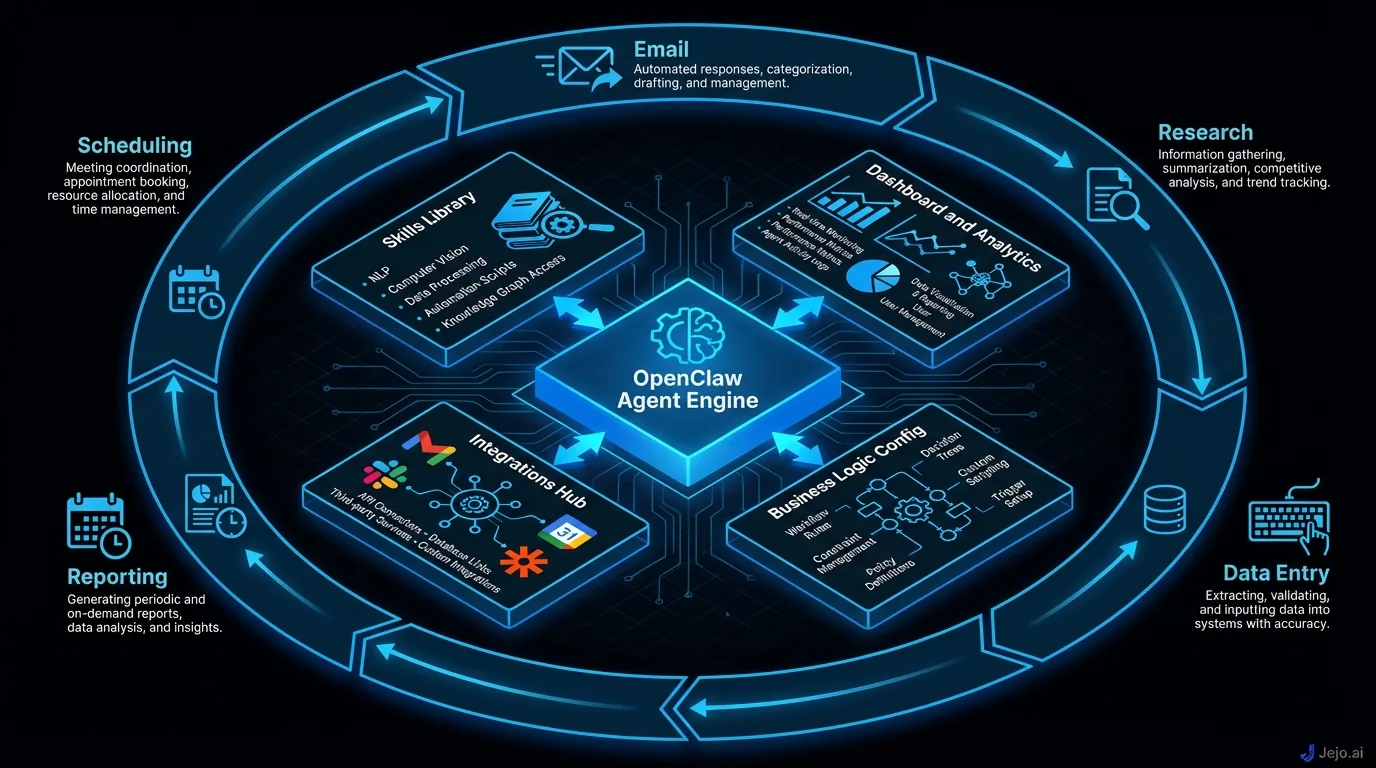
OpenClaw provides the infrastructure to run AI agents. Think of it as the operating system for your digital employee. Here's what sits inside.
The Agent Engine
The core. This is the AI brain that reads context, makes decisions, and takes action. It processes natural language, understands your business rules, and executes multi-step workflows without being prompted each time.
The agent engine connects to large language models (the AI behind ChatGPT, Claude, and similar products) but adds persistence, memory, and action capability on top. Your agent remembers past conversations, learns from your corrections, and improves over time.
The Skill System
Skills are the specific capabilities your agent has. Each skill teaches the agent how to handle a particular task.
| Skill Category | What It Handles | Time Saved |
|---|---|---|
| Communication | Email triage, drafting, follow-ups | 2-3 hrs/day |
| Sales | Lead qualification, outreach sequences, booking | 1-2 hrs/day |
| Operations | Data entry, CRM updates, scheduling | 1-2 hrs/day |
| Marketing | Social posts, content scheduling, analytics | 1-2 hrs/day |
| Support | FAQ responses, ticket routing, escalation | 2-3 hrs/day |
| Finance | Invoice processing, expense tracking, reporting | 1 hr/day |
Skills are modular. Install what you need. Remove what you don't. The marketplace has 400+ pre-built skills, and new ones appear weekly as the community grows. For the full breakdown, see OpenClaw skills.
The Dashboard
Your control center. Monitor everything your agent does, configure skills, set rules and boundaries, review agent decisions, and track performance metrics. Business owners spend 20 to 30 minutes daily here during the first 2 weeks, then 2 to 3 check-ins per week after trust is established. Full walkthrough at OpenClaw dashboard.
The Integration Layer
OpenClaw connects to 100+ business tools. Gmail, Outlook, Google Calendar, HubSpot, Salesforce, Slack, QuickBooks, Stripe, Calendly, Notion, and more. Each integration lets your agent read data from and take action in that tool.
New integrations are added regularly. If your tool has an API (most modern business software does), it can connect to OpenClaw.
How Business Owners Use OpenClaw
Real deployment patterns from real businesses.
The Solo Consultant
Before: 5 hours daily on email, scheduling, follow-ups, and invoicing. Revenue capped because there weren't enough hours left for billable client work. After: Agent handles email triage (45 drafts per day), schedules all meetings, sends follow-up sequences, and processes invoices. Owner spends 30 minutes on oversight. Recovered 4.5 hours daily. Revenue increased 35% in 60 days because billable hours went up. Cost: $750/month managed. Return: $6,750/month in additional revenue.The 8-Person Agency
Before: Office manager spent 6 hours daily on client communication, team scheduling, project updates, and vendor management. The business owner spent 2 hours daily on tasks the office manager couldn't handle. After: Agent handles 80% of the office manager's routine work and 90% of the owner's admin tasks. Office manager shifted to client relationship management (higher-value work). Owner gained 1.5 hours daily for strategy. Cost: $750/month managed. Saved: $2,500/month in recovered operational capacity.The E-Commerce Store
Before: Owner and 2 staff members spent 4 hours daily on customer support, order inquiries, and return processing. Peak seasons required hiring temporary staff at $3,000/month. After: Agent handles 70% of support tickets, all order status inquiries, and standard return processing. No temporary hires needed during peak season. Response time dropped from 4 hours to 8 minutes. Cost: $200/month self-hosted. Saved: $3,000/month in avoided seasonal hiring plus 2.5 hours daily across the team.Industries Getting the Most Value From OpenClaw
Some industries see faster and larger returns than others. Here's where OpenClaw delivers its biggest impact.
Professional services (consulting, legal, accounting, financial advisory): Email volume is high. Client communication is time-sensitive. Scheduling coordination is complex. Document generation is repetitive. All four of OpenClaw's highest-impact skills apply directly. Consultants and lawyers handling 50+ emails per day and 5 to 10 client meetings per week typically recover 3 to 4 hours daily. At $200 to $400 per hour billing rates, that recovery is worth $600 to $1,600 per day in recaptured capacity. Real estate: Lead qualification and follow-up is the defining operational challenge. Agents handle dozens of inquiries per day. Most don't convert immediately. The follow-up sequences that convert warm leads to appointments often fall through the cracks when agents are busy showing properties. An OpenClaw agent that auto-qualifies leads, scores them, routes hot ones to calendars, and maintains follow-up sequences for the rest captures pipeline that would otherwise go cold. Teams of 5 agents routinely report 25 to 40% increases in qualified appointments after 60 days. E-commerce: Customer support volume scales with sales, but headcount doesn't have to. The top 15 customer questions account for 65 to 75% of all support tickets at most e-commerce businesses. Forrester's research on customer service automation found that businesses deploying AI for tier-1 support deflect between 60% and 80% of routine ticket volume without sacrificing customer satisfaction scores. An OpenClaw agent handling those questions reduces ticket volume dramatically while response times drop from hours to minutes. Businesses processing 100+ support tickets per day see the fastest ROI, often within the first 2 weeks. Digital agencies: Client communication, project status reporting, and billing are the three operational burdens that consume disproportionate time at agencies. An agent handling client email, pulling project data from Asana or Jira for status updates, and generating invoices from tracked hours gives account managers and project managers back 2 to 3 hours daily for the client relationship work that actually drives retention. Healthcare practices (non-regulated data): Appointment scheduling, patient reminders, and intake form processing are high-volume, low-complexity tasks that consume significant front-office time. For practices not subject to data residency regulations, a self-hosted OpenClaw agent automates these tasks at a fraction of the cost of a dedicated front-desk hire. For practices with HIPAA requirements, on-premises self-hosting meets data sovereignty needs.How to Get Started
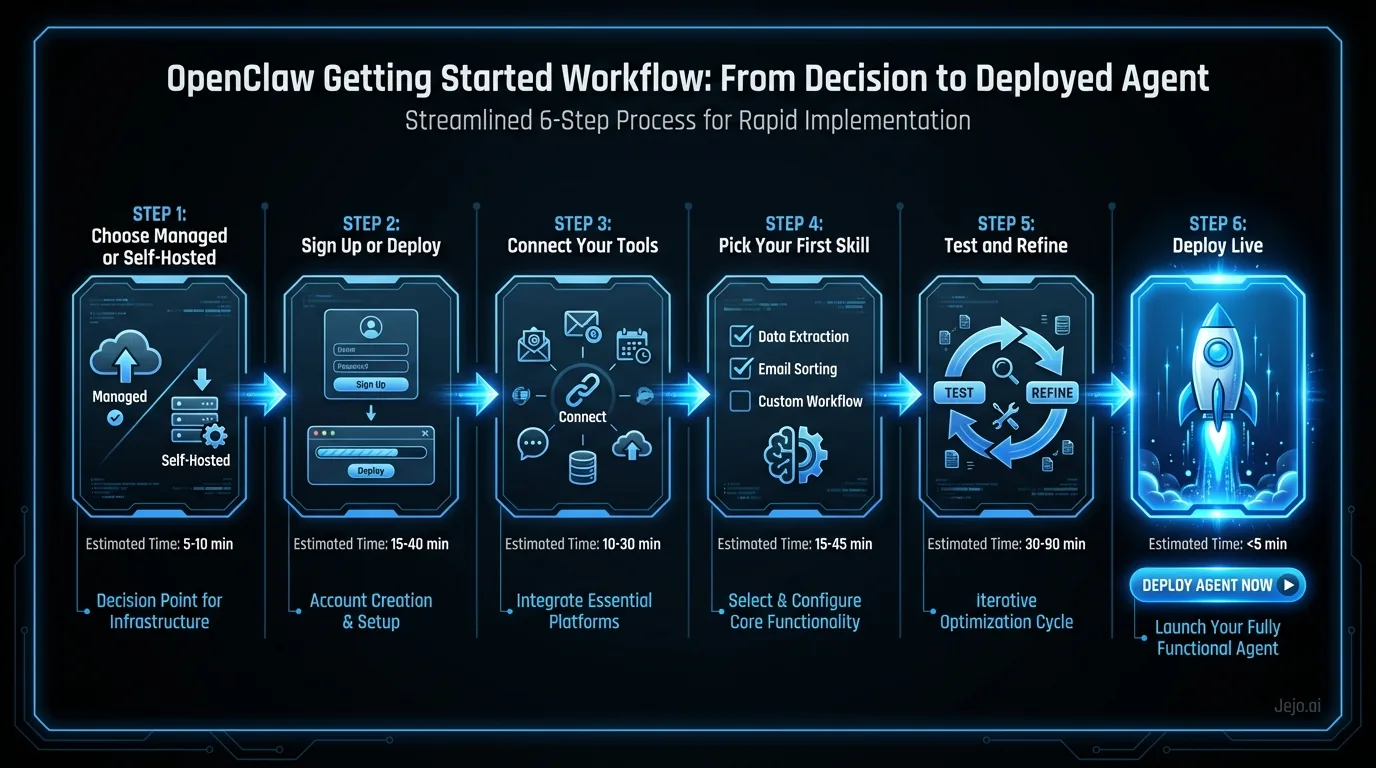
Two paths. Same destination. Different journeys.
Path 1: Self-Hosted
You download OpenClaw, deploy it on your own server using Docker, and manage everything yourself.
Pros: Lower monthly cost ($50-$200), full data control, unlimited customization. Cons: Requires technical skill, 4-15 hours for setup, ongoing maintenance. Best for: Teams with a developer. Businesses in regulated industries. Cost-conscious operations running 500+ agent actions per day.Setup details: OpenClaw setup. Docker specifics: OpenClaw Docker. Hosting comparison: OpenClaw hosting.
Path 2: Managed Service
A company like Jejo.ai handles deployment, configuration, hosting, and maintenance. You manage your agent through the dashboard.
Pros: Working in 30 minutes. Zero technical requirement. Professional support. Cons: Higher monthly cost ($750). Less customization than DIY. Best for: Non-technical business owners. Anyone who'd rather manage their business than manage servers. Teams already spending $1,500+/month on VAs or freelancers.Which Path?
| If You... | Choose |
|---|---|
| Have a developer on staff | Self-hosted |
| Value speed over savings | Managed |
| Handle sensitive/regulated data | Self-hosted (your server) |
| Want your agent running this week | Managed |
| Budget is under $500/mo | Self-hosted |
| Don't know what Docker is | Managed |
OpenClaw vs. the Alternatives
The AI agent landscape has multiple options. Here's where OpenClaw sits.
| Platform | Type | Monthly Cost | Best For |
|---|---|---|---|
| OpenClaw | Open-source framework | $50-$200 (self-hosted) | Technical teams wanting control |
| AutoGPT | Open-source framework | $50-$200 | Experimental/research use |
| CrewAI | Multi-agent framework | $75-$300 | Complex multi-agent workflows |
| Relevance AI | No-code builder | $99-$499 | Simple automations |
| Microsoft Copilot Studio | Enterprise platform | $2,000+ | Large companies (50+ employees) |
| Jejo.ai | Managed OpenClaw | $750 | Business owners wanting results |
| Zapier/Make | Automation (no AI) | $20-$150 | Simple if-then workflows |
For the full comparison, see OpenClaw alternatives.
The Learning Curve: What to Expect Week by Week
OpenClaw isn't plug-and-play. Every business goes through a training period. Here's the honest timeline.
| Week | Agent Accuracy | Your Time Investment | What's Happening |
|---|---|---|---|
| Week 1 | 75-80% | 30-60 min/day | Active teaching. Correcting mistakes. Setting rules. |
| Week 2 | 85-90% | 15-20 min/day | Agent learns patterns. Fewer corrections needed. |
| Week 3 | 90-93% | 10 min/day | Fine-tuning. Expanding to new tasks. |
| Week 4 | 93-95% | 5-10 min/day | Steady state approaching. Trust established. |
| Month 2+ | 95%+ | 2-3 checks/week | Agent runs. You review occasionally. |
The critical period is week 1. Business owners who actively correct their agent during the first 7 days see dramatically better performance by day 30. MIT Technology Review's coverage of machine learning in production emphasizes that human-in-the-loop feedback during early deployment is the single strongest predictor of long-term AI system performance. Those who set it up and ignore it get a mediocre agent that stays mediocre.
Think of it like training a new employee. You wouldn't hire someone and leave them alone on day 1 with zero guidance. You'd spend the first week showing them the ropes, answering questions, and correcting mistakes. The time you invest pays back exponentially.
The commitment: 4 to 5 hours total during week 1. About 2 hours during week 2. Under an hour for weeks 3 and 4. After that, 20 minutes per week. Total first-month investment: roughly 10 hours. For an agent that saves you 60 to 80 hours per month going forward, that's a 6 to 8x return in the very first month. Why corrections matter more than configuration: Most people think getting the initial setup right is the key to a good agent. It matters, but it's not the determining factor. Businesses with identical configurations that differ only in how actively they correct their agents during week 1 show a 20 to 30 percentage point accuracy gap by day 30. The initial setup creates the baseline. Active corrections create the actual agent.Common Misconceptions About OpenClaw
Several persistent misunderstandings trip up business owners evaluating OpenClaw.
Misconception 1: "It replaces my team." OpenClaw handles operational tasks, not relationships or strategy. It frees your team to do more of the work that requires humans. The businesses getting the best results use OpenClaw to eliminate low-value admin and redirect their people toward higher-value activities. Nobody gets replaced. The work that was consuming 60% of their day gets handled automatically, and they redirect that time to work that grows the business. Misconception 2: "It works perfectly from day 1." No. Day 1 accuracy sits at 75 to 80%. That means 1 in 4 tasks needs correction. This is not a product flaw. It's the training model. Your agent doesn't know your business rules, your client preferences, your tone, or your thresholds until you teach it. Week 1 is training. Week 2 is refinement. Month 1 is establishing trust. Month 2 and beyond is where the ROI lives. Misconception 3: "Open-source means it's hard." Open-source means the code is public, not that you have to manage code. You don't modify the source to use OpenClaw. You deploy it, configure it, and run it. The open-source nature is actually a benefit for trust: any developer can audit the code, vulnerabilities get found and fixed by a large community, and the platform can't disappear behind a corporate decision. Misconception 4: "It needs constant attention." After the first 2 weeks, most business owners spend under 20 minutes per week managing their agent. The notification system handles the exceptions. The agent handles the rest. If your agent requires daily manual intervention after 30 days, something is wrong with the configuration, not the technology. Misconception 5: "The free version is enough." OpenClaw (the software) is free. But "the free version" isn't really a category here. The software is the same whether you self-host or use a managed service. What you're paying for in managed services is the expertise, infrastructure, and ongoing support, not a software tier. The distinction isn't free vs. paid. It's DIY vs. done-for-you.What OpenClaw Can't Do
Honest limitations every business owner should know.
It can't replace human judgment on complex matters. Your agent handles routine decisions brilliantly. It shouldn't negotiate a $200K contract, fire an employee, or decide your company strategy. It's not instant expertise. Your agent needs 7 to 14 days of training to reach 90% accuracy. The first week involves corrections. If you expect perfection on day 1, you'll be disappointed. It doesn't work offline. Your agent runs on a server connected to the internet. Server goes down, agent goes down. Managed services mitigate this with redundant infrastructure. Self-hosting requires real skills. "Free to download" doesn't mean "free to run." Server management, security, updates. Someone needs to handle these. See OpenClaw pricing for the true cost breakdown. It's not a person. Your agent doesn't build relationships, read body language in meetings, or bring creative ideas to strategy sessions. It handles operational work. Humans handle human work.The Business Case
The numbers tell the story.
A small business owner spending 4 hours daily on operational tasks burns 80 hours per month. At a $150/hour opportunity cost, that's $12,000 per month of productivity lost to admin work.
An OpenClaw agent (managed at $750/month) recovers 60 to 70 of those hours. Net recovery: $8,250 to $9,750 per month in productive time.
Across a year: $99,000 to $117,000 in recovered value. Against $9,000 in agent costs. ROI: 11x to 13x.
Even at half these numbers (2 hours saved daily, $75/hour), the ROI is $4,500/month recovered minus $750 cost = $3,750 net. A 5x return.
The math changes depending on what you do with the recovered time. If you use it to do more of the same kind of work, you recover time value. If you use it to take on another client, develop a new service, or make strategic decisions you've been putting off, the value multiplies further. Business owners who explicitly allocate their recovered time to revenue-generating activities consistently report higher ROI than those who let the freed hours diffuse into general busyness.
The only businesses where OpenClaw doesn't make sense are those with under 1 hour of daily admin work. If you're spending less than an hour per day on email, scheduling, data entry, and follow-ups, you probably don't need an AI agent. Everyone else should be running the numbers.
Getting Started Today
If you want to explore further:- OpenClaw review for an honest pros-and-cons assessment
- OpenClaw skills to see what your agent can learn
- OpenClaw pricing for the real cost breakdown
- How to use OpenClaw for the non-technical getting-started guide
- Self-hosted: OpenClaw setup walks through deployment
- Managed: Jejo.ai gets you running in 30 minutes
For broader context on AI agents in small business, see AI agent for small business and AI for small business. If you're comparing to hiring, the true cost of hiring breaks down the real numbers.
FAQ
Is OpenClaw safe for my business data?
When self-hosted, your data stays on your servers. No third party accesses it. When using a managed service, check their data handling policies. OpenClaw itself is audited by its open-source community, meaning security vulnerabilities get found and fixed by thousands of developers.
How is OpenClaw different from ChatGPT?
ChatGPT is a text generator. You prompt it, it responds. Close the window and it stops. OpenClaw is an agent framework. It runs 24/7, connects to your business tools, takes actions on your behalf, and learns from your corrections. ChatGPT writes. OpenClaw works. See chatbot vs AI agent for the detailed comparison.
What exactly does OpenClaw do?
OpenClaw connects to your business tools (email, CRM, calendar, Slack) and executes tasks autonomously 24/7. It triages inboxes, responds to leads, updates CRM records, books appointments, and handles follow-ups without you prompting it. You set the rules, it does the work. Think of it as a full-time operations layer that runs on its own once trained. See how to use OpenClaw for what day-one setup looks like.
Is OpenClaw overhyped?
Depends what you expected. If you expected a plug-and-play tool that works perfectly out of the box, yes, it will disappoint. If you expected an open-source agent framework that takes 2 to 4 weeks to train before running reliably, it delivers. The hype usually comes from demos that skip the calibration period. Real results after 30 days of proper training are genuinely impressive for repetitive operations work.
How long does it take to see results?
Managed service: measurable time savings within 3 to 5 days. Self-hosted: 1 to 2 weeks including setup. Full ROI (costs covered by time saved) within 14 to 30 days for most businesses. The critical variable is how actively you train the agent during the first 2 weeks.
What if I decide OpenClaw isn't for me?
Self-hosted: shut down the server. Your data stays with you. No cancellation fees. Managed service: cancel the subscription. Most services offer month-to-month with no long-term contracts. Your agent configuration and data are exportable. No lock-in from the technology side. See OpenClaw alternatives if you're exploring other options.
How does OpenClaw handle tasks it has never seen before?
The agent applies general reasoning to novel situations based on your configured rules and its understanding of your business context. For routine-but-new tasks (a type of email it hasn't seen), it attempts a response and flags it for review since it can't calculate confidence from prior examples. You review and correct. The skill logs the correction and handles similar tasks better going forward. For genuinely ambiguous situations that don't fit any known pattern, the agent escalates to you with a summary of what it observed and why it wasn't sure how to proceed. The escalation is informative, not just a blank hand-off: you get enough context to make the decision quickly.
Can multiple people in my team use the same agent?
Yes. OpenClaw supports multiple users accessing the same agent through role-based permissions. Team members can be configured as admins (full control), managers (skill and rule configuration), or reviewers (view activity and approve escalations without changing settings). For teams using the agent across departments, each department can have its own set of escalation rules and skill configurations while sharing the same underlying agent infrastructure. The activity log tracks which user made which correction, so you can see who is training the agent and how.
