Quick answer
- What this covers: AI agent for small business cuts 3-4 hours of daily admin to 40 minutes.
- Who it’s for: Small business owners and solo founders.
The average small business owner spends 3 to 4 hours per day on email. An AI agent for small business cuts that to under 40 minutes without you overhauling how you work. It reads context, drafts responses, follows up on leads, and flags the 10% that actually needs you. The other 90% gets handled.
This guide explains what an AI agent for small business actually is, what it can do in your specific context, what you should expect to pay, and how to apply The 3-Question Agent Test to separate real agents from chatbots wearing an agent label.
For a broader view of AI in small business, AI for small business maps every tool category available.
Key takeaways:
- The average small business owner spends 3 to 4 hours per day on email. An AI agent reduces this to under 40 minutes
- A managed AI agent at $750/mo costs less than a part-time VA while covering more operational ground, 24/7
- Most "AI agents" on the market are chatbots with better marketing. Test any tool: what does it do at 3 AM?
- The first 4 weeks require active feedback. Agents trained in weeks 1 to 4 perform significantly better by month 2
- The 3-Question Agent Test: does it act without you, retain your business context, and improve over time? Fail any one and it is an assistant, not an agent
In this article:
- What Is an AI Agent, in Plain English?
- How AI Agents Differ From Chatbots and ChatGPT
- What AI Agents Actually Do for Small Business Owners
- What AI Agents Cost for Small Business
- What to Look for When Evaluating an AI Agent for Your Business
- Is an AI Agent Right for Your Business?
- Common Mistakes When Deploying an AI Agent
- FAQ
What Is an AI Agent, in Plain English?
An AI agent is a software system that takes a goal, breaks it into steps, executes those steps using available tools, and adapts based on what it finds. The key word is executes. It does things. It doesn't just describe what should be done.Here's a concrete example. A typical AI agent given access to your email and CRM (customer tracking system) can:
- Read new emails as they arrive
- Identify which are from clients and which are from leads
- Draft responses based on your templates and voice
- Update the CRM with the relevant information
- Flag anything that needs your direct attention
- Send reminders to leads who haven't responded in 48 hours
No prompts required for each step. You set the rules once. The agent runs.
This is different from automation tools like Zapier, which move data between apps using fixed rules. An AI agent can read context, interpret meaning, and make decisions. If an email says "I'm interested but need to talk to my partner first," a rule-based automation can't interpret that. An agent reads it, marks the lead as warm, and schedules a follow-up for 5 days later.
Small business owners spend an average of 23% of their working week on administrative tasks. For a business owner working 50 hours per week, that is 11.5 hours of weekly admin. An AI agent handles most of it.
How AI Agents Differ From Chatbots and ChatGPT
The market is full of products calling themselves AI agents that are, in practice, chatbots. Here's how to tell the difference.
| Feature | Chatbot | ChatGPT | AI Agent |
|---|---|---|---|
| Remembers your business context | No | No (per session) | Yes (persistent) |
| Takes action in other systems | No | No | Yes |
| Works without being prompted | No | No | Yes |
| Handles multi-step workflows | No | Partially (with effort) | Yes |
| Learns from your feedback over time | No | No | Yes |
| Proactively surfaces issues | No | No | Yes |
The phrase "AI-powered" has been applied to almost everything in the past two years. Ignore it. Apply The 3-Question Agent Test: Does it act without you? Does it know your business? Does it improve over time? If the answer to any of those is no, it is not an agent.
The Three Questions That Identify a Real AI Agent for Small Business. Three tests for any tool claiming to be an AI agent: operating on your behalf when you're not logged in, retaining your business context across sessions, and improving based on your feedback over time. Chatbots and ChatGPT fail all three. A real AI agent passes all three; most products marketed as agents in 2026 pass only one.
What AI Agents Actually Do for Small Business Owners
The most valuable thing an AI agent does is handle high-frequency, context-dependent tasks. These are tasks that are too repetitive for you to enjoy but too context-dependent for simple automation.
Email operations The average small business owner spends 3 to 4 hours per day on email. An agent handles:- Triaging inbound emails by urgency and sender type
- Drafting responses using your voice and templates
- Following up on unanswered threads
- Updating the CRM with relevant information from correspondence
- Escalating anything that requires a decision from you
Speed to lead matters. The average response time for a small business is 47 hours. An agent responds within minutes, qualifies the lead, and schedules a call, at any hour.
Client communicationWeekly updates sent on time, without you remembering. Project milestones flagged before they're missed. Invoices followed up automatically at 7, 14, and 30 days overdue.
Reporting and analysisA weekly summary of your key numbers: revenue, pipeline, outstanding invoices, open client issues. Compiled automatically. Delivered to you on Monday morning.
SchedulingCoordinating meetings across time zones, handling calendar conflicts, sending reminders, rescheduling when things shift.
For industry-specific use cases, AI agents for marketing shows how agents handle marketing workflows specifically.
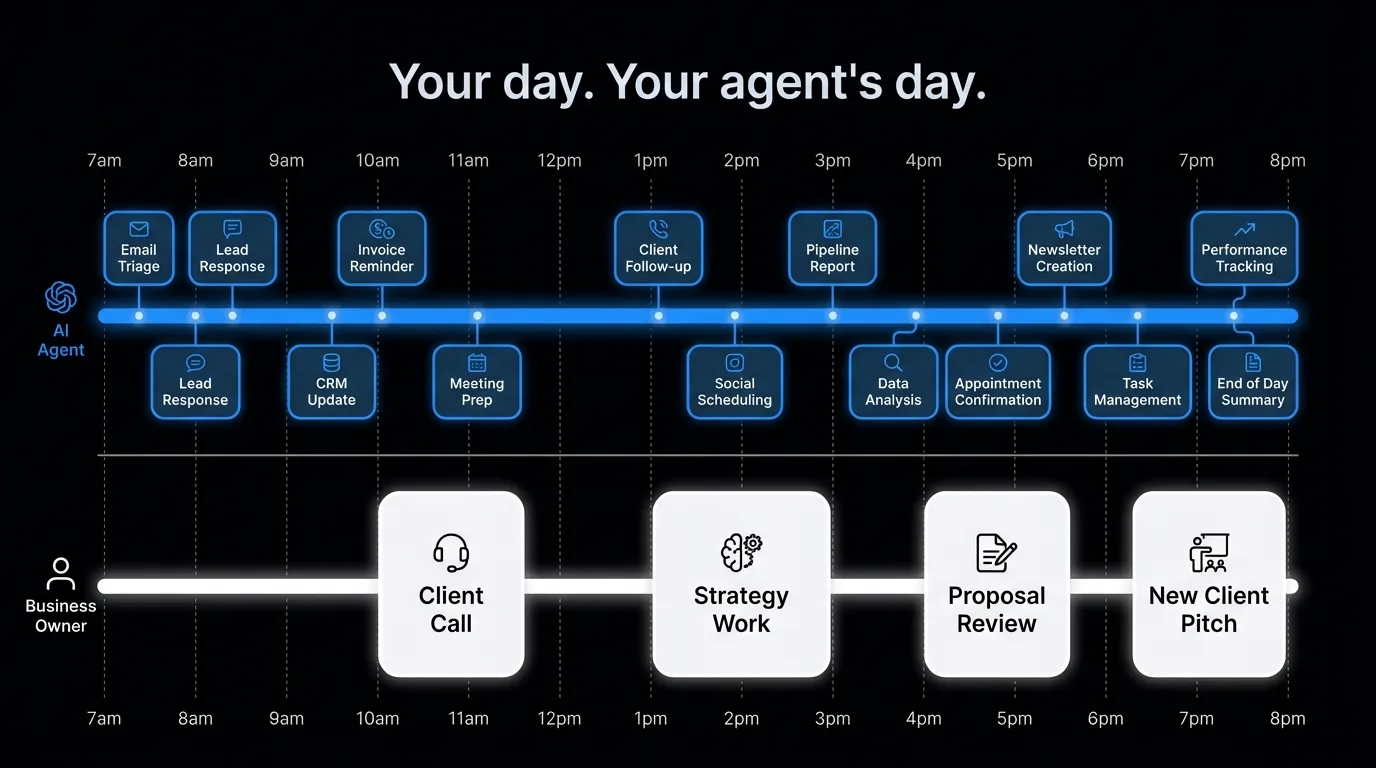
What AI Agents Cost for Small Business
Pricing varies significantly based on what you're buying.
| Type | What it is | Monthly cost | Best for |
|---|---|---|---|
| DIY (ChatGPT + Zapier) | Build your own with consumer tools | $20-100/mo + 10-20 hrs/mo to manage | Technical users who want to build |
| Generic AI assistant apps | Pre-built tools for specific tasks | $30-150/mo per tool | Point solutions (scheduling, email, etc.) |
| AI agent platform (self-service) | No-code platforms to build agents | $100-400/mo + setup time | Teams with technical capacity |
| Managed AI agent service | Agent built, tuned, and managed for you | $750-1,500/mo | Business owners who want results without building |
The cost difference between DIY and managed is real, but so is the time difference. Building your own agent setup on Zapier and ChatGPT takes 20 to 40 hours upfront and ongoing maintenance every time something breaks. A managed service takes the setup and maintenance off your plate.
The real comparison isn't "AI agent vs. nothing." It's "AI agent vs. what you'd otherwise pay."
| Alternative | Annual cost | What you get |
|---|---|---|
| Part-time VA (10 hrs/week) | $15,000-30,000/yr | Human handling similar tasks |
| Operations manager | $55,000-80,000/yr | Strategic + operational oversight |
| Full-time executive assistant | $45,000-75,000/yr | High-context admin and coordination |
| Managed AI agent | $9,000-18,000/yr | Operational workflows, 24/7 availability |
At $750 to $1,000/mo, a managed AI agent costs less than a part-time VA while covering more operational ground, at any hour, without sick days or turnover. Average VA rates run $15 to $25/hour, making a 10-hour/week VA engagement $600 to $1,000/month before benefits or management overhead.
What to Look for When Evaluating an AI Agent for Your Business
Not all AI agents are built the same. Run The 3-Question Agent Test on any tool before you commit: does it act without you, know your business, improve over time? Then evaluate these specifics.
Business context retentionAn agent that doesn't know your business defaults to generic outputs. The best agents invest time upfront in a deep business discovery: who your clients are, how you communicate, what your workflows look like, what decisions you make repeatedly. This context should persist and improve over time.
Action breadthWhat systems does the agent connect to? Email, calendar, and CRM are table stakes. Look for integrations with the specific tools you use: your project management system, your invoicing tool, your communication platform.
Proactive behaviorDoes the agent wait for you or does it surface information you didn't think to ask for? An agent that tells you "this lead has been cold for 12 days" unprompted is worth more than one that answers questions on demand.
Escalation logicAn agent that takes action on everything is dangerous. Good agents have clear rules for when to escalate to you rather than act. Complex decisions, unusual situations, high-value client interactions.
AuditabilityYou should be able to see what the agent did and why. Logging and transparency matter, especially early in the relationship.
Before committing to a slow-response operation, consider what a 4-minute lead response rate versus 47 hours means for your close rate. Book a strategy call to see what an AI agent would handle in your specific workflows.
The Onboarding Process: What to Expect
A well-designed AI agent for small business requires a proper onboarding. This is not a software setup. It's a business knowledge transfer.
Expect to spend 5 to 10 hours upfront covering:
- Your client roster and how you work with them
- Your most common workflows and how they should run
- Your communication style and voice
- Your decision criteria for common situations
- Your priorities and what's currently falling through
For a look at how this works in practice with no technical skills required, no-code AI agent builders covers platforms that make this accessible. For the distinction between agents and chatbots explained clearly, chatbot vs. AI agent is the fastest read. And if you want to see what automation looks like before committing to an agent, AI automation for small business covers what's working today.
Is an AI Agent Right for Your Business?
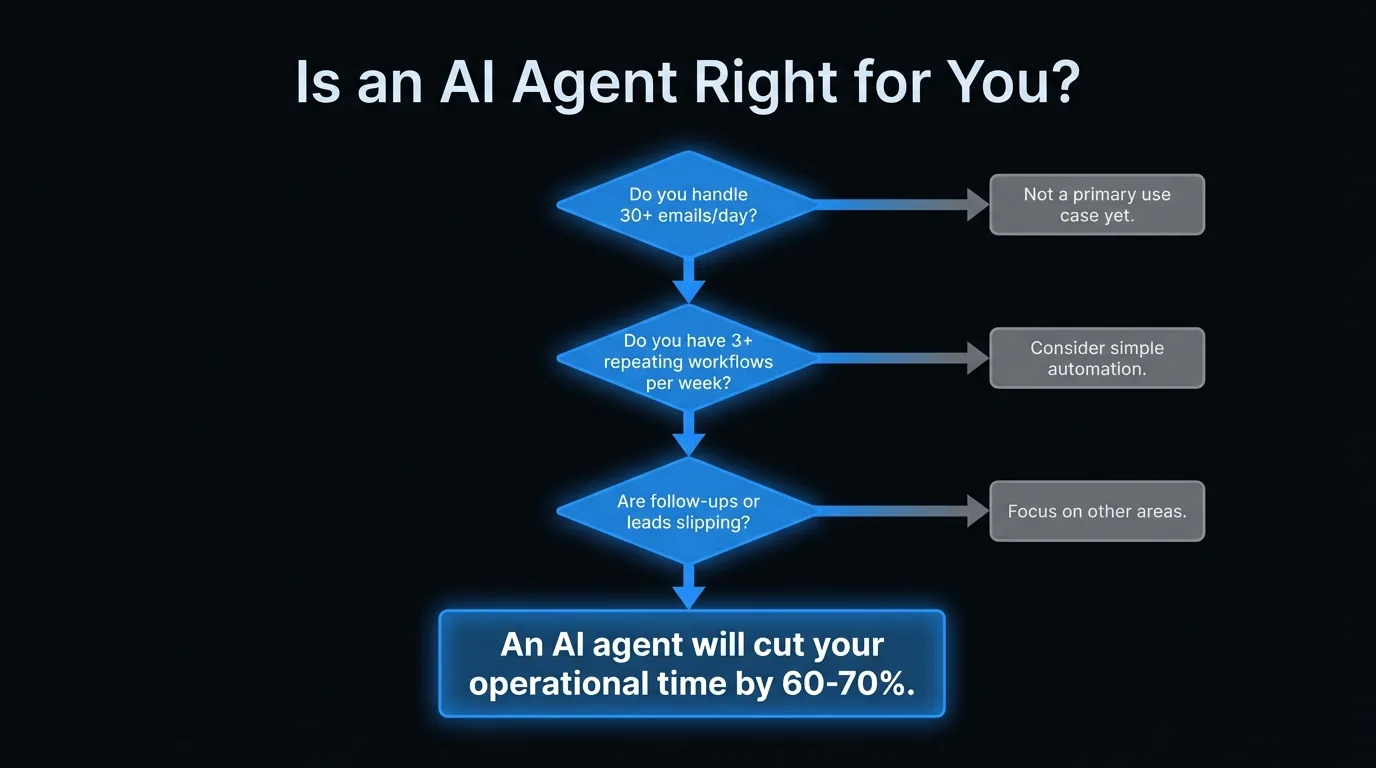
An AI agent for small business makes the most sense when:
- You're handling more than 30 emails per day
- You have repeating workflows where you do the same task 3 or more times per week
- You're losing leads or clients due to slow response times
- You're missing follow-ups because your task list is overwhelming
- You're paying a VA primarily for operational tasks (not judgment-heavy work)
It's less valuable when:
- Your volume is low enough that manual handling takes under an hour a day
- Your work is entirely judgment-intensive with no repeating patterns
- You're not yet using a CRM or email consistently
What an AI Agent Handles in a Real Business Day
David runs a 6-person digital marketing agency in Seattle. Before deploying an AI agent, his operational load looked like this: 47 emails per day (he personally handled 80% of them), 3 to 5 lead follow-ups slipping through the cracks each week, invoices sitting overdue for an average of 22 days before a reminder went out, and client status updates sent inconsistently.
After 3 weeks with a managed AI agent running his email and pipeline operations:
8:00 AM: The agent delivers a 90-second morning brief. Pipeline: 3 active leads, 1 needs follow-up (12 days cold), 2 in proposal stage. Client issues: 1 flag (client responded asking for a scope change). Invoices: 2 overdue at 7 days, automated reminder already sent.
David reviews in 8 minutes. He approves the follow-up draft for the cold lead, adds 2 lines to the scope change response, and starts his first meeting at 8:10 AM.
During the day: the agent handles 34 of the 47 inbound emails. Newsletters filtered. Project update requests handled with templated responses. Meeting scheduling coordinated for 3 clients without David's involvement.
End of day: 6 emails need David's direct input. He handles them in 25 minutes.
Total daily operational time: 35 minutes. Previously: 3+ hours. He used the recovered time to close a new client worth $4,500/month in the same week.
One solo attorney in Chicago deployed an AI agent for client intake and follow-up. Within 30 days, she was handling 3x the inquiry volume with the same personal bandwidth. Her description: "It feels like hiring an employee rather than opening another chat window."
In our experience, the businesses that see the fastest ROI (return on investment) from an AI agent are those with 30+ emails per day and at least 3 repeating workflows per week. The combination of email volume and repeating patterns is where the agent's impact is most immediate.
What AI Agents Cannot Do
They handle the predictable 90%. The 10% that requires real judgment still requires you. A difficult client conversation, a sensitive scope dispute, a relationship under strain: these still need a human. Agents reduce operational burden. They do not remove the need for leadership. The time savings depend on volume and repetition. A business handling 8 emails per day with no repeating workflows will see minimal impact. The numbers in this article hold for businesses with 30+ daily emails and at least 3 predictable repeating workflows. Below that threshold, the tool stack approach is more cost-effective. The first 4 weeks require more of your time, not less. Business context transfer, calibration, and escalation rule setup are active work. Expect 2 to 3 extra hours per week in the first month before the agent runs reliably. Business owners who skip this phase get generic outputs that require constant correction.Common Mistakes When Deploying an AI Agent
Skipping the Business Context Setup
The most expensive mistake is deploying an agent without a proper business knowledge transfer. An agent that does not know your clients, your voice, your pricing, and your decision rules produces generic output that requires constant correction. Budget 5 to 10 hours upfront for this transfer. Agents that skip it cost more in ongoing corrections than they save.Starting With the Highest-Stakes Workflows
A new AI agent should earn trust progressively. Start with low-stakes tasks: newsletter filtering, scheduling coordination, review request sequences. After 2 to 3 weeks, expand to client communications. After 4 to 6 weeks, expand to lead follow-up and pipeline management. Starting with high-stakes tasks before calibration creates costly errors.
Not Defining Escalation Rules Clearly
An AI agent without clear escalation rules will either over-act (handling things that need a human) or under-act (flagging everything and saving no time). Define 5 to 10 specific rules upfront: "If a client mentions a complaint, flag immediately. Do not draft a response." "If a lead inquiry is over $10,000, add to my review queue before responding." This is the most important configuration step.
Treating the Agent as a Set-and-Forget System
The first 4 weeks require active feedback. When the agent handles something incorrectly, correct it and explain why. This context accumulates and directly improves output quality. Business owners who engage with the feedback loop in weeks 1 to 4 see significantly better performance by month 2 than those who do not.How AI Agents Work Across Different Business Types
Professional services (accountants, lawyers, consultants): The highest-value use cases are client intake management, document request follow-up, and meeting coordination. A sole-practitioner attorney who deploys an agent for initial intake can handle 3x the inquiry volume with the same personal bandwidth. The agent qualifies, schedules, and follows up. The attorney shows up to the consultation prepared. Home services (landscaping, cleaning, plumbing): The most impactful use cases are appointment confirmation, post-service review requests, and seasonal outreach to past clients. A cleaning business with 60 recurring clients using an agent for automated post-service messages and quarterly check-in campaigns generates 15 to 25 additional Google reviews per year without a single manual send. Online services and SaaS: The highest-value use cases are trial follow-up sequences, churn risk identification, and upsell timing. An agent monitoring usage data can identify accounts that have not logged in for 7 days and trigger a re-engagement sequence automatically, reducing trial-to-paid churn by 15 to 30% in the first 60 days.What a Managed AI Agent Does Differently
There are two ways to deploy an AI agent for small business: build it yourself using platforms like Zapier AI or Make, or deploy a managed service that handles the configuration, training, and ongoing maintenance.
The difference shows up immediately. A DIY setup requires 20 to 40 hours to build, knowledge of integration platforms, and ongoing maintenance every time a connected tool updates its API (the connection that lets software tools talk to each other). A managed service requires 5 to 10 hours of business knowledge transfer and starts running in days.Most business owners who start with a DIY agent spend more time maintaining it than benefiting from it.
Jejo.ai is a managed AI agent service. The process: a 10-hour Business DNA Extraction session where the agent learns your clients, your voice, your workflows, and your decision rules. Then the agent goes live, handling email, lead follow-up, scheduling, and reporting. You review for 30 minutes each morning. The agent handles the rest.
Cost: $750/mo with a 30-day guarantee. That is $9,000/year versus $15,000 to $30,000 for a part-time VA covering the same operational scope.
See what's included in the onboarding process or book a strategy call to see what an agent would handle in your specific business.Who This Is For (and Who It's Not)
This is for you if:- You handle 30+ emails per day and find that email management eats 2 to 3 hours of your working time
- You have 3 or more repeating operational workflows that follow the same pattern every time
- You are currently paying a VA for operational tasks and want to see whether an agent can cover the same scope for less
- Your entire workflow is judgment-intensive with no repeating patterns (e.g., creative direction, bespoke consulting)
- Your email and communication volume is low enough that manual handling takes under 45 minutes per day
- You are not yet using a CRM or structured email system (the foundation needs to exist before the agent adds value)
The Bottom Line
An AI agent for small business reduces 3 to 4 hours of daily operational work to under 40 minutes for most service businesses with 30+ emails per day. At $750/mo, a managed AI agent costs less than a part-time VA while operating 24/7 with no onboarding time, no sick days, and no turnover. If your operation has repeating workflows and growing email volume, see what a Jejo.ai agent handles in practice.
FAQ
What's the difference between an AI agent and an AI assistant?
An AI assistant responds to your requests. An AI agent acts on your behalf without waiting to be asked. The distinction is proactivity and execution. An assistant helps you do things. An agent does things while you're doing something else.
Can a small business with no technical staff use an AI agent?
Yes, especially with managed AI agent services that handle all the technical setup. The business owner provides the business knowledge. The provider handles the configuration, integrations, and maintenance. Non-technical operators run these daily without writing code.
How long before an AI agent starts producing value?
Most businesses see measurable time savings within 2 to 4 weeks of a properly configured agent going live. The first week is calibration. By week two, the agent handles the most common tasks accurately. By week four, it's integrated into daily operations.
What happens when the AI agent makes a mistake?
Mistakes happen, especially early. Good agent setups include error handling: flagging uncertain decisions for human review, logging actions for audit, and easy correction mechanisms. Over time, mistakes decrease as the agent learns your preferences. The key is starting with lower-stakes workflows and expanding as confidence builds.
Do I need to change my existing tools and software?
Usually not. Most AI agents integrate with the tools you already use: Gmail, Outlook, Slack, common CRMs (Salesforce, HubSpot, Pipedrive), Notion, and others. The agent works within your existing stack, not against it.
Ready to see what an AI agent would actually handle in your business?
Compare the DIY approach against a managed agent: ChatGPT and Zapier vs. Jejo.ai or see what's included.
