Quick answer
- What this covers: How to use OpenClaw without technical skills.
- Who it’s for: People evaluating openclaw.
- What it costs: $50.
You've heard about OpenClaw. 90,500 people searched for it last month. 176 agencies are deploying it for businesses. But every guide you've found reads like it was written for software engineers.
This one isn't. This is how to use OpenClaw as a business owner who wants an AI employee, not a coding project.
What You're Actually Getting
OpenClaw gives you an AI agent. Not a chatbot. Not an assistant you have to prompt every time. An agent that works 24/7, handles multiple tasks simultaneously, and gets better the more you use it.
Here's what a typical day looks like after your agent is running:
| Time | What Your Agent Does | What You Do |
|---|---|---|
| 6:00 AM | Triages overnight emails, drafts responses | Sleep |
| 8:00 AM | Qualifies 12 new leads, scores them | Review 3 flagged items (5 min) |
| 10:00 AM | Processes 8 invoices, updates CRM | Check dashboard between meetings |
| 12:00 PM | Sends follow-ups to 15 warm leads | Lunch |
| 2:00 PM | Generates weekly performance report | Review report, make decisions |
| 4:00 PM | Schedules 6 meetings for tomorrow | Focus on strategy work |
| 11:00 PM | Handles support tickets from other time zones | Watch TV |
That's a real deployment pattern from a 12-person marketing agency. Their owner went from 11 hours of daily admin to 45 minutes of review and decision-making. McKinsey research on knowledge worker productivity found that workers at companies with high email and communications volume spend 28% of their working week managing email alone, making inbox triage one of the highest-leverage targets for automation.
Two Paths to Using OpenClaw
Path 1: Self-hosted. You set up OpenClaw on your own server. Full control, lower recurring cost, higher setup effort. Best if you have a technical person on your team. Path 2: Managed service. A company like Jejo.ai deploys and manages OpenClaw for you. Higher monthly cost, zero technical requirement, working within days. Best for non-technical owners who want results fast.Both paths give you the same core technology. The difference is who does the technical work.
| Path | Setup Time | Monthly Cost | Technical Skill | Best For |
|---|---|---|---|---|
| Self-hosted | 4-15 hours | $50-$200 + maintenance time | High | Teams with a developer |
| Managed | 30 min onboarding | $750/mo | None | Business owners doing 3-5 jobs |
For self-hosting details, see OpenClaw Docker and OpenClaw hosting.
Your First Week: What to Expect
Whether self-hosted or managed, the first week follows the same pattern. Here's the honest timeline.
Day 1: Setup and Connection
Your agent connects to your core tools. Email, calendar, CRM. The managed path does this in 30 minutes during an onboarding call. Self-hosted takes 4 to 8 hours.
What gets connected first:
- Primary email account (Gmail, Outlook)
- Calendar (Google Calendar, Outlook)
- CRM or contact database (HubSpot, Salesforce, even a spreadsheet)
Start with these three. Add more integrations in week 2 after you've built confidence.
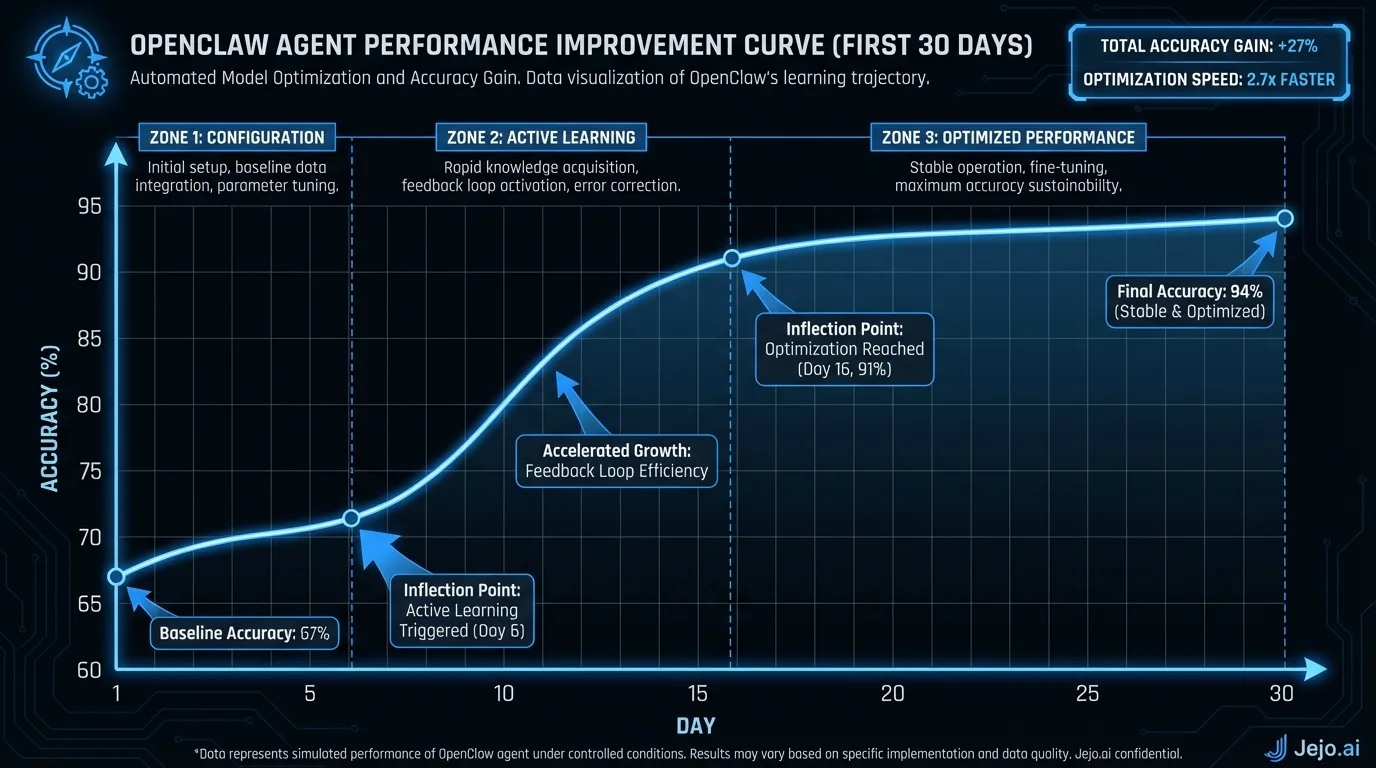
Day 2-3: The Training Phase
Your agent starts working. It will make mistakes. That's expected and necessary.
The agent handles tasks based on its default configuration. You review its work in the OpenClaw dashboard and provide corrections. Did it categorize a VIP client email as low priority? Correct it. Did it draft a response that doesn't match your tone? Edit it.
Expect to spend 30 to 60 minutes per day reviewing and correcting during days 2 and 3. This drops to 15 to 20 minutes by day 5.
Day 4-5: Pattern Recognition Kicks In
Your agent starts getting it right. The corrections from days 2 and 3 compound. It recognizes your VIP clients. It matches your communication style. It knows which leads to prioritize.
Accuracy jumps from 75% to 85%. You're spending less time reviewing and more time on actual business work.
Day 6-7: The Handoff Point
By the end of week 1, your agent handles 80 to 85% of routine tasks correctly. You've shifted from actively teaching to occasionally reviewing. Most business owners describe this moment as "the switch" when the agent feels like an employee, not a project.
The 5 Rules for Getting Results
Hundreds of businesses have deployed OpenClaw. The ones that get the best results follow these patterns.
Rule 1: Start narrow. Don't activate every skill on day 1. Pick the task that eats the most of your time. Master that. Then expand. Businesses that start with 1 to 2 skills get to reliable performance 3x faster than those that start with 6 or more. Rule 2: Correct immediately. When your agent makes a mistake, correct it right away. Delayed corrections are less effective. The agent learns from the feedback loop. Speed up the loop, speed up the learning. Rule 3: Set clear boundaries. Define exactly what the agent can do without your approval and what requires sign-off. Start conservative. Loosen over time. Example: the agent can respond to routine client emails but flags anything involving money, deadlines, or complaints. Rule 4: Check the dashboard daily for 14 days. Not hourly. Not every 5 minutes. Once in the morning, once before you stop working. After 14 days, switch to 2 to 3 times per week. Rule 5: Measure before and after. Track how many hours you spend on admin tasks before deploying your agent. Track again at day 7, day 14, and day 30. The numbers make the ROI undeniable and help you decide where to expand next. Harvard Business Review's research on measuring automation ROI recommends establishing pre-deployment baselines specifically because time savings are easy to undercount without comparison data.What Your Agent Handles vs. What You Keep
This is the most important distinction. Your agent handles execution. You keep strategy and judgment.
Agent handles:- Email triage and routine responses
- Lead qualification and scoring
- Appointment scheduling and reminders
- Data entry and CRM updates
- Report generation
- Follow-up sequences
- FAQ and support ticket responses
- Invoice processing
- Final decisions on deals over your threshold
- Client relationship conversations
- Strategy and business direction
- Creative decisions
- Hiring and team management
- Anything that requires emotional intelligence
The line between these categories shifts over time. Month 1, you keep more. Month 6, the agent handles more. The agent never replaces your judgment. It replaces the 3 to 5 hours of daily tasks that don't need your judgment.
Month 2 and Beyond: Expanding Your Agent
The first month is about trust-building and training. Month 2 is about expansion. Here's the typical growth pattern.
Month 2: Add 2 to 3 more skills. Your agent proved itself on email and scheduling. Now add lead qualification, report generation, or customer support. Each new skill needs its own training period (shorter now because your agent already understands your business context). Budget 3 to 5 days of light oversight per new skill. Month 3: Refine and optimize. Look at the performance data. Which skills have the highest accuracy? Which still need work? Tighten the rules on underperforming skills. Give more autonomy to the high performers. Most businesses reach a steady state by month 3 where the agent handles 90%+ of routine tasks without intervention. Month 4 and beyond: Compound value. Your agent now has 3 months of your business context. It knows your clients by name. It recognizes patterns in your leads. It understands which emails need your attention and which don't. The corrections you made in month 1 are paying dividends you'll benefit from for years.The businesses that get the most from OpenClaw treat the first month as an investment and months 2 through 12 as the return. Gartner's guidance on AI implementation consistently shows that organizations willing to invest in a supervised learning phase during early deployment achieve materially better long-term outcomes than those that skip the human-in-the-loop training period. Patient training early produces an agent that feels indistinguishable from a well-trained human employee by month 6.
Key milestone: the "forget it's there" moment. Around month 3 to 4, business owners report a shift. They stop thinking about the agent. It works. Tasks get done. Leads get followed up. Emails get answered. The dashboard check becomes a quick glance rather than an active review session. That's when the real value kicks in: your mental space clears for the work that grows your business.Real Deployment Playbooks by Business Type
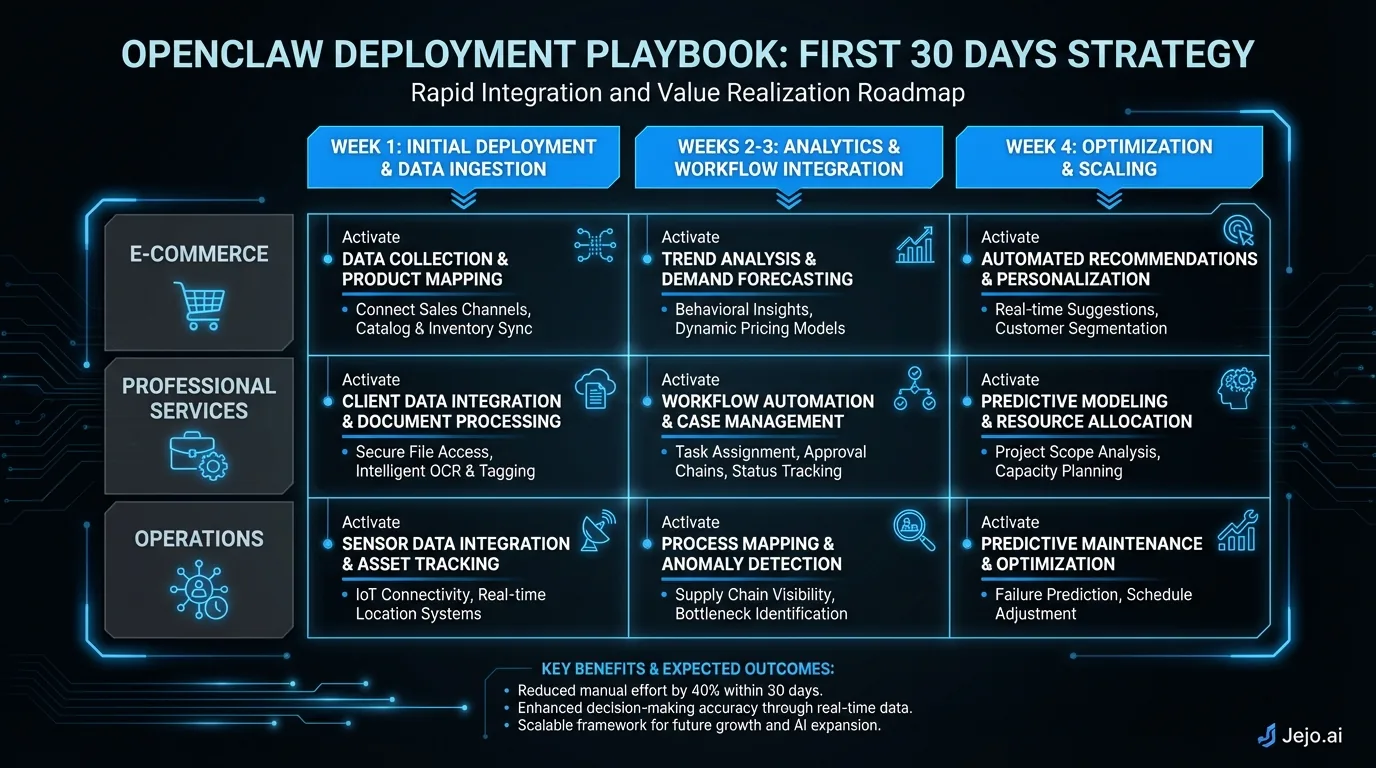
The first month looks different depending on what kind of business you run. Here's what actually works, by industry.
For consultants and solo service providers:Your highest-leverage starting point is email triage combined with follow-up sequences. Consultants live and die by their inbox. An agent that triages 60 emails per day, drafts responses to 40 of them, and follows up on 15 client threads you forgot about recovers 3 to 4 hours daily.
Week 1: Email triage only. Get it accurate to 90% before adding anything else. Week 2: Add appointment scheduling. Week 3: Add document drafting for proposals and scopes. By week 4, your agent is handling the mechanics of the business while you focus on client work.
For e-commerce businesses:Start with customer support automation. FAQ response and order status are low-risk, high-volume, and fast to train. A skill that handles the top 15 customer questions reduces ticket volume by 60 to 70% immediately.
Week 1: Customer FAQ and order status. Week 2: Add return processing. Week 3: Add inventory monitoring. By month 2, your support queue handles itself and you're only touching tickets with genuine complexity.
For sales-heavy businesses:Lead qualification is the obvious starting point. Score leads automatically, route hot ones to your calendar, send nurture sequences to the rest. Businesses with 20+ inbound leads per day recover 2 to 3 hours of sales team time daily.
Week 1: Lead qualification with conservative routing (only very high-score leads get auto-booked). Verify the scoring logic is correct before loosening. Week 2: Add follow-up sequences for warm leads. Week 3: Add CRM updates to capture every interaction. By week 4, your pipeline maintains itself between active selling conversations.
For agency owners:Your pain points are client communication and project coordination. Email triage gets you the immediate win. But the real value comes from project status reporting and client update generation.
Week 1: Email triage across all client threads. Week 2: Add report generation pulling from your project management tool. Week 3: Add invoice processing to close the billing loop. By month 2, client communications are handled, reports go out on schedule, and invoices process without manual work.
When to Add More Skills
The most common mistake in month 2 is adding skills too fast. Here's the decision framework for when a new skill is ready to add.
The readiness checklist:- Your existing skills are at 90%+ accuracy
- You're spending under 15 minutes per day on corrections across all active skills
- You've identified a specific task that consumes 30+ minutes daily
- That task is repetitive and rule-based (not relationship-heavy or judgment-dependent)
If all four boxes check out, add one new skill. Not two. Not three. One. Each new skill starts at 75% accuracy and needs its own training window. Adding two at once means both are learning simultaneously, neither gets enough correction attention, and both plateau lower than they would have with focused training.
The skill-addition timeline most businesses follow:Month 1: 2 to 3 skills (email, scheduling, one operations task)
Month 2: Add 1 to 2 skills (first sales or support skill)
Month 3: Add 1 custom or specialized skill
Month 4 and beyond: Add incrementally based on where the remaining manual work sits
By month 4, businesses running 6 to 8 skills typically have 85 to 90% of their operational workflow automated. The remaining 10 to 15% either doesn't fit the pattern for agent work (judgment-heavy, relationship-sensitive) or represents a custom workflow that a developer can build into a specialized skill.
Signals that you're not ready to add a new skill:Your current skills are still getting frequent corrections. You find yourself spending more than 20 minutes per day in the dashboard. Your escalation rate hasn't declined in the past week. Any of these signals mean your agent needs more training on what it already knows before you expand its responsibilities. Patience here pays off. A well-trained 4-skill agent outperforms a poorly trained 8-skill agent every time.
Common Mistakes (and How to Avoid Them)
Mistake 1: Expecting perfection on day 1. Your agent needs 7 to 14 days of corrections to reach 90% accuracy. Businesses that abandon after 3 days miss the payoff. Mistake 2: Activating too many skills at once. Start with 2 to 3. Each skill needs your attention during its training period. Five skills simultaneously means five things learning poorly. Mistake 3: Not setting boundaries. Without clear rules, your agent will handle things you didn't want it to. Define escalation triggers before going live. Mistake 4: Ignoring the dashboard. The first 14 days of dashboard interaction determine your agent's long-term accuracy. Skip it and your agent stays mediocre.For a full list of what skills are available, see OpenClaw skills. For pricing details, read OpenClaw pricing. For the full platform overview, start with what is OpenClaw.
If you want to skip the technical setup entirely, Jejo.ai handles deployment, skill configuration, and ongoing management. Same technology, zero configuration on your end.
FAQ
How long before my agent is fully reliable?
Most agents reach 90% accuracy within 7 to 14 days. By day 30, expect 95%+ accuracy on routine tasks. The key variable is how actively you provide corrections during the first 2 weeks. More feedback equals faster learning.
Can I use OpenClaw if I'm not technical at all?
Yes, through a managed service. You manage your agent through a dashboard with point-and-click controls. The technical infrastructure is handled for you. Self-hosting requires technical skills or a hired consultant.
What if my agent makes a serious mistake?
Every action has an audit trail. Emails can be recalled (within platform limits), CRM entries can be reverted, and scheduled tasks can be cancelled. Set your escalation rules to flag high-stakes actions before they execute. The agent asks for approval on anything above your defined thresholds.
How much does it cost to run an OpenClaw agent?
Self-hosted: $50 to $200 per month for hosting plus your time. Managed: around $750 per month including setup, maintenance, and support. Compare to a part-time VA at $1,500 to $2,500 or a full-time employee at $4,000 to $8,000 per month. Full breakdown at OpenClaw pricing.
Can I use OpenClaw alongside my existing team?
Absolutely. Most businesses deploy OpenClaw to handle the work that nobody wants to do: email triage, data entry, scheduling, follow-ups. Your team focuses on relationship-building, creative work, and strategic decisions. The agent handles the other 60 to 70% of operational tasks.
How do I stop OpenClaw gateway?
The OpenClaw gateway is the integration bridge between your agent and external tools. To stop it, go to Settings, then Integrations, and toggle off any active connections. For self-hosted deployments, run `docker stop openclaw-gateway` from the command line to halt the process. If you're on a managed service like Jejo.ai, contact support and they'll pause or terminate the gateway without you touching any infrastructure.
