Quick answer
- What this covers: Paperclip vs OpenClaw compared for small business.
- Who it’s for: People evaluating openclaw.
Paperclip vs OpenClaw is the comparison every small business owner runs into when researching AI agents. Both platforms automate business operations. Both run 24/7. Both cost a fraction of hiring a human. But they are built for different people, and choosing wrong wastes months and money. Gartner predicts that by 2028, 33% of enterprise software applications will include agentic AI, making platform selection decisions increasingly consequential.
The quick answer: Paperclip AI is built for non-technical business owners who want fast setup and low maintenance. OpenClaw is built for technical users (or teams with technical staff) who want maximum control and customization.
This guide puts them side by side on every factor that matters: pricing, setup, features, learning curve, scalability, and real-world performance. No affiliate bias. Both are legitimate platforms with clear strengths and trade-offs.
The Core Difference
Paperclip and OpenClaw solve the same problem (automating business operations) from opposite directions.
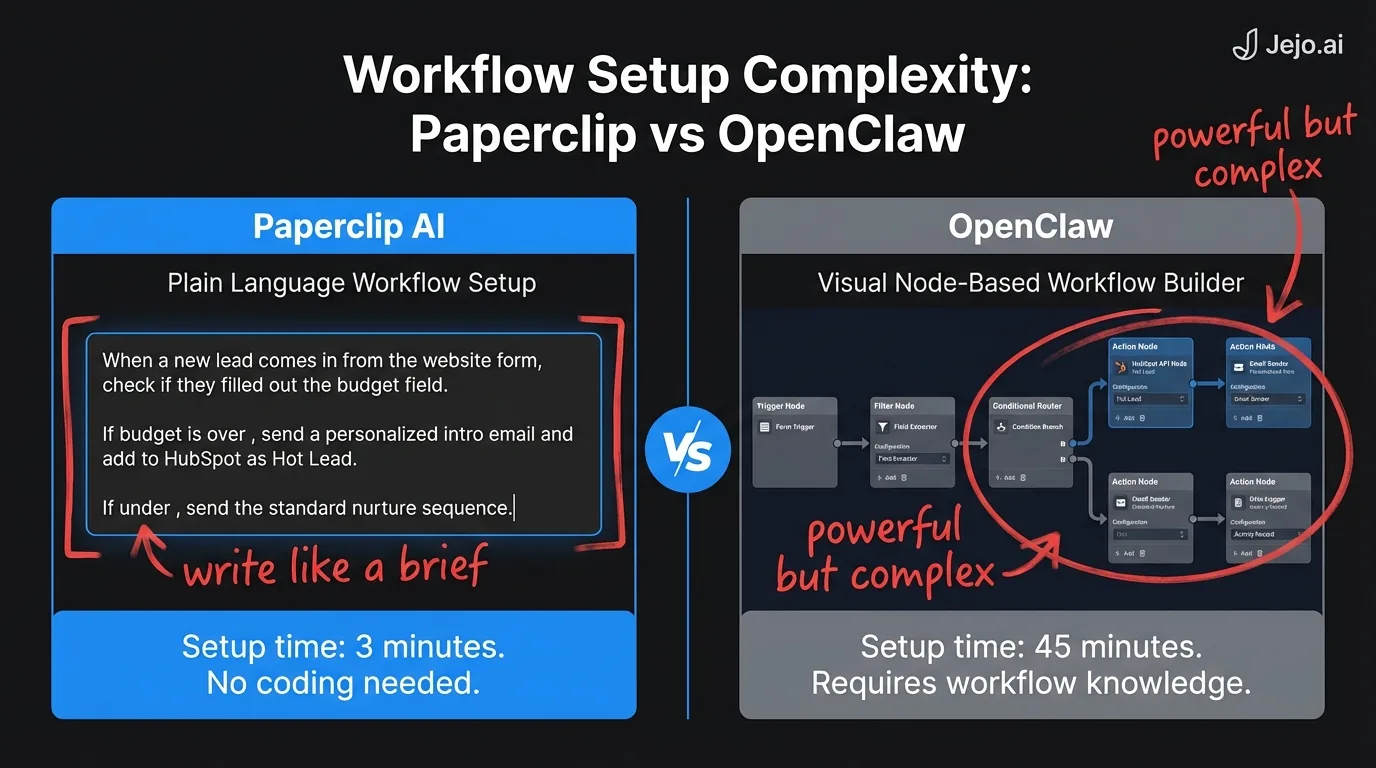
Paperclip's philosophy: Make it easy. Describe workflows in plain language. The platform handles configuration, optimization, and execution. Trade customization for accessibility. OpenClaw's philosophy: Make it powerful. Give users deep control over every workflow, trigger, condition, and output. Trade ease of use for flexibility.This isn't a quality difference. It's a design difference. A Toyota Camry and a BMW M3 both get you to work. One prioritizes comfort and reliability. The other prioritizes performance and control.
For business owners: the question isn't "which is better?" It's "which matches how I work?"
Side-by-Side Comparison
| Factor | Paperclip AI | OpenClaw |
|---|---|---|
| Starting price | $200/mo | $100/mo |
| Full-featured price | $750/mo | $500/mo |
| Annual cost (mid-tier) | $5,400/yr | $3,600/yr |
| Setup time | 30 minutes | 1-3 hours |
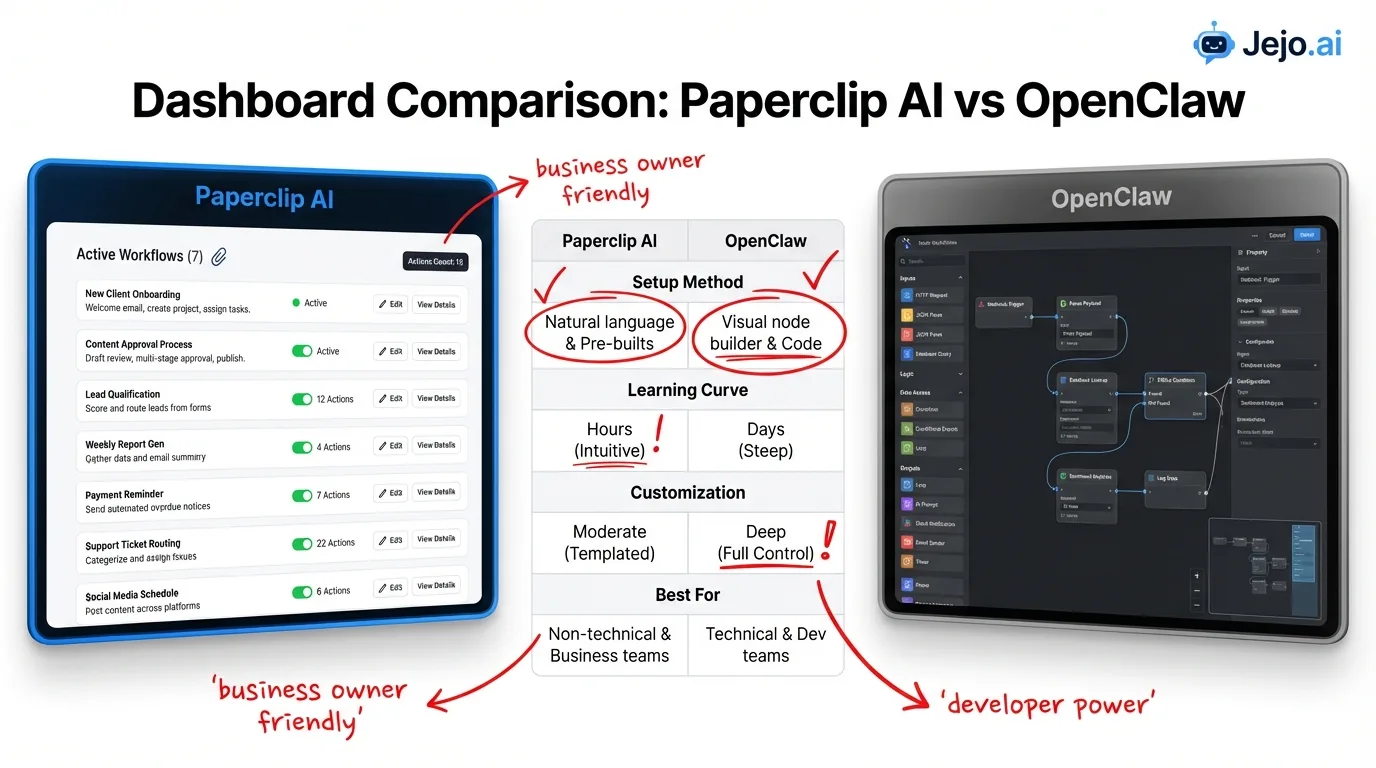
| Technical skill needed | None | Moderate (API basics, logic flows) |
| Workflow configuration | Plain language descriptions | Visual builder + custom logic |
| Max workflows | Unlimited (Business plan) | Unlimited (all plans) |
| Tool integrations | 50+ native | 200+ (native + API) |
| Customization depth | Low-medium | High |
| Learning curve | 1 week | 2-4 weeks |
| Autonomous operation | Yes, 24/7 | Yes, 24/7 |
| Self-improvement | Automatic | User-configured optimization rules |
| Error handling | Guardrails + human routing | Custom error flows + fallback chains |
| Reporting | Basic daily/weekly summaries | Custom dashboards + exports |
| API access | Business plan only | All plans |
| Best for | Non-technical operators | Technical users or teams with dev support |
The price gap matters less than the capability gap. OpenClaw at $300/mo can do things Paperclip at $750/mo cannot. But Paperclip at $450/mo is operational in 30 minutes while OpenClaw at $300/mo needs a weekend of configuration to reach the same baseline.
Pricing: Paperclip vs OpenClaw in Detail
Cost is usually the first question. Here's the full picture, including hidden costs most comparisons skip:
| Cost component | Paperclip AI (Professional) | OpenClaw (Pro) |
|---|---|---|
| Monthly subscription | $450/mo | $300/mo |
| Annual subscription | $4,560/yr (15% discount) | $3,240/yr (10% discount) |
| Setup cost | $0 (your time: ~30 min) | $0 (your time: 3-8 hours) |
| Overage charges | $0 (no action cap on Pro) | $0 (no action cap on Pro) |
| Integrations | Included | Included (custom APIs may need dev time) |
| Support | Email + chat (48hr response) | Community + docs (paid priority available) |
| Training/learning | 1 week self-guided | 2-4 weeks (or hire help) |
| Total year one cost | $5,400-$5,760 | $3,240-$3,600 + $500-$2,000 setup time |
OpenClaw wins on sticker price. Paperclip wins on total cost of ownership for non-technical users. If your time is worth $100/hr and you spend 10 extra hours learning and configuring OpenClaw, that is $1,000 in hidden costs that close the gap. McKinsey's research on small business automation adoption consistently finds that implementation complexity, not cost, is the primary barrier to adoption.
For detailed pricing on each platform: Paperclip AI pricing and OpenClaw pricing.
Setup: What Day One Actually Looks Like
Paperclip AI Setup
- Connect your tools (5 min). Click, authorize, done.
- Describe workflows in plain language (8 min). "Send follow-up emails to leads who haven't replied in 3 days."
- Set guardrails (5 min). Choose which actions need approval.
- Test batch (8 min). Review what the agent would have done on recent data.
- Go live (4 min). Flip the switch.
Total: 30 minutes. No code. No flowcharts. No documentation to read.
Full guide: Paperclip AI setup.
OpenClaw Setup
- Create an account and configure workspace (10 min).
- Connect integrations via API keys or OAuth (15-30 min, depending on tools).
- Build workflows using the visual builder (30-90 min per workflow). Define triggers, conditions, actions, and error handling for each.
- Test each workflow individually (15-30 min).
- Configure monitoring and alerts (15 min).
- Go live with one workflow at a time (gradual rollout recommended).
Total: 2-6 hours for a baseline setup. More time yields more power.
The setup gap is real. Business owners who enjoy configuring systems will prefer OpenClaw's depth. Business owners who want results fast will prefer Paperclip's speed.
Features: Where Each Platform Wins
Paperclip AI Wins On:
Accessibility. Zero technical barrier. If you can type a sentence, you can build a workflow. This isn't marketing language. It's the actual product experience. No other AI agent platform matches this for non-technical users. Speed to value. Operational within 30 minutes. Producing real output within 24 hours. Most business owners report measurable time savings by day 3. Automatic optimization. Paperclip tracks performance and adjusts without user intervention. Open rates improve. Response times shorten. Task routing gets smarter. You don't configure this. It happens. Guardrails. The approval/autonomy control is the best in the market. Granular enough to approve individual email sends while auto-approving CRM updates. OpenClaw has similar functionality but requires manual configuration. Multi-step workflow chains without code. When you describe a five-step workflow in plain language, Paperclip builds the entire chain automatically. OpenClaw requires you to define each step, condition, and branch manually in the visual builder. For business owners without technical staff, this is a decisive difference.OpenClaw Wins On:
Customization depth. Every trigger, condition, and action is configurable. Branching logic. Multi-step error handling. Conditional routing based on any data point. If you can think it, you can build it. Integration breadth. 200+ integrations vs Paperclip's 50+. OpenClaw also offers direct API access on all plans, meaning any tool with an API can connect. Paperclip restricts API access to the Business plan ($750/mo). Pricing. OpenClaw is $150/mo cheaper at the mid-tier and $250/mo cheaper at the top tier. Over a year, that is $1,800-$3,000 in savings. Reporting and analytics. Custom dashboards, data exports, trend analysis, and performance breakdowns. Paperclip gives you a daily summary. OpenClaw gives you a command center. Community and ecosystem. OpenClaw has a large, active user community sharing workflow templates, optimization strategies, and troubleshooting help. MIT Technology Review notes that community-driven ecosystems are a significant competitive moat for developer-oriented automation platforms. Paperclip's community is newer and smaller. For businesses that rely on community-sourced templates to bootstrap complex workflows quickly, this gap matters. OpenClaw users have published hundreds of ready-to-use workflow templates across industries. Paperclip's template library is growing but doesn't yet match OpenClaw's depth. Error handling logic. When a workflow fails, OpenClaw lets you define exactly what happens next: retry three times, send an alert, route to a backup workflow, or escalate to a specific team member. Paperclip routes failures to your review queue. For businesses where operational failures have real consequences (missed renewals, unprocessed payments), OpenClaw's fallback chains provide a safety net that Paperclip's simpler routing cannot match.For the full OpenClaw breakdown: OpenClaw review.
Workflow Complexity: Where Each Platform Breaks Down
Understanding the ceiling of each platform helps you pick the right one before you hit its limits.
Paperclip's ceiling: Workflows that require conditional branching based on multiple variables. "Route this lead to Account Manager A if the deal value is over $10,000 AND the industry is SaaS AND the lead came from a paid channel, otherwise route to the SDR queue unless the SDR queue has more than 8 open leads, in which case route to Account Manager B." Paperclip's plain language interface struggles with this level of nesting. It either misinterprets the conditions or flattens the logic into a simpler version of what you described. OpenClaw's ceiling: Workflows that need to evolve automatically based on outcomes. If you want the platform to test three different follow-up sequences, measure which gets the best reply rate, and then shift all future leads toward the winner without manual intervention, OpenClaw doesn't do this automatically. You configure the test. You review the results. You update the workflows manually. Paperclip's automatic optimization handles this natively.The practical takeaway: if your workflows are straightforward enough to describe in one or two sentences, Paperclip handles them cleanly. If your workflows require decision trees with four or more branches, OpenClaw is the right choice. If you want the platform to continuously improve its own logic, Paperclip's automatic optimization is the better fit.
Real-World Scenarios: Which Platform Fits?
Scenario 1: Solo Consultant, $200K Revenue
Profile: One-person consulting firm. 15 active clients. Spends 3 hours/day on email, scheduling, invoicing, and follow-ups. Zero technical skills. Tried a VA for 6 months; did not work out. Best fit: Paperclip AI (Professional, $450/mo). Setup in 30 minutes. Automates email triage, appointment scheduling, invoice reminders, and lead follow-up. Recovers 2+ hours/day. ROI positive in week one.Why not OpenClaw: The 2-4 week learning curve eats into the time savings for the first month. This person needs relief now, not a project. The plain language setup and automatic optimization match this profile exactly.
Scenario 2: Marketing Agency, 12 People, $1.5M Revenue
Profile: Agency with 3 account managers, 2 designers, and support staff. Operations manager left. Need to cover client onboarding, reporting, and task routing without hiring a replacement ($85,000/yr). Best fit: OpenClaw (Pro, $300/mo). The agency has a technical project manager who can configure workflows. Complex client routing requires conditional logic that Paperclip's plain language interface cannot express. Custom dashboards replace the manual reporting the ops manager used to do.Why not Paperclip: The workflows are too complex for plain language descriptions. "Route new client requests to Account Manager A if retainer is over $5K/mo and industry is SaaS, otherwise to Account Manager B unless they are over capacity, in which case queue for review." OpenClaw handles this. Paperclip doesn't.
Scenario 3: E-Commerce Business, 8 People, $800K Revenue
Profile: Online store with high customer service volume (50+ tickets/day). Needs automated responses, order status updates, return processing, and inventory alerts. Owner manages everything. Best fit: Either platform works. Paperclip for the owner who wants fast results and minimal configuration. OpenClaw for the team that wants custom workflows per product category, conditional response routing, and detailed analytics. The deciding factor is whether someone on the team has the technical patience for OpenClaw's configuration. If yes, OpenClaw delivers more tailored automation. If no, Paperclip's out-of-the-box handling covers 80% of the same workflows.A useful test: describe your most complex recurring process out loud. If it takes more than three sentences to describe all the conditions, OpenClaw is the better fit. If you can describe it in one or two sentences with clear triggers, Paperclip handles it cleanly.
Or: Managed AI through Jejo.ai. We pick the right platform based on your specific operations, configure it, and manage it. You spend zero time on platform decisions.Scenario 4: Professional Services, 20 People, $3M Revenue
Profile: Accounting or law firm. Regulated industry. Strict data handling requirements. Complex client intake processes with compliance checkpoints. Best fit: OpenClaw (Business, $500/mo). Compliance requirements demand granular control over every automated action. Custom audit logs, approval chains, and data handling rules need the depth that OpenClaw provides. Paperclip's abstracted approach doesn't offer enough visibility into how data flows through automated processes.The Third Option: Managed AI Through Jejo.ai
Most comparison articles stop at "pick one." Here's what they miss: you don't have to manage either platform yourself.
Jejo.ai is a managed AI service. We evaluate your business operations, select the right platform (Paperclip, OpenClaw, Hermes, or a combination), configure it, and manage it ongoing.| Factor | DIY Paperclip | DIY OpenClaw | Managed (Jejo.ai) |
|---|---|---|---|
| Your time investment | 30 min setup + 15 min/day | 3-8 hrs setup + 30 min/day | 15 min intake call + 5 min/day |
| Platform cost | $200-$750/mo | $100-$500/mo | Included in service fee |
| Management cost | Your time | Your time | $750-$1,500/mo (all-in) |
| Optimization | Automatic (limited) | Manual (powerful) | Continuous by our team |
| Platform selection | You chose Paperclip | You chose OpenClaw | We choose what fits best |
The managed approach costs more per month. But it eliminates platform risk (what if you pick wrong?), configuration time, ongoing management overhead, and the learning curve entirely. For business owners making $150/hr+ in billable time, the math favors managed service.
For more on the managed alternative: how it works vs hiring and onboarding process.
FAQ
Is Paperclip AI or OpenClaw better for small business?
It depends on your technical comfort. Paperclip AI is better for non-technical business owners who want fast setup and low maintenance ($200-$750/mo, 30-minute setup). OpenClaw is better for technical users or teams with dev support who want deep customization ($100-$500/mo, requires 2-6 hours setup). Both automate the same core operations. The difference is how much control you want vs how much ease you need.
Can I switch from Paperclip to OpenClaw later?
Yes. Both platforms connect to your existing business tools (CRM, email, calendar), so your data stays in those tools regardless of which platform you use. The switch requires rebuilding your workflows on the new platform. Expect 4-8 hours of migration work for a typical small business setup. Through Jejo.ai, we handle platform migrations as part of the service.
Which is cheaper, Paperclip AI or OpenClaw?
OpenClaw has lower subscription prices ($100-$500/mo vs Paperclip's $200-$750/mo). But total cost includes your time. OpenClaw requires 2-4 weeks of learning and 2-6 hours of initial configuration. At $100/hr, that adds $1,000-$2,000 to year-one costs. If you value your time highly and lack technical skills, Paperclip's higher subscription may deliver lower total cost.
Do I need both Paperclip AI and OpenClaw?
No. They serve the same function (business operations automation). Running both adds complexity without proportional benefit. Pick one based on your profile, or use a managed service that selects and configures the right platform for your specific operations.
What is the biggest difference between Paperclip AI and OpenClaw?
Configuration approach. Paperclip uses plain language descriptions ("send follow-up emails to leads who haven't replied in 3 days"). OpenClaw uses a visual builder with triggers, conditions, and logic flows. Paperclip trades depth for accessibility. OpenClaw trades accessibility for depth. Neither approach is wrong. The right choice depends on who is configuring and maintaining the system.
What is the paperclip AI problem?
If you searched "paperclip AI problem" looking for the philosophical thought experiment, that's the "paperclip maximizer" concept from AI safety literature, unrelated to this product. Paperclip AI (this platform) is a small business automation tool. If you're comparing Paperclip AI vs OpenClaw as a business decision, you're in the right place. See what is Paperclip AI for a full overview of the product before committing to this comparison.
