Quick answer
- What this covers: Paperclip AI pricing starts at $200/mo.
- Who it’s for: People evaluating paperclip ai.
- What it costs: $200/mo.
Paperclip AI pricing ranges from $200/mo to $750/mo depending on the plan. That's the short answer. The real question isn't what Paperclip costs. It's what you are paying right now to do the same work without it.
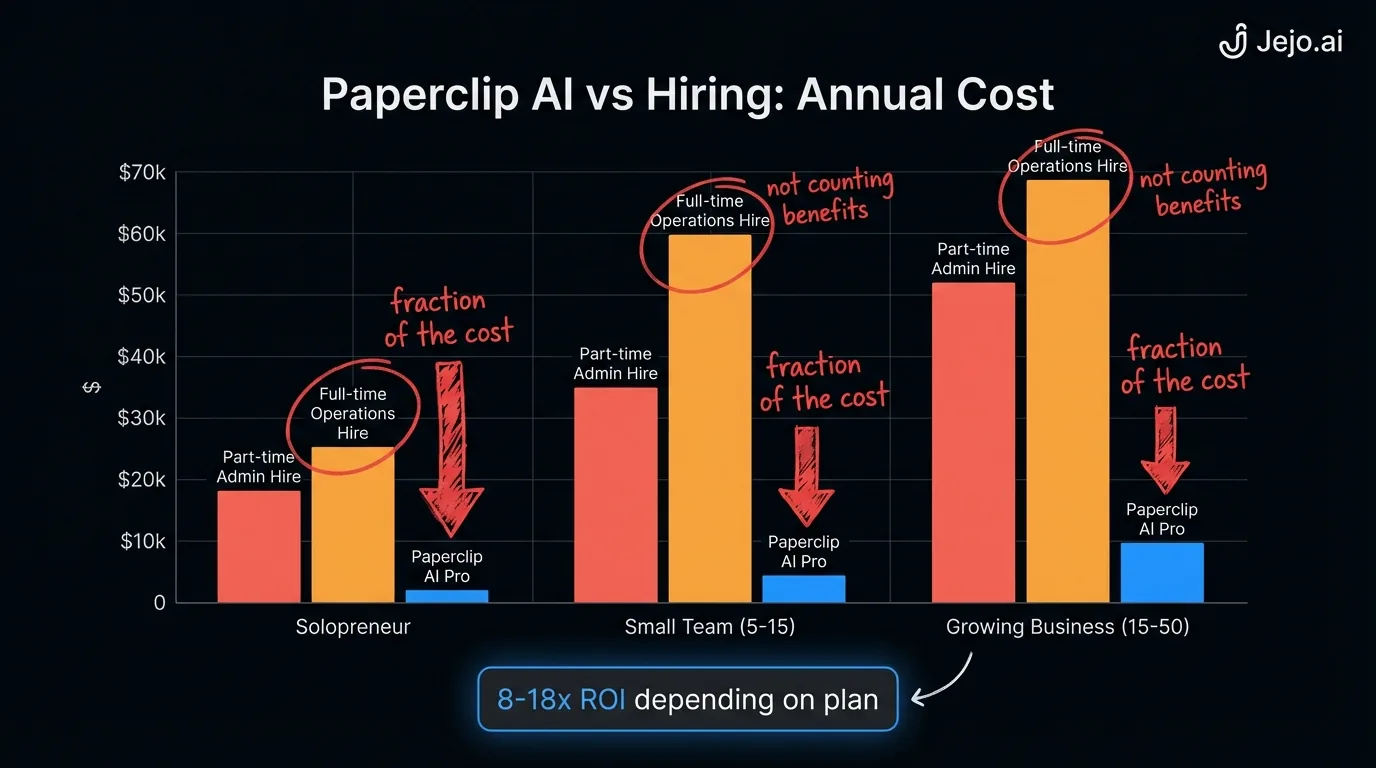
A full-time operations coordinator costs $55,000-$75,000/yr in salary. Add benefits, payroll taxes, and management overhead, the real number is $85,000-$130,000/yr. According to the Bureau of Labor Statistics Employer Costs for Employee Compensation report, benefits alone add 31-38% on top of base wages for private industry workers. A senior hire who can run your ops autonomously? $130,000-$200,000/yr loaded.
Paperclip AI does 60-80% of that work for $2,400-$9,000/yr.
This guide breaks down every tier, surfaces the costs that Paperclip's pricing page doesn't emphasize, and gives you the actual ROI math for a business under $2M in revenue.
Paperclip AI Pricing Plans
| Plan | Monthly cost | Annual cost | What you get |
|---|---|---|---|
| Starter | $200/mo | $2,400/yr | 5 workflows, 3 tool connections, basic email + CRM automation |
| Professional | $450/mo | $5,400/yr | 15 workflows, unlimited tool connections, advanced routing, daily reporting |
| Business | $750/mo | $9,000/yr | Unlimited workflows, priority processing, custom integrations, dedicated support |
All plans include: 24/7 operation, automatic optimization, action logging, and guardrail controls.
Which plan do most small business owners pick? Professional at $450/mo. The Starter plan works for solo operators with a tight stack (email + CRM + calendar and nothing else). But most 5-15 person businesses need 8-12 active workflows within the first month, which pushes past the Starter's 5-workflow cap.The Hidden Costs Nobody Mentions
Paperclip AI pricing looks clean on the surface. Here's what the pricing page doesn't highlight:
Overage charges. The Starter plan caps at 5 workflows and 1,000 actions/month. Exceed either limit and you pay per-action fees ($0.05-$0.15 per action). One business owner reported $340/mo on the Starter plan after overages. At that point, the Professional plan at $450/mo is cheaper and has no action cap. Integration limits on Starter. Three tool connections sounds fine until you count: email (1), CRM (2), calendar (3). That's your cap. No room for Slack, project management, invoicing, or anything else. Most real business stacks need 5-8 connections minimum. Setup time is free but not zero. Paperclip doesn't charge for setup. But your time has a cost. DIY setup takes 30 minutes plus 5-7 days of calibration where you review outputs. At a $100/hr effective rate, that is $500-$1,000 in your time. Through a managed setup with Jejo.ai, you spend 15 minutes on an intake call and we handle the rest. Annual discount exists but isn't advertised. Paying annually saves 15-20% on most plans. The Professional plan drops from $450/mo to roughly $380/mo when paid annually ($4,560/yr vs $5,400/yr). Ask for it. They don't always show it on the pricing page.The Real Comparison: Paperclip AI vs Hiring
The most honest way to evaluate Paperclip AI pricing is against the alternative: a human doing the same work.
| Cost category | Human hire (ops coordinator) | Paperclip AI (Professional) |
|---|---|---|
| Base salary/subscription | $55,000-$75,000/yr | $5,400/yr |
| Benefits + payroll taxes (25-35%) | $13,750-$26,250/yr | $0 |
| Recruiting + onboarding | $5,000-$15,000 (one-time) | $0 |
| Management overhead (your time) | $10,000-$20,000/yr | $1,200/yr (review time) |
| Training + development | $2,000-$5,000/yr | $0 (self-improving) |
| Sick days + vacation (15-20 days) | $4,200-$5,800 in lost productivity | $0 (24/7/365) |
| Total year one | $90,000-$147,000 | $6,600 |
| Total year two | $80,000-$126,000 | $5,400 |
Year one for a human hire is the most expensive because of recruiting and onboarding costs. Year two stabilizes but still runs 15-23x more than Paperclip AI.
The math isn't close. Even if Paperclip only handles 60% of what a full-time hire would do, you are paying $6,600/yr for 60% of a $90,000-$147,000 role. That frees budget to hire a part-time specialist for the remaining 40%, if you even need one.
One more factor the table above doesn't capture: a human hire works 8 hours a day, 5 days a week, minus vacation and sick time. The Society for Human Resource Management estimates average recruiting and onboarding costs at $4,700 per hire, with complex roles running much higher. Paperclip runs every hour of every day. For businesses with after-hours lead flow or weekend client requests, the 24/7 coverage alone changes the comparison. A prospect who fills out a form on Sunday at 9pm hears back immediately rather than Monday morning.
For the complete cost breakdown on hiring, including hidden costs most business owners miss, see the true cost of hiring an employee.
ROI Calculator: Is Paperclip AI Worth It for Your Business?
Forget the abstract math. Here's the specific ROI based on business size:
Solo operator ($100K-$300K revenue):- Current ops time: 3 hours/day = 780 hours/yr
- Your effective hourly rate: $75-$150/hr
- Value of time spent on ops: $58,500-$117,000/yr
- Paperclip cost (Starter): $2,400/yr
- Hours recovered: 500-600/yr (65-75% of ops work automated)
- ROI: $36,000-$87,000 in recovered capacity on a $2,400 investment
- Current ops overhead: 1.5 FTE equivalent across team
- Cost of that labor: $65,000-$120,000/yr
- Paperclip cost (Professional): $5,400/yr
- Labor replaced: 0.8-1.0 FTE
- ROI: $47,000-$95,000 savings on a $5,400 investment
- Current ops overhead: 2-3 dedicated ops staff
- Cost: $150,000-$300,000/yr
- Paperclip cost (Business): $9,000/yr
- Staff reduction or redeployment: 1-2 FTEs to higher-value roles
- ROI: $65,000-$191,000 in savings or capacity redeployment
The payback period for every scenario: under 30 days.
Paperclip AI Pricing vs Alternatives
How does Paperclip AI pricing compare against other options in the AI agent space?
| Platform | Starting price | Full-featured price | Best for |
|---|---|---|---|
| Paperclip AI | $200/mo | $750/mo | Non-technical business owners wanting turnkey automation |
| OpenClaw | $100/mo | $500/mo | Technical users who want deep customization |
| Zapier (with AI) | $50/mo | $300/mo | Simple trigger-based automations (not true agents) |
| Full-time VA | $2,000/mo | $5,000/mo | Tasks requiring human judgment and relationship building |
| Managed AI agent (Jejo.ai) | $750/mo | $1,500/mo | Business owners who want results without managing any platform |
Paperclip AI sits in the middle. Cheaper than hiring. More accessible than OpenClaw for non-technical users. More capable than Zapier for complex operations. The Jejo.ai managed option adds a layer on top: we run Paperclip for you, so you never log into the platform at all.
One comparison worth noting: Zapier automates tasks based on triggers you set up manually. Forrester research on intelligent automation distinguishes between rule-based RPA and AI agents that adapt based on context and outcomes. If the trigger doesn't fire exactly right, nothing happens. Paperclip AI monitors your business context and acts based on conditions, not rigid triggers. A Zapier flow doesn't know that a lead opened your email twice without replying. Paperclip does.
For a detailed feature-by-feature comparison, see Paperclip vs OpenClaw.
What Each Plan Actually Includes
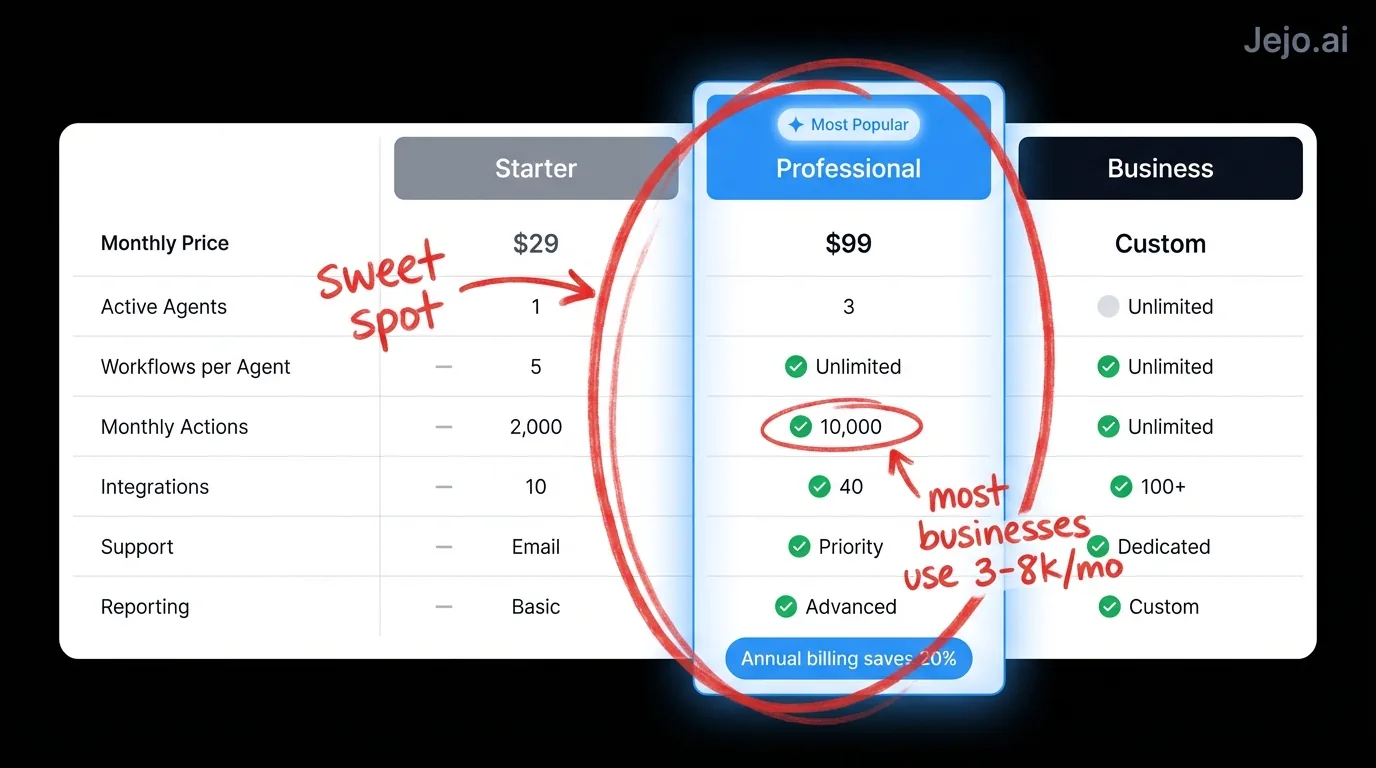
The pricing table shows the numbers. Here's what those numbers mean in practice:
Starter ($200/mo): Best thought of as a trial with training wheels. Five workflows cover the basics: email triage, one CRM automation, appointment scheduling, a follow-up sequence, and a daily summary. Three tool connections mean email + CRM + calendar, and nothing else. The 1,000 action/month cap sounds generous until you realize a single email workflow touching 20 leads/day burns 600 actions in a month. Solo operators with a simple stack and low volume can stay here. Everyone else outgrows it in 2-3 weeks. Professional ($450/mo): The sweet spot. Fifteen workflows cover a full operations stack: email, CRM, calendar, project management, invoicing, reporting, lead routing, and follow-up sequences. Unlimited tool connections mean your entire software stack integrates. No action cap means Paperclip processes as much as your business generates. This is the plan 70% of small business owners land on. Business ($750/mo): For businesses with custom needs. Unlimited everything, plus API access for custom integrations, priority processing (actions execute faster during peak hours), and dedicated support with 4-hour response times. The API access matters for companies using niche or industry-specific software that doesn't have a native Paperclip integration. If your stack is standard tools, Professional handles everything Business does. The dedicated support tier is the other meaningful differentiator: businesses running Paperclip for mission-critical operations get faster responses when something needs troubleshooting.What You Get in the 14-Day Trial
Every Paperclip plan includes a 14-day trial. Here's what to actually test during those two weeks:
Test the workflow descriptions. Write 5 workflows in plain language and see if Paperclip interprets them correctly. The test batch feature (step 4 in setup) shows you exactly what the agent would have done on your actual data from the past 48 hours. This is the most important thing to evaluate. Check the email tone. Ask Paperclip to draft 5 follow-up emails to real leads. Compare them to how you actually write. Tone calibration takes 1-2 days after feeding the agent your example emails. Evaluate the tone on day 5 of the trial, not day 1. Count your action volume. Track how many actions Paperclip takes per day across your workflows. Multiply by 30 to project your monthly volume. If you are hitting 800+ actions on the trial workflows alone, Starter will cap out immediately. Upgrade to Professional from day one. Measure time recovery. Track how many minutes per day you spend on the tasks Paperclip handles. Compare week one (before full calibration) to week two (after adjustment). The week two number is your real ongoing time cost. Most business owners see 75-90 minutes per day recovered by the end of the trial.When Paperclip AI Is Not Worth the Cost
Honest assessment. Not every business should pay for Paperclip AI:
Skip it if: you have fewer than 10 repeatable operational tasks per week. The setup time and monthly cost don't justify automating a handful of tasks. Use ChatGPT for ad-hoc help instead. Skip it if: your operations are already systematized and staffed. If you have a reliable ops team that costs less than $5,000/mo and runs smoothly, Paperclip adds complexity without enough savings. Skip it if: your business changes dramatically every month. Paperclip excels at repeatable patterns. If your workflows change weekly, the agent spends more time recalibrating than producing value. Skip it if: every client interaction requires high-touch, custom communication. Paperclip handles operational tasks well. Businesses where every email needs personal judgment and relationship-building get less value from automation. Get it if: you are the bottleneck. If your business stalls when you are on vacation, unavailable, or overwhelmed, that is the clearest signal that an operational agent pays for itself immediately.How to Save on Paperclip AI
Four ways to reduce your effective cost:
- Start on Starter, upgrade when you hit the cap. Do not pay $450/mo if you only need 3 workflows in month one. Grow into the Professional plan.
- Ask for annual pricing. 15-20% discount. That's $810-$1,800 saved per year depending on the plan.
- Use a managed service. Through Jejo.ai, we optimize your Paperclip configuration to avoid overage charges and ensure you are on the right plan. The management fee often pays for itself in avoided overages and faster ROI.
- Stack with free tools. Use ChatGPT for brainstorming, Paperclip for execution. Do not pay Paperclip to do what a free chat tool handles.
FAQ
How much does Paperclip AI cost per month?
Paperclip AI pricing has three tiers: Starter at $200/mo (5 workflows, 3 tool connections), Professional at $450/mo (15 workflows, unlimited connections), and Business at $750/mo (unlimited everything plus priority support). Annual billing saves 15-20%. Most small business owners land on the Professional plan.
Is Paperclip AI cheaper than hiring a virtual assistant?
Yes. A full-time virtual assistant costs $2,000-$5,000/mo ($24,000-$60,000/yr). Paperclip AI Professional costs $450/mo ($5,400/yr). For operational tasks like email triage, CRM updates, scheduling, and follow-ups, Paperclip handles 60-80% of what a VA does at 10-20% of the cost. See VA pricing for the full comparison.
Are there any hidden costs with Paperclip AI?
The Starter plan has overage charges if you exceed 1,000 actions/month ($0.05-$0.15 per action). The three tool connection limit on Starter also forces most businesses to upgrade sooner than expected. Professional and Business plans have no action caps. Setup is free but requires your time for calibration (30 minutes + 5-7 days of light review).
What is the ROI of Paperclip AI for a small business?
A solo operator spending 3 hours/day on operations recovers 500-600 hours/yr with Paperclip. At a $100/hr effective rate, that is $50,000-$60,000 in reclaimed capacity on a $2,400-$5,400/yr investment. Payback period: under 30 days for every business size we have modeled.
Can I switch plans or cancel at any time?
Yes. Paperclip AI is month-to-month on all plans unless you choose annual billing. You can upgrade, downgrade, or cancel at any time. No cancellation fees. Your data stays in your connected tools (CRM, email, calendar). Nothing is held hostage. Annual plans typically offer a prorated refund if you cancel mid-term.
Which plan should I start on if I am unsure?
Start on Starter for the trial to verify the platform works for your use case. If you hit the workflow or action cap during the trial, move directly to Professional. Do not spend two weeks fighting plan limits when you already know Professional is where you will land. The $250/mo difference disappears quickly against the time savings from having unlimited workflows and connections.
How to use Paperclip AI?
Connect your tools (Gmail, HubSpot, Google Calendar), describe your workflows in plain language, set guardrails for high-stakes actions, run a test batch to review quality, then go live. The full setup takes 30 minutes. From there, check the dashboard daily for the first two weeks to correct any outputs and train the agent to your style. By week three, most business owners are spending under 5 minutes a day. See the Paperclip AI setup guide for the step-by-step walkthrough.
