Quick answer
- What this covers: Paperclip AI runs in the cloud or on your own infrastructure.
- Who it’s for: People evaluating paperclip ai.
- What it costs: $200/mo.
Where your agent runs matters more than most setup guides let on. For most small business owners, the answer is simple. Cloud. Paperclip's managed cloud service handles everything. You sign up, connect your tools, and the agent runs. No servers to manage. No deployments to maintain. Monthly fee, ongoing service.
But hosting decisions have gotten more nuanced in 2026. Privacy regulations tightened. More businesses have internal systems that cannot expose APIs to external services. Self-hosting tooling has matured. The GDPR and emerging AI Act in the EU, along with the US state privacy law landscape documented by the IAPP, are driving a growing percentage of businesses to evaluate data residency requirements before selecting SaaS tools. The options are real and meaningful, not theoretical.
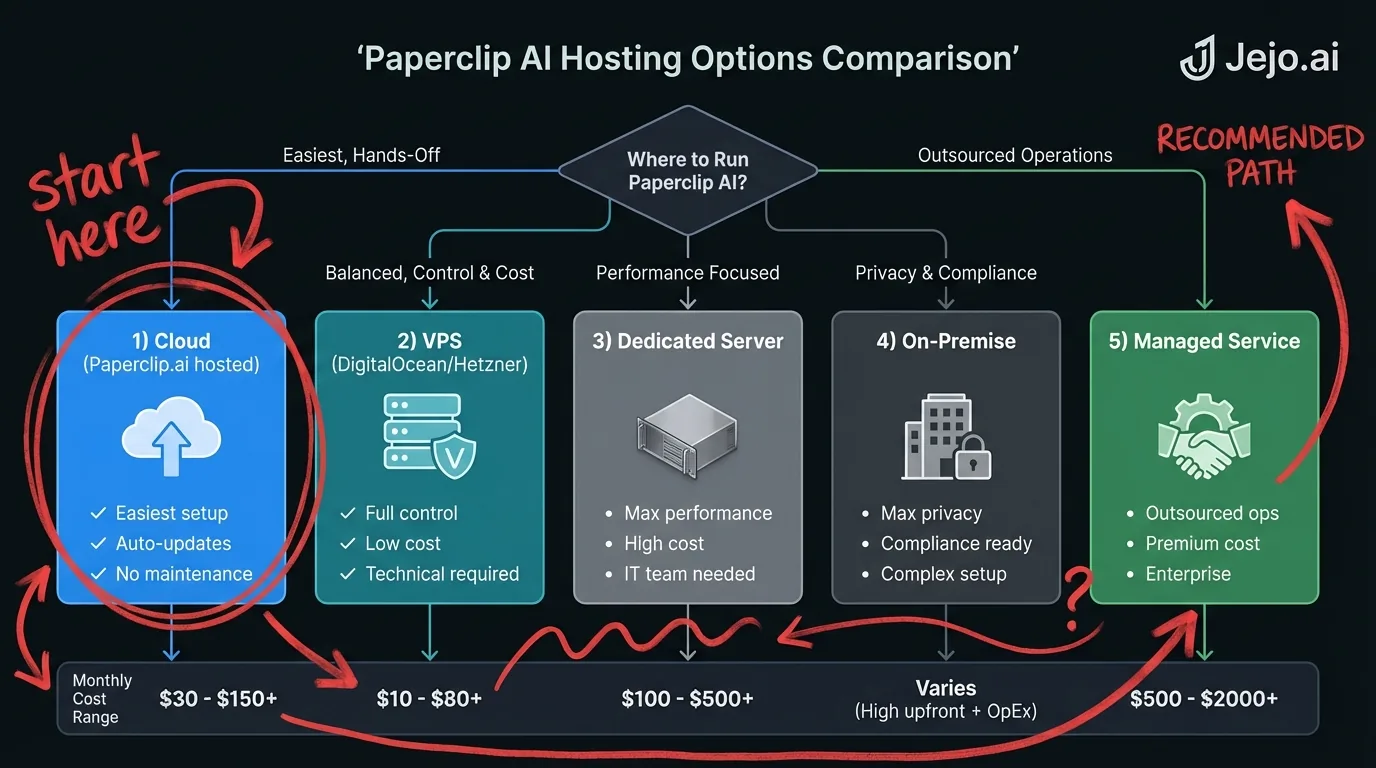
This guide covers all five realistic hosting paths for Paperclip AI: what each one involves, what it costs, and which type of business it fits. No technical gatekeeping. Plain business framing.
Quick orientation:- 90% of small businesses should use Paperclip's cloud. It is the lowest friction and most cost-effective option for most use cases.
- Self-hosting exists for compliance, integration, and scale reasons. Not for tech enthusiasts.
- Managed services like Jejo.ai sit between DIY cloud and full self-hosted. You get results without managing the agent yourself.
Option 1: Paperclip AI Cloud (Managed SaaS)
The default. You subscribe to Paperclip AI through their website, connect your business tools, and the agent runs on Paperclip's infrastructure in AWS or their cloud provider of choice.
What you manage: Nothing infrastructure-related. You configure workflows, set guardrails, and review outputs. Paperclip handles uptime, updates, scaling, and security. What you get:- 99.9% uptime SLA on paid plans. AWS and other major cloud providers publish detailed SLA documentation explaining what this guarantee means in practice
- Automatic updates with new features and model improvements
- Zero infrastructure cost beyond the monthly subscription
- Setup in under 30 minutes for most businesses
- Standard Paperclip support
Option 2: Paperclip AI Self-Hosted on a VPS
You run Paperclip AI on a virtual private server that you control. The agent logic, state data, and audit logs live on your infrastructure. The agent still makes outbound API calls to external tools (Gmail, HubSpot, Slack) but the core system runs on your server.
This is a Docker-based deployment. You pull Paperclip's Docker images, configure the environment, start the stack. The dashboard runs at your server's IP or a domain you point at it.
What you manage: The server. OS updates. Docker container updates when Paperclip releases new versions. Database backups. SSL certificate renewal if you set up HTTPS. What you get:- Agent data stays on your infrastructure
- Full network access to internal tools (private databases, internal APIs, on-prem software)
- Fixed infrastructure cost that does not scale with usage volume
- Full control over update timing
For detailed Docker deployment information, see Paperclip AI Docker.
Option 3: Paperclip AI on a Dedicated Cloud Server
A step up from a basic VPS. You provision dedicated compute on a cloud provider (AWS EC2, Google Cloud Compute Engine, Azure Virtual Machines, Hetzner dedicated) and run the Docker stack on it.
The difference from a shared VPS: guaranteed CPU and RAM that is not shared with other tenants. Better performance consistency. Higher cost. Worth it when you are running multiple agents simultaneously or have high-volume workflow execution that strains shared infrastructure.
What you manage: Same as VPS self-hosting, with more infrastructure decisions (instance sizing, auto-scaling rules, load balancing if needed, backup policies). What you get:- Consistent performance without noisy neighbor problems
- More headroom for high-volume agent operation
- Full data residency control
- Professional infrastructure foundation for larger deployments
| Hosting Option | Monthly Infrastructure Cost | Setup Time | Technical Skill Required | Data Residency |
|---|---|---|---|---|
| Cloud SaaS | $0 (included in subscription) | 30 min | None | Paperclip's servers |
| VPS Self-Host | $20-$150 + license | 2-8 hours | Docker + Linux basics | Your server |
| Dedicated Cloud | $150-$800 + license | 4-16 hours | Cloud infrastructure experience | Your cloud account |
| On-Premise | $0 (existing hardware) + license | 1-3 days | DevOps | Your building |
| Managed Service | $0 (included in service fee) | Days to configure | None | Varies by provider |
Option 4: On-Premise (Air-Gapped or Private Network)
The most restrictive and most controlled option. Paperclip AI running on hardware you own, inside your physical network perimeter. No data leaves your building unless you explicitly route it out.
This exists for industries with the strictest data handling requirements: defense contractors, certain healthcare institutions, government agencies. If your contracts require data never to touch any cloud infrastructure from any vendor, on-premise is the only viable path.
What you manage: Physical hardware. Network infrastructure. All software updates. Disaster recovery. The full stack. What you get:- Complete data control
- No dependency on external cloud services for agent operation
- Full integration with air-gapped internal systems
- Regulatory compliance for the strictest frameworks
Option 5: Managed AI Agent Service (Jejo.ai)
None of the above hosting options are relevant if you work with a managed AI agent provider. With Jejo.ai, you are not buying software and figuring out where to run it. You are hiring an operations team that runs the agent for you, configured to your business, on appropriate infrastructure.
What you manage: Your business outcomes. You define what you want the agent to do. You review results. You give feedback on performance. Infrastructure, configuration, updates, monitoring, troubleshooting. None of that is your problem. What you get:- An AI agent running and producing results within days
- Expert configuration for your specific business workflows
- Ongoing optimization based on performance data
- No infrastructure decisions required
- Dedicated support from people who know your setup
For service businesses, agencies, and operators who want more operational capacity without hiring, the managed path typically delivers results faster and with less friction than any DIY hosting path. Learn how it works at Jejo.ai onboarding.
How to Choose
Four questions narrow this down quickly.
1. Do you have compliance or data residency requirements?If yes, on-premise or self-hosted. If no, move to question 2.
2. Do you need to connect to internal tools not accessible via public API?If yes, self-hosted VPS or dedicated. If no, move to question 3.
3. Do you want to own the configuration and management of the agent?If yes, cloud SaaS is the path. If no, managed service is the path.
4. How much technical capacity do your team have?No technical capacity: cloud SaaS or managed service. Basic Docker knowledge: VPS self-host. Full DevOps capacity: any option.
For 80% of the businesses looking at Paperclip AI, the answer after these four questions is cloud SaaS. The other options exist for genuine business requirements, not because self-hosting is inherently better.
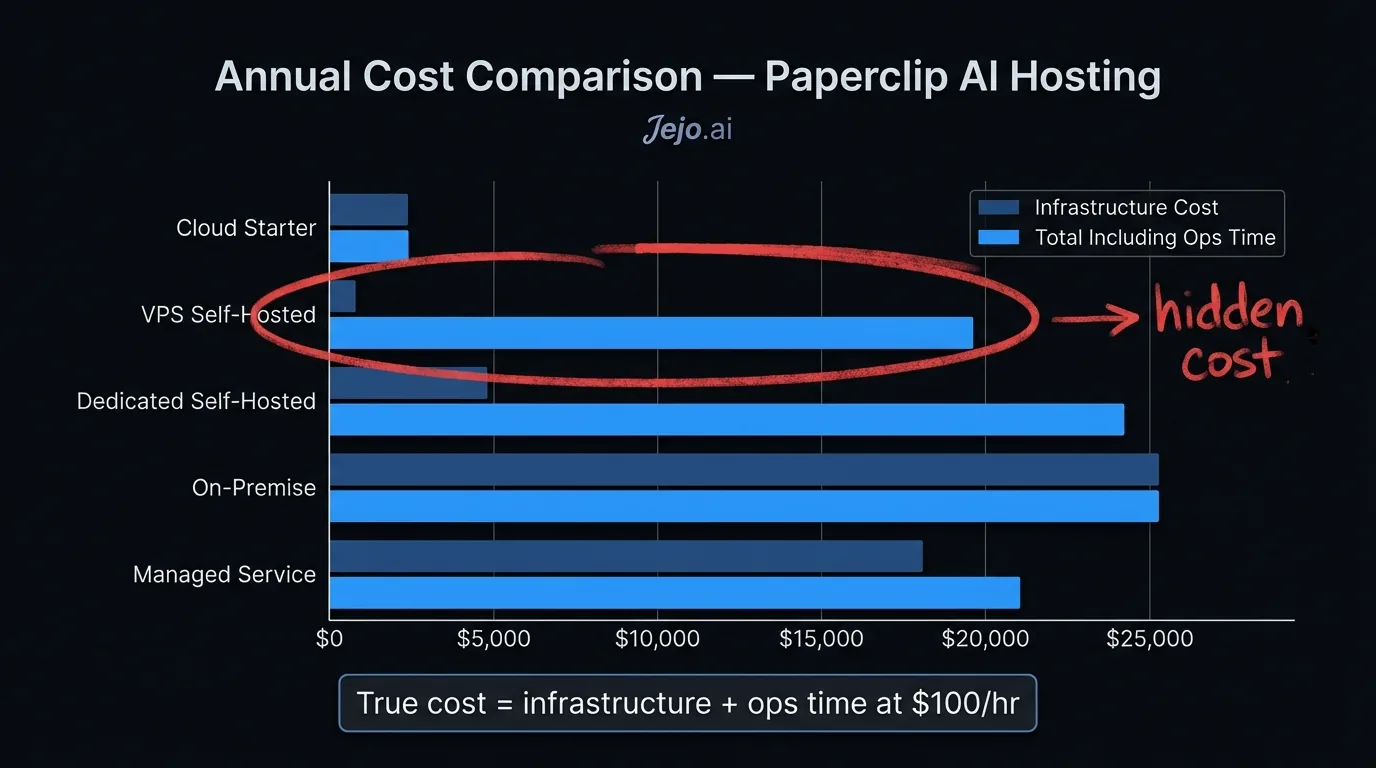
Costs Across Hosting Options: 12-Month View
Realistic 12-month numbers for a small business running one Paperclip AI agent:
Cloud SaaS (Paperclip): $200-$750/month. Over 12 months: $2,400-$9,000. Zero additional infrastructure or engineering cost. VPS Self-Host: License (assume 60% of SaaS cost) $120-$450/month + VPS $40/month + 2 hours/month engineering at $100/hr $200/month. Total: $360-$690/month, $4,320-$8,280/year. Similar total cost to cloud for solo operators. Dedicated Cloud Self-Host: License + $300/month compute + $400/month engineering = $820-$1,150/month. $9,840-$13,800/year. Only makes sense at high volume or with strict compliance needs. Managed Service (Jejo.ai): Pricing varies by scope of service and business complexity. Includes full configuration, ongoing optimization, and support. Contact for assessment.The economic argument for self-hosting only holds at scale or under compliance constraints. For a small business spending $400/month on SaaS and paying even half that in infrastructure and maintenance costs, cloud is a wash at best and often cheaper when opportunity cost is factored in. Flexera's State of the Cloud report consistently shows that cloud waste and underutilized infrastructure cost organizations 30% of their cloud spend, a risk that multiplies when self-hosting small-scale deployments.
FAQ
What hosting option is best for a small business?
For most small businesses (1-20 employees, no specific compliance requirements, standard tool stack), Paperclip AI's cloud SaaS is the right answer. It requires zero infrastructure management, updates automatically, and is fully supported. Self-hosting only makes sense with specific technical or compliance requirements.
Can I switch hosting options later?
Yes. Paperclip supports exporting your workflow configurations. You can start on cloud, self-host later, or migrate between hosting environments. Action history does not transfer, but workflow configurations and agent settings do. Plan for 1-4 hours of migration work depending on complexity.
Does self-hosting give you better performance?
Not automatically. Performance depends more on how you configure the agent than where it runs. A well-configured cloud deployment outperforms a poorly resourced self-hosted deployment. If you self-host, size your infrastructure appropriately. See the minimum specs in the Docker deployment guide.
Is there a free hosting option?
No production-grade free option exists. Paperclip's trial allows you to run the agent for a limited period on their cloud. Self-hosting requires a paid license. There is no permanently free tier for production use.
Does Jejo.ai use Paperclip AI or a different agent?
Jejo.ai manages AI agent deployments including Paperclip AI as part of its service offerings. The specific agent configuration depends on your business needs. The value of the managed service is that the hosting and agent selection decisions are handled for you. For more context on what Jejo.ai does differently, see AI for small business.
How much does Paperclip AI cost?
Cloud SaaS plans: Starter at $200/mo, Professional at $450/mo, Business at $750/mo. Self-hosted licensing costs less, but add $200-$500/mo in infrastructure and maintenance. If you want the full deployment handled, Jejo.ai offers managed Paperclip at $750/mo including hosting, setup, and ongoing optimization. See the full breakdown at Paperclip AI pricing.
For more on Paperclip AI overall, start with what is Paperclip AI or read a detailed Paperclip AI review before deciding on a deployment path.
