Quick answer
- What this covers: OpenClaw skills explained for business owners.
- Who it’s for: People evaluating openclaw.
Your AI agent is only as useful as its skills. OpenClaw skills are the specific capabilities your agent has. Each skill teaches it to handle a particular business task: answering emails, qualifying leads, processing invoices, scheduling appointments, managing social media.
With 1,900+ people searching for "OpenClaw skills" every month, the demand is clear. Business owners want to know: what can this thing actually do for me?
Here's the complete breakdown.
How Skills Work
Think of skills like job training for your AI employee. A new hire doesn't walk in knowing your business. You train them. Same with OpenClaw.
Each skill is a package of instructions, rules, and connections that teach your agent how to handle a specific task. Install a skill, configure it with your business rules, and the agent starts executing.
Key facts:
- Skills are modular. Add and remove them without affecting other capabilities.
- Skills improve over time. Your corrections make them more accurate.
- Skills stack. An agent with 5 skills handles 5 different job functions simultaneously.
- Pre-built skills cover 80% of common business tasks. Custom skills handle the other 20%.
Skill Categories
OpenClaw organizes skills into categories that map to business functions.
| Category | What It Covers | Example Tasks | Time Saved |
|---|---|---|---|
| Communication | Email, chat, messaging | Triage inbox, draft replies, follow up | 2-3 hrs/day |
| Sales | Lead management, outreach | Qualify leads, send sequences, book calls | 1-2 hrs/day |
| Operations | Admin, scheduling, data entry | Process invoices, update records, manage calendar | 1-2 hrs/day |
| Marketing | Content, social media, analytics | Schedule posts, draft content, track performance | 1-2 hrs/day |
| Customer Support | Tickets, FAQ, satisfaction | Answer common questions, escalate complex issues | 2-3 hrs/day |
| Finance | Bookkeeping, invoicing, reporting | Categorize expenses, send invoices, generate reports | 1 hr/day |
The 10 Most Popular Skills
Based on deployment data from 176 OpenClaw agencies, these are the skills business owners install first.
1. Email Triage. Reads every incoming email. Sorts into categories: urgent, needs response, informational, spam. Drafts responses for routine messages. Flags the 10% that need you. Saves 2 to 3 hours per day for the average business owner. 2. Lead Qualification. Evaluates inbound leads against your criteria. Scores them. Routes hot leads to your calendar, sends nurture sequences to warm leads, archives cold ones. Businesses report 40% faster lead response times. According to Harvard Business Review's research on lead response, companies that respond to inbound leads within an hour are seven times more likely to qualify them than companies that wait longer. 3. Appointment Scheduling. Manages your calendar across time zones. Proposes meeting times, handles rescheduling, sends reminders. Eliminates the 15-email thread to find a meeting time. 4. Invoice Processing. Reads incoming invoices, matches them to purchase orders, flags discrepancies, routes for approval. Reduces invoice processing from 15 minutes to 2 minutes per invoice. 5. Social Media Management. Schedules posts, responds to comments, tracks engagement metrics. Handles the daily maintenance so you focus on strategy. Covers LinkedIn, X, Instagram, and Facebook. 6. Customer FAQ Response. Answers the same 20 questions your team gets every day. Learns from your knowledge base. Escalates anything it can't handle with full context. Cuts support volume by 60 to 70%. 7. Data Entry and CRM Updates. Pulls information from emails, forms, and documents. Updates your CRM automatically. No more end-of-day data catch-up sessions. 8. Report Generation. Pulls data from your connected tools. Generates daily, weekly, or monthly reports. Delivers them to your inbox on schedule. No manual spreadsheet work. 9. Follow-up Sequences. Sends timed follow-up messages to leads, clients, or partners. Adjusts messaging based on previous interactions. Never lets a warm lead go cold because you forgot to follow up. 10. Document Drafting. Creates first drafts of proposals, contracts, project scopes, and business documents using your templates and voice. Cuts document creation time by 70%.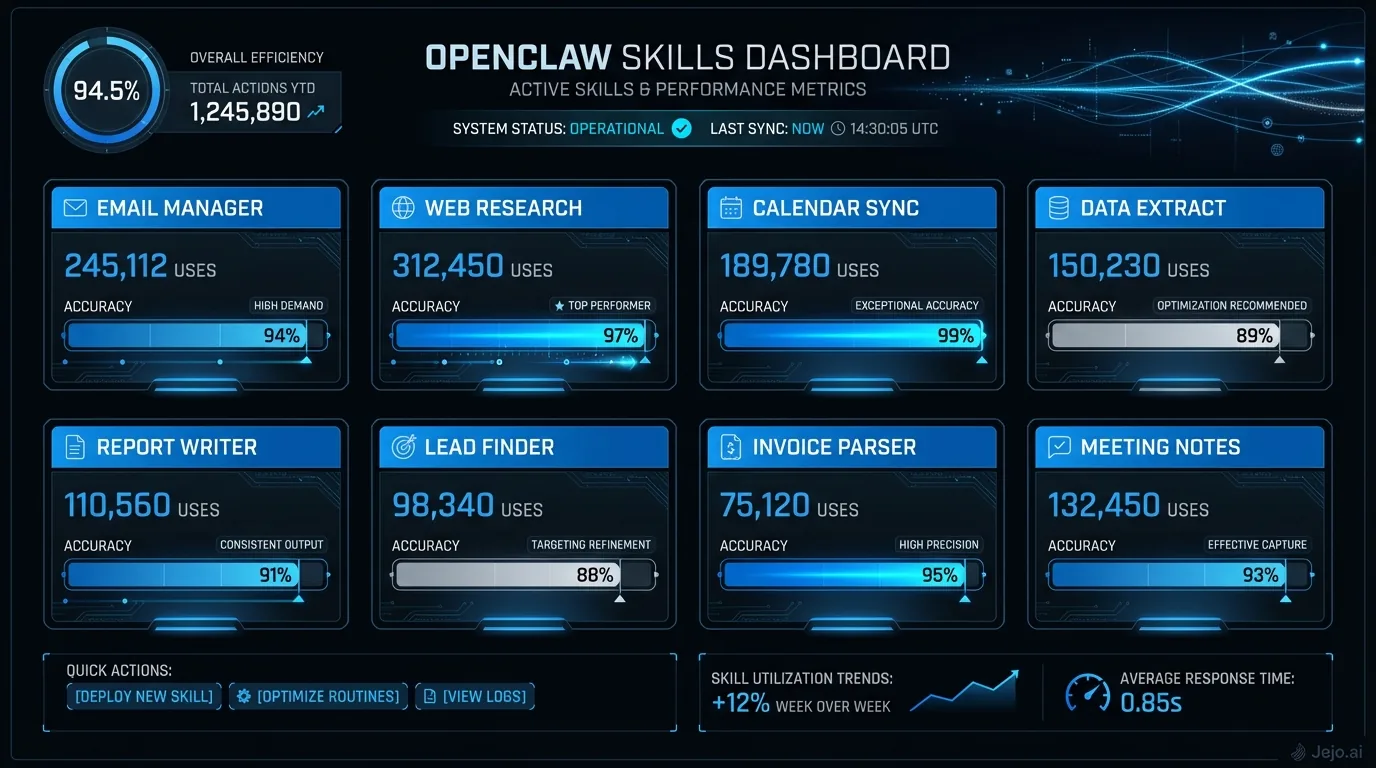
Building Custom Skills
Pre-built skills handle most common tasks. But your business has unique workflows.
Custom skills let you teach your agent processes specific to your operation. Examples:
- A real estate agency trained a skill to analyze comparable sales and generate property valuations
- An e-commerce business built a skill to monitor inventory levels and auto-reorder when stock drops below thresholds
- A consulting firm created a skill to generate personalized onboarding documents for each new client
Building custom skills requires technical knowledge or a developer. The process takes 2 to 8 hours per skill depending on complexity. Alternatively, managed services like Jejo.ai build custom skills as part of their service.
Cost of custom skills: If you hire a developer, expect $500 to $2,000 per skill depending on complexity. Simple skills (data transfer between two tools) sit at the low end. Complex skills (multi-step workflows with conditional logic) sit at the high end. The investment pays back quickly. A custom skill that saves 30 minutes per day returns 10 hours per month. At a $100 per hour opportunity cost, that's $1,000 monthly return on a one-time $1,500 investment. When to build custom vs. using pre-built: If a pre-built skill handles 70% or more of what you need, use it and accept the gap. Building custom for that last 30% only makes sense when the gap costs you more than $500 per month in time or lost revenue. Most businesses get to month 3 before needing their first custom skill.Skills Marketplace
The OpenClaw community has produced hundreds of pre-built skills. The marketplace is growing fast, fueled by 176 agencies building on the platform.
| Marketplace Stat | Number |
|---|---|
| Pre-built skills available | 400+ |
| Average skill rating | 4.2/5 |
| Free skills | 250+ |
| Premium skills | $10-$50 one-time |
| Average setup time per skill | 15-30 minutes |
Most business owners start with 3 to 5 free skills, add 1 to 2 premium skills, and build 1 custom skill within their first 60 days.
How to Choose Your First Skills
Start where the pain is worst. Not where the technology is coolest.
Step 1: Track your time for 3 days. Write down every task and how long it takes. Step 2: Identify the top 3 tasks that are repetitive, rule-based, and time-consuming. Step 3: Match those tasks to OpenClaw skill categories. Step 4: Install the corresponding skills. Configure them with your business rules. Step 5: Monitor for 7 days. Correct mistakes. The skills improve from your feedback.Most businesses see measurable time savings within the first 2 weeks. Full ROI within 30 days.
For a business owner spending 3 to 5 hours daily on admin tasks, deploying 3 skills typically reduces that to under 1 hour. At a $150 per hour opportunity cost, that's $300 to $600 per day in recovered productivity.
Skills by Industry
Different industries get the most value from different skill combinations. Here's what works best based on real deployments.
Professional services (consulting, legal, accounting):- Email triage (highest impact: 50+ emails per day)
- Appointment scheduling (cross-timezone coordination)
- Document drafting (proposals, engagement letters, reports)
- Follow-up sequences (client check-ins, billing reminders)
- Customer FAQ response (handles 60-70% of support volume)
- Order status tracking (reduces "where's my order" tickets by 80%)
- Inventory monitoring (alerts before stockouts)
- Review management (responds to reviews, flags negative ones)
- Lead qualification (scores incoming leads, routes to agents)
- Showing scheduling (coordinates buyer, seller, and agent calendars)
- Follow-up sequences (drip campaigns for leads not ready to buy)
- CRM updates (logs every interaction automatically)
- Email triage (client communications sorted by priority)
- Project status reporting (pulls from project management tools)
- Invoice processing (tracks billable hours, generates invoices)
- Social media management (maintains client and agency presence)
The pattern: every industry starts with email triage and scheduling. The third and fourth skills are where industry-specific value kicks in. Start generic. Add specialized skills in week 2 or 3.
Healthcare and wellness practices: Appointment scheduling and reminder systems are the highest-impact starting point. A health practice handling 30 to 50 appointments per week spends significant front-office time on booking, confirmation, and reminder calls. The scheduling skill handles outbound confirmations and inbound reschedule requests automatically. Pair it with FAQ response for common patient questions (hours, location, insurance accepted, what to bring) and the front desk shifts from reactive phone management to proactive patient care. For practices with HIPAA requirements, self-hosted OpenClaw keeps patient interaction data on your own servers. The U.S. Department of Health and Human Services HIPAA guidance is clear that covered entities must ensure protected health information remains within controlled infrastructure regardless of whether processing is automated or manual. Financial advisory and insurance: Lead qualification and follow-up sequences are the first priority. Inbound inquiries for financial services are high-value but often high-volume with long sales cycles. An agent that scores leads based on asset level, inquiry type, and engagement signals, routes the high-score leads to calendar booking, and maintains a drip sequence for medium-score leads prevents hot opportunities from going cold during busy periods. Add document drafting in week 3 to generate initial assessment templates and proposal outlines.Skill Performance Benchmarks
What "good" looks like for the most common skills after 30 days of deployment.
| Skill | Accuracy Target | Avg. Response Time | Tasks/Day |
|---|---|---|---|
| Email triage | 95%+ | Under 2 minutes | 30-100 |
| Lead qualification | 90%+ | Under 5 minutes | 10-50 |
| Appointment scheduling | 98%+ | Under 3 minutes | 5-20 |
| Invoice processing | 97%+ | Under 5 minutes | 5-30 |
| Customer FAQ | 92%+ | Under 1 minute | 20-80 |
| CRM updates | 99%+ | Under 1 minute | 20-100 |
If your skills are performing below these benchmarks after 30 days, two things to check: are you providing enough corrections during the training period, and are your business rules clearly defined in the skill configuration? Most performance issues trace back to vague rules, not technology limitations.
Stacking Skills for Compound Workflows
Single skills save time. Multiple skills working together create compounding value through automated handoffs between tasks.
Here's a concrete example: the lead-to-meeting pipeline.
A new lead fills out your contact form. The lead qualification skill reads the submission, scores it against your criteria, and routes it. A hot lead triggers the appointment scheduling skill, which checks your calendar and proposes three meeting times via email. The follow-up sequences skill tracks whether the prospect responds. If they don't respond within 48 hours, it sends a second message. When the meeting is booked, the CRM updates skill logs the full interaction history.
That entire workflow runs without a human touch. From form submission to confirmed meeting, the agent handles it. A business owner who previously spent 20 minutes per lead on this process now spends zero. At 10 leads per day, that's 3.3 hours recovered daily from a single 4-skill stack.
Skill handoff patterns to build first:- Email triage passes flagged items to the CRM update skill for automatic logging
- Lead qualification passes hot leads to appointment scheduling
- Invoice processing passes approved invoices to the report generation skill for monthly summaries
- Customer FAQ passes unanswered questions to email triage for human handling
The more skills you have, the more handoff opportunities exist. Month 1 you're running 3 skills independently. Month 3 you're running 6 skills with 4 handoff automations. The agent operates less like individual tools and more like a coordinated workflow.
Avoiding skill conflicts: When two skills might act on the same trigger (an email that could be a support ticket or a lead inquiry), define priority rules in your configuration. Which skill gets first look? Which escalates to the other? Getting this wrong causes duplicate actions. Getting it right makes the stack more effective than any individual skill alone.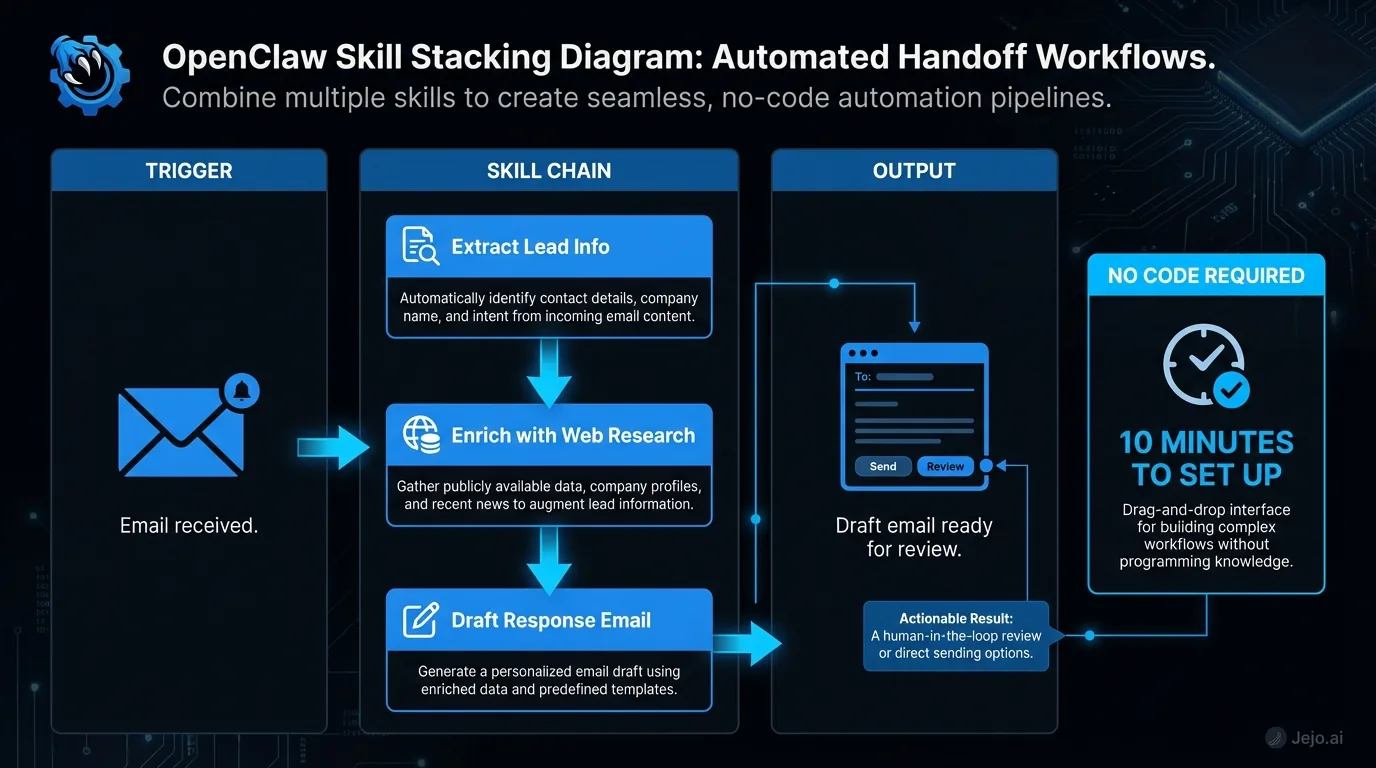
Skills and the Managed Experience
If configuring skills sounds like more work than you want, managed services handle it for you.
Jejo.ai deploys OpenClaw agents with skills pre-configured for your business. The onboarding call identifies your highest-impact tasks, and your agent ships with the right skills already working. No marketplace browsing. No configuration. No 15-minute setup per skill.For a broader understanding of the platform, see what is OpenClaw. For setup specifics, read OpenClaw setup. For cost details, check OpenClaw pricing.
FAQ
How many skills can one agent run at the same time?
There's no hard limit. Most business agents run 5 to 10 skills simultaneously. Performance depends on your hosting setup. A standard $50 to $100 server handles 8 to 12 active skills without slowdown.
Do skills work with my existing tools?
OpenClaw integrates with 100+ business tools: Gmail, Outlook, Slack, HubSpot, Salesforce, Google Sheets, QuickBooks, Stripe, Calendly, and more. Skills use these integrations to read data and take action. If your tool has an API, it can connect.
How long does it take a skill to become reliable?
Most skills reach 90% accuracy within 7 to 14 days. The first 3 days involve the most corrections. By day 7, your agent handles most tasks correctly. By day 30, accuracy typically hits 95%+. Continuous feedback keeps improving performance.
Can I turn skills off without losing their configuration?
Yes. Disabling a skill pauses it. All settings, rules, and learned behaviors are preserved. Re-enable it anytime and it picks up exactly where it left off.
What's the difference between free and premium skills?
Free skills cover fundamental tasks (email triage, scheduling, basic data entry). Premium skills handle specialized workflows (advanced analytics, multi-step sales sequences, compliance monitoring). Premium skills typically save more time and include better default configurations.
How do I know if a skill is ready to train on more complex tasks?
Two signals indicate a skill is ready to expand: accuracy has been above 90% for at least 5 consecutive days, and you haven't made any corrections in the last 48 hours. When both are true, the skill has internalized your rules well enough to handle more edge cases without degrading. You can then either loosen the escalation threshold (let the skill handle things it was previously flagging) or add additional configuration rules that teach it how to handle the next layer of complexity. Expanding too early, before accuracy is stable, creates two learning problems at once. Expanding after stability is achieved adds capability without disruption.
Is OpenClaw overhyped?
For the self-serve path, partly yes. Demo videos skip the 2 to 4 week training period. Real-world deployment for non-technical users is harder than it looks. But the underlying capability is genuine: a well-trained OpenClaw agent running 8 to 10 skills handles a meaningful chunk of operational work that would otherwise require a part-time hire. The hype is around the ease. The substance is real once you get through setup.
What happens when a skill makes an error that affects a real customer?
Check the decision log immediately. Most skills have a revert option for recent actions, letting you undo the last action and replace it with the correct one. Then add a correction note explaining what the right response would have been. The skill learns from this and flags similar situations for your approval until confidence rebuilds. For high-stakes skills (anything touching customer communications or financial transactions), set conservative escalation thresholds during the first 30 days. The few extra approvals you handle are worth avoiding errors in sensitive areas.
