Quick answer
- What this covers: Hermes Agent skills define what your AI employee can handle.
- Who it’s for: People evaluating hermes agent.
Skills are what separate a general AI employee from one that knows your business. Out of the box, Hermes Agent handles broad business operations: email, scheduling, CRM updates, lead response. Add skills and the agent gets specific. It knows your pricing structure. It can draft proposals using your exact template. It handles objections the way you handle objections.
This guide covers how Hermes Agent skills work, which skills exist in 2026, how to configure them for your business, and how to build the skill stack that matches your actual workflow.
Key takeaways:- Skills are pre-trained operational modules. Each one adds a specific capability to your agent without custom development
- Skills connect to specific business tools. A scheduling skill requires calendar access. A CRM skill requires CRM access. The tools you give the agent determine what it can do
- Skill stacks compound. A lead qualification skill feeding into an email response skill feeding into a CRM update skill creates an end-to-end workflow no single skill covers
- You configure skills, not code them. Business-specific details go in as plain-English rules, not programming
- What Skills Are and Why They Matter
- Core Skills: What Ships With Hermes Agent
- Extended Skills: Advanced Capabilities
- How Skill Stacks Work for Real Business Workflows
- Configuring Skills for Your Business
- Skills vs Custom Development: When to Use Each
- How to Prioritize Which Skills to Deploy First
- FAQ
What Skills Are and Why They Matter
Think of skills as specialized training for your AI employee.
A newly hired operations coordinator knows general business processes. But they don't know your specific qualification criteria, your pricing tiers, your CRM field conventions, or how you like to handle difficult client conversations. You train them over 4 to 8 weeks. According to SHRM, it takes an average of 42 days to fill a position and 90 days for a new hire to reach full productivity. Skills do the same thing for Hermes Agent in a fraction of that time: they add domain-specific capability and business-specific rules on top of the base platform.
Technically, a skill is a configured module that combines:
- A specific operational domain (email, CRM, scheduling, research, communication)
- Pre-trained behavior patterns for that domain
- Business-specific rules you provide during configuration
- Integration connections to the relevant tools
Without skills, Hermes can read your email and draft a generic response. With a Lead Qualification skill configured with your ICP criteria, pricing range, and qualification questions, it can read your email and make the same judgment call you would make about whether this lead is worth 30 minutes of your time.
That's the difference. Hermes Agent without skills is a capable generalist. Hermes Agent with a configured skill stack is your operational brain, trained to your specific business.
For an overview of everything Hermes Agent does, see what is Hermes Agent.
Core Skills: What Ships With Hermes Agent
Every Hermes Agent deployment includes a set of core skills that cover the most common business operations needs.
Email Management Skill
Triage, draft, and send email based on business rules you define. This skill handles:
- Priority classification (urgent vs. standard vs. low)
- Response drafting in your voice
- Routing rules (which email types go to you vs. get handled autonomously)
- Follow-up detection (is this thread waiting for a response?)
- Thread summarization when you need context fast
Configuration inputs: your typical response style, categories of email that always need your review, word choices and phrases that match your voice, templates for common response types.
Typical activation: 2 to 3 hours of configuration plus 2 to 3 weeks of correction feedback before the skill operates at your standard.
Lead Response Skill
The highest-value skill for most service businesses. Handles inbound leads from first contact through qualified and scheduled.
What it does:
- Reads new inquiries from your form, email, or CRM
- Applies your qualification criteria to score the lead
- Drafts and sends a personalized first response
- Handles back-and-forth until a call is booked or the lead disqualifies
- Updates CRM with qualification status and interaction history
- Queues follow-up sequences for unresponsive leads
Configuration inputs: your ICP description (company size, industry, problem type, budget range), your typical first response structure, your call booking process, your CRM field mapping.
The speed-to-lead advantage this creates is significant. The average small business takes 47 hours to respond to a new lead. Hermes Agent responds in under 5 minutes. Research published in the Harvard Business Review shows that firms responding within an hour of receiving an online query are 7x more likely to have a meaningful qualifying conversation. At a 5-minute response rate, conversion to a booked call runs 9x higher than at 30 minutes.
Scheduling and Calendar Skill
End-to-end scheduling without back-and-forth. This skill:
- Checks your calendar for availability
- Proposes times to prospects and clients
- Handles rescheduling requests
- Sends confirmation and reminder sequences
- Blocks prep time before important calls based on your rules
Configuration inputs: your available meeting windows, buffer time requirements, meeting types and their default durations, reminder timing preferences.
CRM Management Skill
Keeps your CRM current without data entry. This skill:
- Creates and updates contact records from email interactions
- Moves leads through pipeline stages based on defined triggers
- Logs all agent interactions automatically
- Flags records that haven't been updated in a defined period
- Generates CRM summary reports on your schedule
Compatible CRMs: HubSpot, Pipedrive, Salesforce, and spreadsheet-based CRM setups.
Client Communication Skill
Systematic communication with existing clients. This skill:
- Sends project status updates on a schedule you define
- Handles routine client questions using project data
- Tracks response rates and flags non-responding clients
- Manages milestone notifications and deadline reminders
- Maintains communication logs for account management
Configuration inputs: your client communication cadence, standard update structure, which project data fields to pull for updates, escalation triggers.
| Core Skill | Primary Function | Key Integration | Time to Configure |
|---|---|---|---|
| Email Management | Triage, draft, route | Gmail / Outlook | 2-3 hrs |
| Lead Response | Qualify, respond, schedule | CRM + Calendar | 3-4 hrs |
| Scheduling | Book, reschedule, remind | Google/Outlook Calendar | 1-2 hrs |
| CRM Management | Log, update, stage | HubSpot / Pipedrive / Salesforce | 2-3 hrs |
| Client Communication | Update, notify, track | CRM + Email | 2-3 hrs |
Extended Skills: Advanced Capabilities
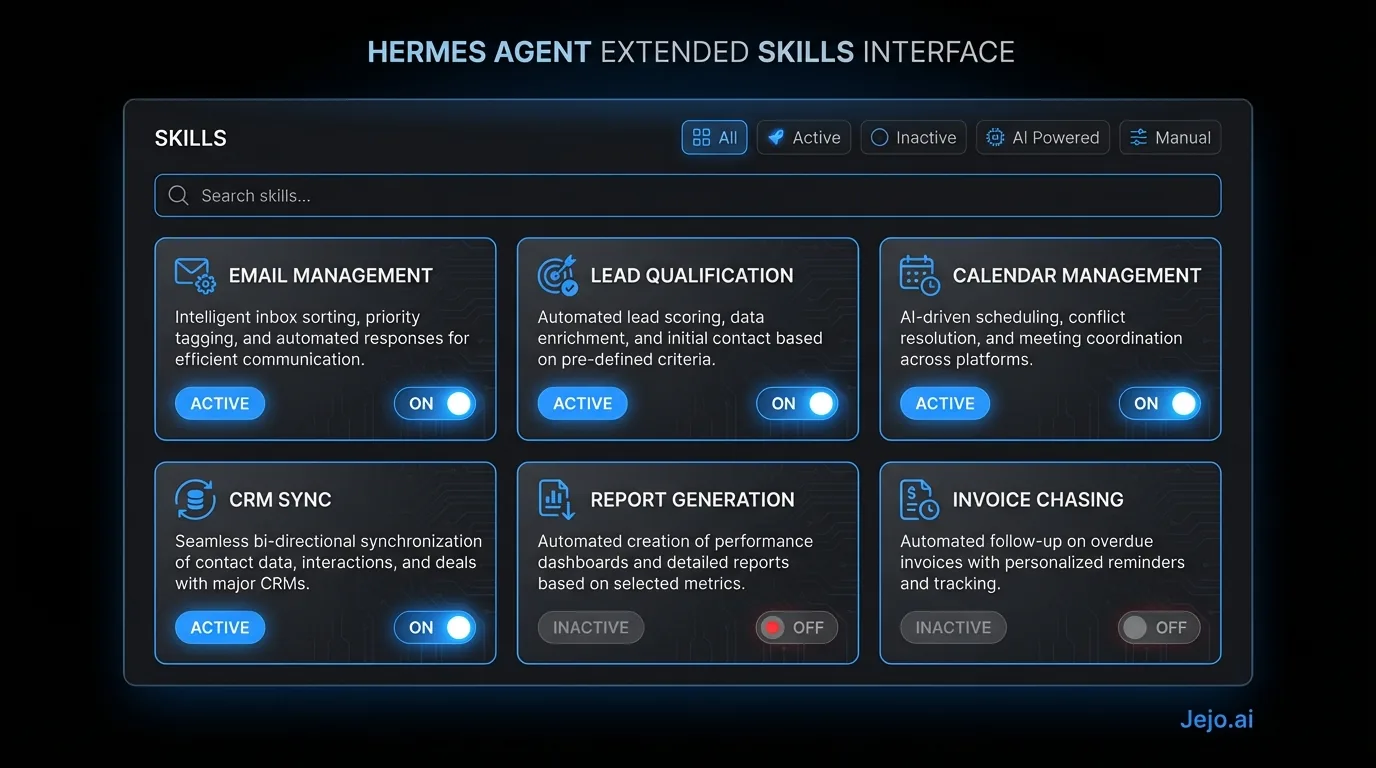
Beyond core skills, Hermes Agent supports extended skills for more specific business functions.
Research and Briefing Skill
Pre-call research on contacts, companies, and prospects. Given a name or company, this skill:
- Pulls publicly available company information
- Summarizes recent news and relevant context
- Builds a call briefing document with key talking points
- Identifies potential objections or alignment with your services
Useful for: consultants, agencies, and sales-focused businesses where call preparation adds tangible deal value.
Proposal and Quote Skill
Generates first-draft proposals using your template and pricing structure. Configuration-heavy but high-value for service businesses.
This skill requires: your proposal template, service descriptions and scope definitions, pricing tiers, standard terms, and customization rules by client type.
Output: a draft proposal ready for your review, incorporating client-specific information from the CRM and conversation history.
Invoice and Billing Communication Skill
Handles billing touchpoints without your involvement. This skill:
- Sends invoice delivery emails when invoices are generated
- Manages payment reminder sequences at defined intervals
- Routes payment dispute communications for your review
- Tracks overdue receivables and escalates at thresholds you set
Compatible with QuickBooks Online, FreshBooks, and direct Stripe integrations.
Content and Document Skill
Produces structured content from data you specify: meeting summaries, project status documents, weekly team updates, client-facing reports. Not a content marketing skill. An operational documentation skill.
This is the skill that eliminates the Friday afternoon task of writing the weekly summary that feels low-value but needs to happen.
Social Listening and Mention Skill
Monitors specified keywords, your brand name, or competitor mentions across platforms you authorize. Surfaces relevant mentions for your review. Does not post autonomously.
Useful for: businesses where reputation monitoring or competitive intelligence is part of operations.
How Skill Stacks Work for Real Business Workflows
Individual skills are useful. Skill stacks that feed into each other change the operational picture entirely.
Here's a real example of a consulting firm's skill stack at month 4 of deployment:
Inbound Lead Workflow Stack:- Email Management Skill detects a new inquiry in the inbox, classifies it as a potential new client, and routes it to the Lead Response Skill
- Lead Response Skill checks the sender's company against ICP criteria, determines it's a qualified lead, drafts a response using the firm's standard introduction template, and sends it
- Scheduling Skill handles the resulting back-and-forth to book a 30-minute discovery call
- Research Skill triggers 24 hours before the call, builds a briefing document on the prospect's company, and delivers it to the consultant
- CRM Management Skill logs every step automatically, moves the record from "New Lead" to "Call Scheduled" with timestamps
The consultant sees one item in their morning briefing: "Discovery call scheduled with Company X on Thursday at 2 PM. Briefing in your inbox."
Five skills. One workflow. Zero manual steps from inquiry to prepared discovery call.
Client Retention Workflow Stack:- Client Communication Skill sends weekly project updates to all active clients
- CRM Management Skill logs client response rates and engagement
- Research Skill surfaces any news about client companies that's relevant to their project
- Email Management Skill handles client responses, routing routine ones autonomously and escalating complex ones
A client feeling neglected is a client who churns. Bain & Company research found that increasing customer retention rates by 5% increases profits by 25 to 95%, which makes systematic client communication one of the highest-ROI activities a service business can automate. This stack keeps 15 active clients feeling consistently attended to at a cadence that would require a full-time account manager to maintain manually.
Configuring Skills for Your Business
Every skill requires business-specific configuration before it operates at your standard. Configuration is not code. It's structured plain-English input through the Hermes Agent dashboard.
What configuration typically involves:For Lead Response Skill: You describe your ideal client in plain English. "We work best with professional services firms in the US with 10 to 100 employees who are scaling and struggling with operational capacity. Our minimum engagement is $5,000/mo. We don't work with retail or e-commerce." That description becomes the qualification filter.
For Email Management Skill: You review 20 to 30 of your past emails with the agent and classify each: "This one I handled myself because it was a pricing negotiation. This one I could have had an employee handle. This one needed my direct relationship with the client." The agent builds rules from your classifications.
For Client Communication Skill: You paste a sample project update email that represents your standard. The agent learns your structure, tone, and level of detail from that sample.
The calibration period for each skill: 2 to 4 weeks of correction and feedback. Skills that receive more frequent corrections calibrate faster because there's more feedback signal. By week 4, most skills operate at 85% to 92% accuracy on the tasks you've trained them on.
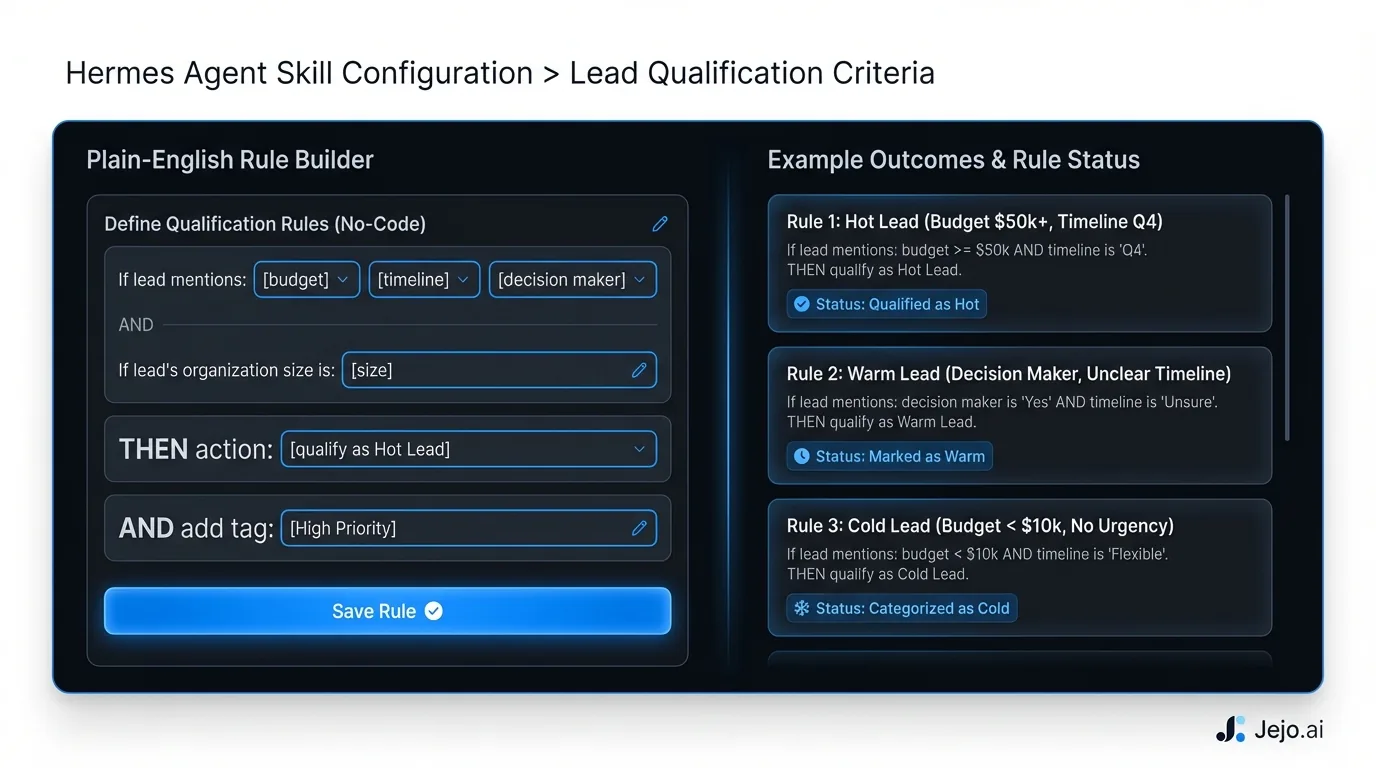 For managed deployments through Jejo.ai, your account manager walks through skill configuration during onboarding. You answer questions, they translate your answers into configuration. You don't interact with technical settings directly. The 30-minute kickoff call covers which skills to activate first and collects the initial configuration inputs.
Skills vs Custom Development: When to Use Each
Some business owners ask whether they need custom AI development for their specific needs. The honest answer: most don't.
Skills cover a wide range of use cases. Before considering custom development, ask whether the need fits into an existing skill category with specific business configuration.
Custom development makes sense when:
- Your workflow involves a proprietary internal system with no standard API
- Your industry has workflow requirements that no existing skill pattern covers
- You're building a competitive differentiation around a specific AI capability, not running operations
- You need the agent to take actions in a custom application your business built
Custom development does not make sense when:
- An existing skill "doesn't know your business yet" (this is a configuration gap, not a capability gap)
- You want the agent to write in your exact voice (this is a voice training problem, solved through email and content samples)
- You want the agent to handle industry-specific communication (most industry-specific patterns are covered by configuring existing skills with the right terminology and rules)
The test: describe exactly what you need the agent to do in plain English. If it maps to an existing skill category (email, scheduling, CRM, research, communication), you need configuration, not custom development. If it doesn't map to anything, that's when custom development is worth exploring.
How to Prioritize Which Skills to Deploy First
Every business that deploys Hermes Agent faces the same question: which skill first?
The answer comes from where your time actually goes.
Start with the task that costs you the most time or money. For most service businesses, this is lead response. You're either missing leads overnight or spending significant time on qualification and follow-up that the agent can handle better. Lead Response Skill first. Second is whatever creates the biggest operational friction. For businesses with a lot of active clients, Client Communication Skill eliminates the weekly update chore. For businesses with calendar chaos, Scheduling Skill fixes it immediately. Third is whatever your team asks for most often. If your VA spends most of their time on CRM data entry, CRM Management Skill frees that up. If calls are under-prepared, Research Skill adds the preparation systematically. The rule: one skill, calibrated well, beats three skills configured poorly. The temptation is to activate everything at once. The result is an agent that does many things at 60% accuracy instead of one thing at 93% accuracy. Sequence the activation. Each skill gets its calibration period before the next one starts.For a head-to-head comparison of how Hermes Agent's skill system compares to other platforms, see Hermes Agent vs OpenClaw. For pricing across deployment tiers, see Hermes Agent pricing.
FAQ
What are Hermes Agent skills?
Skills are configurable operational modules that add specific capabilities to your Hermes Agent. Core skills cover email management, lead response, scheduling, CRM management, and client communication. Extended skills add research, proposals, billing communication, and document generation. Skills are configured with your business-specific rules through plain-English inputs, not code.
How long does it take to configure a skill?
Initial configuration takes 1 to 4 hours depending on skill complexity. The calibration period, where you review and correct agent outputs to train the skill to your specific business, takes 2 to 4 weeks. By week 4, most skills operate at 85% to 92% accuracy on trained task types.
Can I add skills after initial deployment?
Yes. Skills are activated through the dashboard at any time. Managed deployments through Jejo.ai include skill addition support. The recommended approach is to start with one or two high-priority skills, calibrate them fully, then add the next skill once the first is operating autonomously.
Does Hermes Agent have skills for my industry?
The core skills work across industries because they're built on common business functions (email, scheduling, CRM, communication) that most service businesses share. Industry-specific behavior comes from configuration: your terminology, your qualification criteria, your communication style. If you're in a highly specialized field, check Hermes Agent review for industry-specific deployment feedback.
What's the difference between a skill and a goal?
A goal is a standing instruction that tells the agent what to do. A skill is the trained capability that lets the agent do it well. The Lead Response Skill gives Hermes the ability to qualify leads using your criteria. The goal "respond to all new inbound leads within 5 minutes" tells it to use that skill continuously. You need both: skills for capability, goals for direction. See how to use Hermes Agent for more on goal configuration.
Is Hermes Agent better than OpenClaw?
For operational skills (email, scheduling, CRM, lead response), Hermes Agent's skill library is more business-ready out of the box. OpenClaw has a larger total marketplace and more customization depth, but the core business skills require more configuration time. If you want operational skills running within 30 days without technical effort, Hermes is the better choice. For custom or technical workflows, OpenClaw has more flexibility. See the full breakdown at Hermes Agent vs OpenClaw.
