Quick answer
- What this covers: Paperclip AI skills define what tasks your agent can handle.
- Who it’s for: People evaluating paperclip ai.
Think of Paperclip AI skills as the job description you give a new employee. You do not hand someone a job title and expect them to figure everything out. You tell them what they are responsible for, what authority they have, and what requires your sign-off.
Skills in Paperclip AI work the same way. Each skill is a defined capability: a set of actions the agent is authorized to take, the conditions under which it takes them, and the tools it uses to execute. Add a skill, and your agent can do that job. Remove a skill, and it stops. Adjust a skill, and the behavior changes accordingly.
This article covers every major skill category available in Paperclip AI, how skills are configured, which ones deliver the fastest returns for small businesses, and how skills differ from raw workflow automation. By the end, you will have a clear picture of what your agent can actually do and what to set up first.
What skills are and are not:- A skill is a structured capability with defined inputs, outputs, and decision rules. Not just a trigger-action pair.
- Skills can learn from feedback. Workflow automations cannot. This is the meaningful distinction.
- Skills are composable. One skill can trigger another. This is how complex multi-step operations happen without manual orchestration.
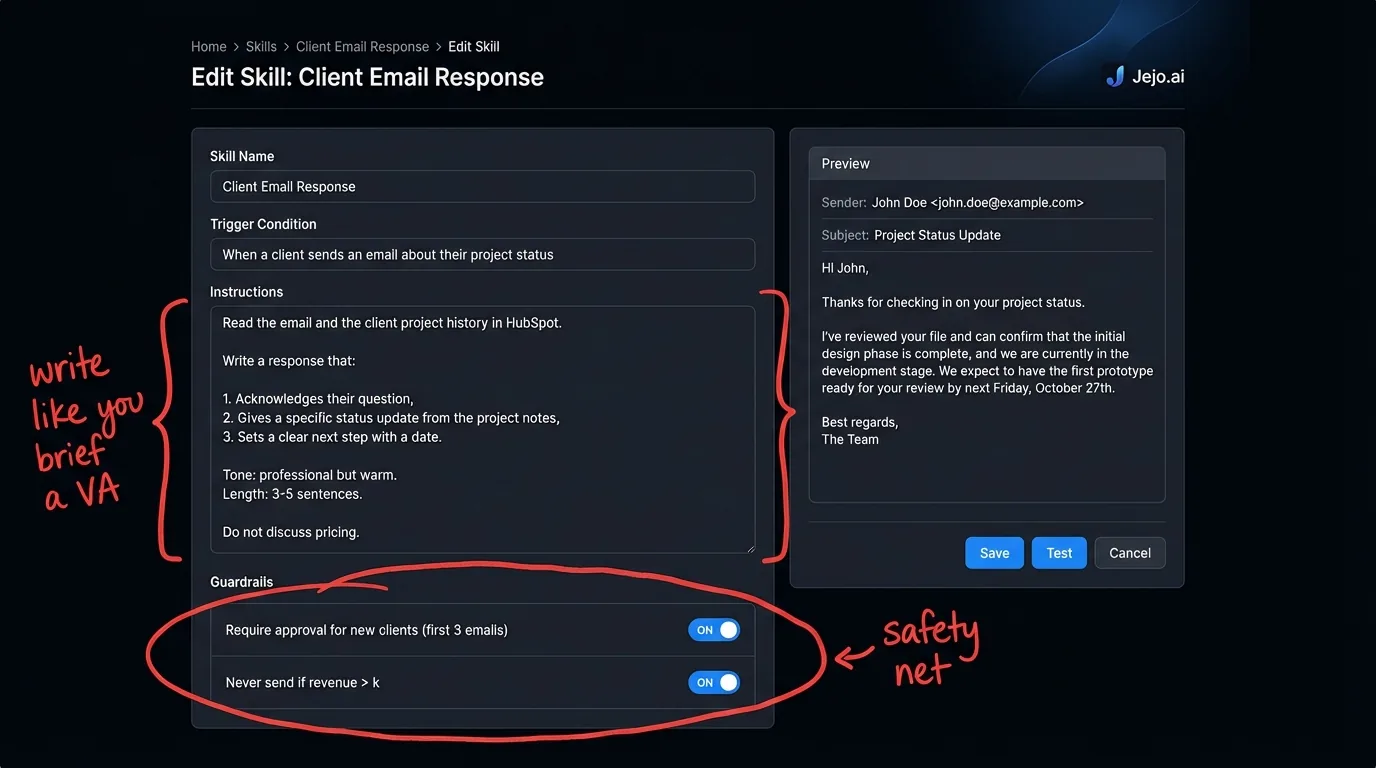
- Skills have guardrails built in. You define what decisions require human approval per skill, not globally.
Core Skill Categories
Paperclip AI skills fall into six categories. Each category covers a domain of business operations. Most small businesses start with two or three categories and expand from there.
1. Communication Skills
Communication skills handle inbound and outbound messages across your connected channels: email, SMS, chat, and in some configurations, social DMs.
Email triage. The agent reads every incoming email. It categorizes them by urgency and type (sales inquiry, client communication, billing question, spam, internal). It tags each one in your email client, handles routine replies autonomously, drafts responses to more complex ones for your review, and flags the 3-5 emails per day that require your personal attention. Out of 80 emails arriving daily, most business owners find 70+ can be handled or drafted by the agent without their involvement. McKinsey research found that professionals spend 28% of their workweek reading and answering email, making this the highest-ROI starting skill for most businesses. Follow-up sequences. After a sales call, a proposal submission, or a service delivery, the agent runs follow-up email sequences on a schedule you define. Day 3: check-in. Day 7: additional value. Day 14: final outreach. Each email is generated contextually from the CRM data on that contact, not from a generic template. Response rates on contextual follow-ups run 15-25% higher than template-based sequences. Meeting confirmation and reminders. The agent sends confirmation emails to scheduled meetings 48 hours out and reminder messages 2 hours before. It handles reschedule requests, offers alternative times from your calendar, and updates the calendar event when a new time is agreed. The average business owner spends 45 minutes per day on scheduling back-and-forth. This skill eliminates most of it. Client communication routing. For businesses with team members handling different client accounts, the routing skill directs incoming communications to the right person based on account ownership, topic, or urgency classification. No more messages sitting in an owner inbox that should have gone to a team member.2. Sales and Pipeline Skills
Sales skills handle the operational work that keeps deals moving without requiring your constant attention.
Lead qualification. When a new lead comes in through any connected source (web form, email, LinkedIn message, phone call transcribed via integration), the agent evaluates them against your defined qualification criteria. Company size, industry, budget signals, timing language in the inquiry. It assigns a qualification score, categorizes the lead (cold/warm/hot), and either routes them to the appropriate follow-up sequence or flags them for personal outreach if they hit your "high priority" threshold. CRM updates. Every interaction with a prospect or client that flows through your connected tools gets logged in your CRM automatically. The agent writes contact notes after calls (using call transcripts if you have a transcription integration), updates deal stages based on email activity, adds touchpoint records for every outbound communication, and sets follow-up task dates based on where each deal is in your pipeline. A CRM that updates itself is a CRM people actually use. Proposal follow-up. Proposals sent without follow-up close at dramatically lower rates than those with structured follow-up. The agent knows when each proposal was sent (from your email), when it was opened (from your email provider's tracking), and whether a reply has come in. Based on this data, it runs a configurable follow-up sequence for every outstanding proposal. The sequence stops the moment a reply arrives. No more forgetting to follow up on a $20,000 proposal because you got busy. Pipeline reporting. Weekly pipeline report delivered to your inbox every Monday morning: number of active deals, total pipeline value, deals by stage, deals that have gone cold, and the top three opportunities that need attention this week. This is not a dashboard you have to remember to check. It is a report that comes to you.| Sales Skill | Time Saved Per Week | Revenue Impact |
|---|---|---|
| Lead qualification | 3-5 hours | Higher close rate on qualified leads |
| CRM updates | 4-6 hours | Better pipeline visibility |
| Proposal follow-up | 2-3 hours | 15-30% higher close rate on proposals |
| Pipeline reporting | 1-2 hours | Consistent attention to highest-value deals |
| Follow-up sequences | 5-8 hours | 35-50% more prospects touched per week |
3. Operations Skills
Operations skills handle the administrative and coordination work that keeps your business running but adds no strategic value.
Invoice and billing management. The agent tracks every invoice in your billing system against its due date. At configurable intervals (7 days before due, on due date, 3 days after), it sends reminders. Tone escalates as the invoice ages: friendly reminder, firm follow-up, formal notice. You set the tone templates. The agent executes them. Average collection time typically drops by 8-12 days for businesses that activate this skill, translating directly to improved cash flow. The Federal Reserve's Small Business Credit Survey reports that cash flow problems are the most common financial challenge for small businesses, with invoice delays cited as a primary driver. Document routing and filing. Contracts, signed agreements, receipts, invoices received. When documents arrive in your email or through connected tools, the agent categorizes them, extracts key information (contract value, parties, dates, payment terms), and files them in the correct folder structure in your connected storage (Google Drive, Dropbox, SharePoint). Searching for a contract from six months ago shifts from a 10-minute hunt to a 10-second search. Task creation and assignment. When specific trigger conditions occur (new client signed, project phase completed, payment received), the agent creates tasks in your project management tool, assigns them to the appropriate team member, sets due dates, and notifies the assignee via Slack or email. The trigger conditions are yours to define. "When a new contract is signed in HubSpot, create a client onboarding task in Asana, assign it to [team member], due in 3 business days." Meeting notes and action items. If you connect a meeting transcription tool (Otter.ai, Fireflies, or similar), the agent reads completed meeting transcripts, extracts action items, creates tasks in your project management tool for each action item, and sends a summary to all meeting participants. Every meeting you run produces an automatic action plan without anyone typing notes. Vendor communication. For businesses managing subcontractors, suppliers, or service vendors, the agent handles routine communication: status requests, invoice confirmations, delivery acknowledgments. The operational overhead of managing five vendors drops by 60-70% with this skill active.4. Reporting Skills
Reporting skills generate regular business intelligence without you building dashboards or running queries.
Daily operations summary. Delivered to your inbox at a time you choose (most business owners prefer 7am). Covers everything that happened since the last summary: leads received, emails sent, tasks completed, invoices issued, pipeline changes. Not a raw data dump. A curated summary of what you need to know to start your day. Weekly performance report. Broader than the daily summary. Covers weekly trends in key metrics: leads generated vs last week, response rates on outbound communications, revenue collected, overdue invoices, and a comparison against the prior week's performance. Delivered every Monday. You review it in 5 minutes or less. Custom metric alerts. You define the thresholds. "Alert me when weekly new leads drop below 5." "Notify me when the open invoice total exceeds $50,000." "Tell me if response rates on follow-up emails fall below 20% for two weeks in a row." These alerts fire proactively. You do not have to check the data. The data checks itself and tells you when something needs attention.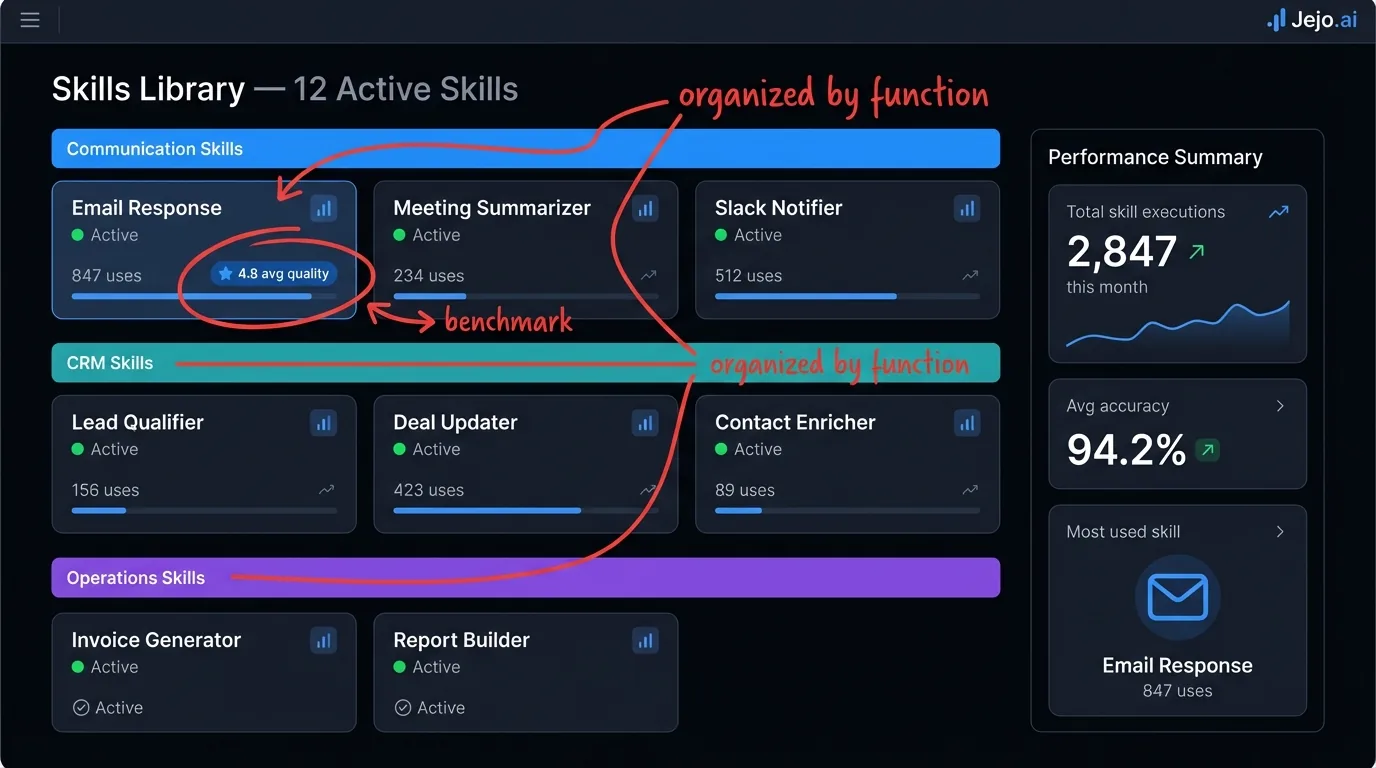
5. Integration Skills
Integration skills handle the connective tissue between your tools. Not the primary automations, but the data synchronization and translation work that keeps all your tools in agreement.
CRM-calendar sync. When a deal moves to "closed-won" in your CRM, the agent creates a kickoff meeting in your calendar for 5 business days later, invites the client, and creates an onboarding task in your project management tool. One event in one system triggers coordinated actions across three systems automatically. Cross-platform data consistency. Contact information updated in one tool gets propagated to connected tools. A phone number updated in your CRM gets updated in your email client's contact list. A company name changed in one system does not create divergent records across your stack. Data stays consistent without manual reconciliation. Webhook handler. For businesses with developers on their team, the webhook integration skill lets external systems trigger agent actions. A new payment processed in Stripe fires a webhook to Paperclip, which then creates a receipt task, updates the CRM, and notifies the account manager. Custom integrations without writing full automation code.6. Learning Skills (The Differentiator)
Learning skills are where Paperclip AI separates from static workflow automation. These are the mechanisms by which the agent improves its own performance over time.
Pattern recognition. The agent tracks outcomes for every action it takes. Emails sent at different times, with different subject lines, to contacts at different stages, with different tone settings. Over 30-60 days, it has enough data to identify which patterns produce better outcomes and adjusts its behavior accordingly. An email follow-up sent on Tuesday morning consistently outperforms one sent Friday afternoon? The agent shifts its send windows without you telling it to. Feedback integration. When you edit an agent output (changing a word in a draft email, adjusting a CRM entry the agent created, modifying a task it assigned), that edit becomes training data. The agent learns from every correction. Corrections you make in week 2 reduce similar errors in week 4. By month 2, most business owners find they are editing fewer than 10% of agent outputs. Anomaly detection. The agent establishes baselines for normal business operation. When something deviates from baseline (lead volume drops 40% in a week, response rates on proposals suddenly fall, a client who normally communicates daily goes silent for 10 days), the agent flags the anomaly. You see the alert. You decide if it warrants attention. The agent does not decide what the deviation means, but it tells you it happened.Which Skills to Set Up First
The answer depends on where you are losing the most time. For a typical 5-15 person service business, this sequence produces the fastest payoff:
Week 1: Email triage + CRM updates. These two skills alone recover 5-8 hours per week for most business owners. Email triage reduces inbox management to a daily 10-minute review instead of a continuous drain. CRM updates eliminate the manual data entry that makes CRMs a burden rather than an asset. Week 2: Lead qualification + follow-up sequences. Once the base communication and CRM infrastructure is running cleanly, these skills multiply the commercial impact. A qualified lead that gets a well-timed follow-up sequence closes at 2-3x the rate of a lead that gets a single email and silence. Week 3-4: Invoice management + daily summary. Cash flow and visibility. The invoice management skill typically pays for the entire Paperclip subscription within the first month through faster payment collection. The daily summary gives you the information layer to operate with confidence rather than guessing at what your agent has been doing. Month 2+: Expand based on where friction remains. Add meeting confirmation if scheduling is still eating time. Add document routing if finding files is a persistent issue. Add pipeline reporting if you still lack a regular review of your sales pipeline. The skills build on each other.Skills vs Workflow Automation: The Real Difference
Paperclip AI skills are not Zapier flows or Make scenarios. The distinction matters.
A workflow automation is a fixed trigger-action chain. Event A happens, then B happens, then C happens. The chain is rigid. It does not learn. It does not adapt. When the chain breaks (because an API changes or an edge case was not anticipated), it breaks silently and you might not notice for days.
A Paperclip AI skill is a governed capability. It has objectives, not just triggers. It has guardrails, not just sequences. It tracks outcomes and adjusts. MIT CSAIL research on adaptive AI systems distinguishes between reactive automation and goal-directed agents that improve through continuous feedback loops. When it encounters an edge case the instructions did not cover, it flags the situation for human review rather than either proceeding incorrectly or failing silently. Over time, edge cases that needed human review become patterns the agent handles independently.
The practical implication: a workflow automation you build today runs identically in month 6. A Paperclip skill configured today performs materially better in month 6. That compounding improvement is the argument for agent-based systems over static automation.
Configuring Skills Without Technical Knowledge
Skills in Paperclip AI are configured in plain language. You describe what you want the skill to do, what the success condition looks like, and what requires your approval. The platform translates your description into executable behavior.
An email triage skill description looks like: "Read all incoming emails. Flag any email containing a complaint or a threat to cancel as urgent, requiring my review before any reply. Auto-reply to any email asking about pricing with our standard pricing message. Auto-reply to meeting requests with a link to my calendar. Everything else, draft a reply and put it in my drafts folder for review."
That description is the skill. You wrote it. The agent executes it. When you encounter a type of email that the description does not handle well, you update one or two sentences. The skill immediately behaves differently.
This is the operational model: you manage the description, the agent manages the execution.
FAQ
How many skills can Paperclip AI run at once?
The number of concurrent active skills depends on your plan tier. Entry plans support 5-10 active skills. Business plans support 20+. In practice, most small businesses find 5-8 well-configured skills covers 80% of their operational needs. Adding more skills is only valuable if each one handles a meaningful volume of repetitive work.
Can I build custom skills not in the default library?
Yes. You can create custom skills using plain language descriptions for any repeatable process in your business. The platform also supports importing skill templates from Paperclip's community library, which includes skills built and shared by other users for specific industries and use cases.
How long before a skill is running reliably?
Communication and CRM skills typically stabilize within 7-14 days. The agent learns your patterns, you correct a few outputs, and it finds its groove. More complex skills involving multi-step decisions (lead qualification, proposal routing) take 3-4 weeks to reach full reliability. Learning skills (pattern recognition, anomaly detection) require 30-60 days of data before they produce meaningful insights.
Do skills work if I use uncommon tools?
Skills work with any tool that has a publicly accessible API. The standard Paperclip integration library covers 200+ tools. If your tool is not in the library, a developer can add a custom API integration. For tools without any API (legacy software, spreadsheet-based systems), some workflows require manual input steps. Check the integration list before assuming full compatibility.
How is this different from what OpenClaw or Hermes do?
All three platforms offer agent-based automation. The skill model in Paperclip is designed for accessibility. Descriptions in plain language, guardrails set conversationally, outcomes-based configuration. OpenClaw and Hermes offer more technical configuration depth but require more setup sophistication. For a full comparison, see Paperclip vs OpenClaw.
How to use Paperclip AI?
Activate skills from the Skills panel, configure each one with plain-language instructions (who it applies to, what it should do, what to escalate), set guardrails, and let the agent start executing. For your first skill, keep the scope narrow: one workflow type, one outcome. Correct any outputs in the first two weeks using the Action Log. Each correction teaches the skill. By week three, most skills are running without intervention. See the Paperclip AI setup guide for the full onboarding walkthrough.
For context on how skills fit into the broader picture of what Paperclip AI does for your business, start with what is Paperclip AI.
