Quick answer
- What this covers: How to use Hermes Agent without technical experience.
- Who it’s for: People evaluating hermes agent.
You don't need to understand AI infrastructure to use Hermes Agent effectively. You need to understand your business, your priorities, and how you want to spend your time. Those are things you already know.
This guide covers how to go from zero to a fully operational Hermes Agent as a business owner with no technical background. What happens in the first 30 minutes. What the first week looks like. What month two looks like. And the patterns that separate business owners who get 30 saved hours per week from those who use the agent for a month and abandon it.
Key takeaways:- Getting started requires a 30-minute kickoff call, not a technical setup. With a managed deployment, Hermes is operational within 48 hours
- The first two weeks are about feedback, not hands-off automation. You're training an AI employee, not flipping a switch
- Goals drive everything. Setting clear, specific goals is the single most important thing you do as the agent operator
- Month 2 is when it pays off. Most business owners see 25 to 35 hours per week recovered by the start of month 2
- Before You Start: What to Prepare
- The First 48 Hours: Deployment and Initial Setup
- Setting Goals: The Foundation of Everything
- The First Two Weeks: Active Training
- Month Two: Autonomous Operation Begins
- Daily Use: What Your Routine Actually Looks Like
- Common Mistakes Business Owners Make
- FAQ
Before You Start: What to Prepare
You don't need technical knowledge before deploying Hermes Agent. You need business clarity. These are the questions to have answers to before your kickoff call because they drive everything about how your agent gets configured.
What tasks do you spend the most time on? Be specific. Not "email." "Responding to new client inquiries, scheduling discovery calls, and sending weekly project updates to my 8 active clients." Specificity drives skill configuration. What are your lead qualification criteria? Who is your ideal client? What's your minimum project size? What industries do you serve? What situations disqualify a lead immediately? The agent uses this to handle inbound leads. Fuzzy criteria produce fuzzy results. HubSpot research shows that 61% of salespeople say they spend too much time on unqualified leads. Precise qualification criteria are what fix that, whether the qualification is done by a human or an AI agent. What communication style do you use with prospects vs. clients? Find 3 to 5 examples of emails you've sent that represent your standard: a first response to a new lead, a client update, a follow-up to a stalled prospect. These become training samples. Which tools do you need to connect? Email (Gmail or Outlook). Your CRM (HubSpot, Pipedrive, or which spreadsheet you use). Your calendar (Google Calendar or Outlook). Your project management tool if applicable (Asana, Notion, Trello). What are your hard limits? What should the agent NEVER do without your explicit approval? Common examples: send any email with pricing, make any commitment about timeline, contact any client with an active complaint. These become hard escalation rules.Spend 30 minutes writing these down before your kickoff call. The business owners who get the fastest results from Hermes Agent are the ones who arrive with this clarity already established.
The First 48 Hours: Deployment and Initial Setup
With a managed deployment through Jejo.ai, the technical work happens without your involvement. Here's what the first 48 hours actually look like from your side.
Day 1, morning: The kickoff call (30 minutes)This is your primary time investment. The kickoff covers:
- Which skills to activate first based on your stated priorities
- Initial goal configuration using the clarity you prepared
- Tool connection walkthrough (you authorize access; the technical team configures the integrations)
- Your hard limits and escalation rules
- What "test mode" means and how to use it (test mode means the agent drafts everything for your review before sending anything)
By the end of the kickoff call, the technical configuration is defined. Your account manager handles implementation while you return to work.
Day 1, afternoon: Integration verificationYou'll receive a confirmation that your tools are connected. You do one quick verification: open the Hermes Agent dashboard, check that your email account shows as connected, your calendar shows current availability, your CRM shows recent contacts. Three checks. Five minutes.
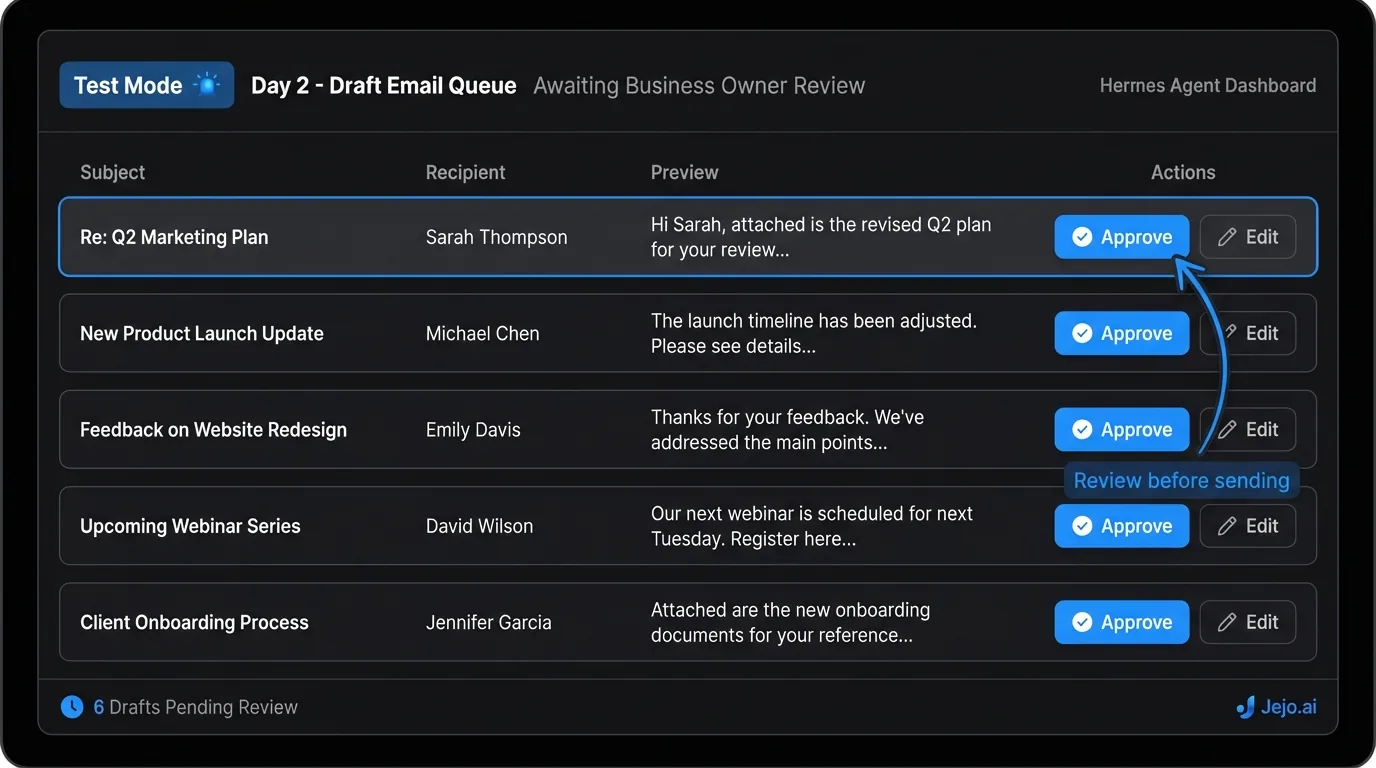
Day 2: First tasks in test modeWithin 48 hours of your kickoff call, the agent is processing your business data and drafting its first actions. Because you're in test mode, nothing goes out without your review.
Your first task: review the first 5 to 10 drafts the agent produces. These are typically:
- Draft responses to new leads or recent inquiries
- Draft follow-up emails on threads that haven't received a response
- Draft CRM updates for recent interactions
Read each draft. Notice what's right and what's wrong. The goal isn't to edit perfect output. It's to understand where the agent's initial calibration matches your standard and where it needs correction.
Setting Goals: The Foundation of Everything
Goals are the standing instructions that drive what Hermes Agent does every day. Not tasks. Goals.
The distinction matters. A task is "send a follow-up email to John." A goal is "follow up with every unresponsive lead at 3 days, 7 days, and 14 days with escalating specificity." Tasks are one-time. Goals run continuously.
How to write effective goals:The format: What should the agent do? When? For whom? What qualifies?
Bad goal: "Handle lead follow-ups."
Good goal: "For every lead who hasn't responded to our first outreach within 72 hours, send a follow-up email that references their original inquiry and includes a direct link to my calendar. If there's no response after 7 days, send a second follow-up with a different angle. After 14 days with no response, move the lead to 'Inactive' in the CRM and schedule one final touchpoint at 30 days."
Bad goal: "Send client updates."
Good goal: "Every Monday at 8 AM, send a project status update to every client with an active project. The update should include: what was completed last week, what's planned for this week, and any items we need from them. Pull project data from Asana. If a project is behind schedule, flag it for my review before sending."
The specificity of your goals is the main variable in how well Hermes operates. Vague goals produce variable results. Specific goals produce consistent results.
Goal categories to set in your first week:| Priority | Goal Category | Example |
|---|---|---|
| 1 | Lead response speed | Respond to all new inquiries within 5 minutes during business hours, 30 minutes overnight |
| 2 | Lead qualification | Apply ICP criteria and qualify/disqualify every new lead before responding |
| 3 | Follow-up sequences | Automated touchpoints for unresponsive leads at 3, 7, 14, 30 days |
| 4 | Client communication cadence | Weekly updates to active clients every Monday |
| 5 | Scheduling | Handle all meeting scheduling without back-and-forth |
Start with 3 to 5 goals. Not 15. Each goal needs to be specific enough to produce consistent behavior and limited enough that the agent can be calibrated properly.
You'll add goals over time as the initial stack runs cleanly. Most business owners are operating 12 to 20 goals by month 3.
The First Two Weeks: Active Training
This is the part most business owners underestimate. The first two weeks are not "set it and forget it." They're active training of an AI employee.
Your daily time commitment in weeks 1 and 2: 15 to 25 minutes. Specifically:
- Review the flagged item queue (5 to 10 minutes)
- Review a sample of 3 to 5 agent actions from the activity log (5 to 10 minutes)
- Make corrections and mark them as teaching moments when the agent made a wrong call (5 minutes)
When the agent sends a draft that doesn't match your standard, you don't delete it and move on. You open the correction interface and explain what was wrong:
- "This tone is too formal for a first inquiry. We use a more conversational approach in first responses."
- "This draft mentioned our pricing tier. Never mention pricing in first responses. That's for the discovery call."
- "This follow-up referenced the wrong service. We should match the follow-up reference to the original inquiry topic."
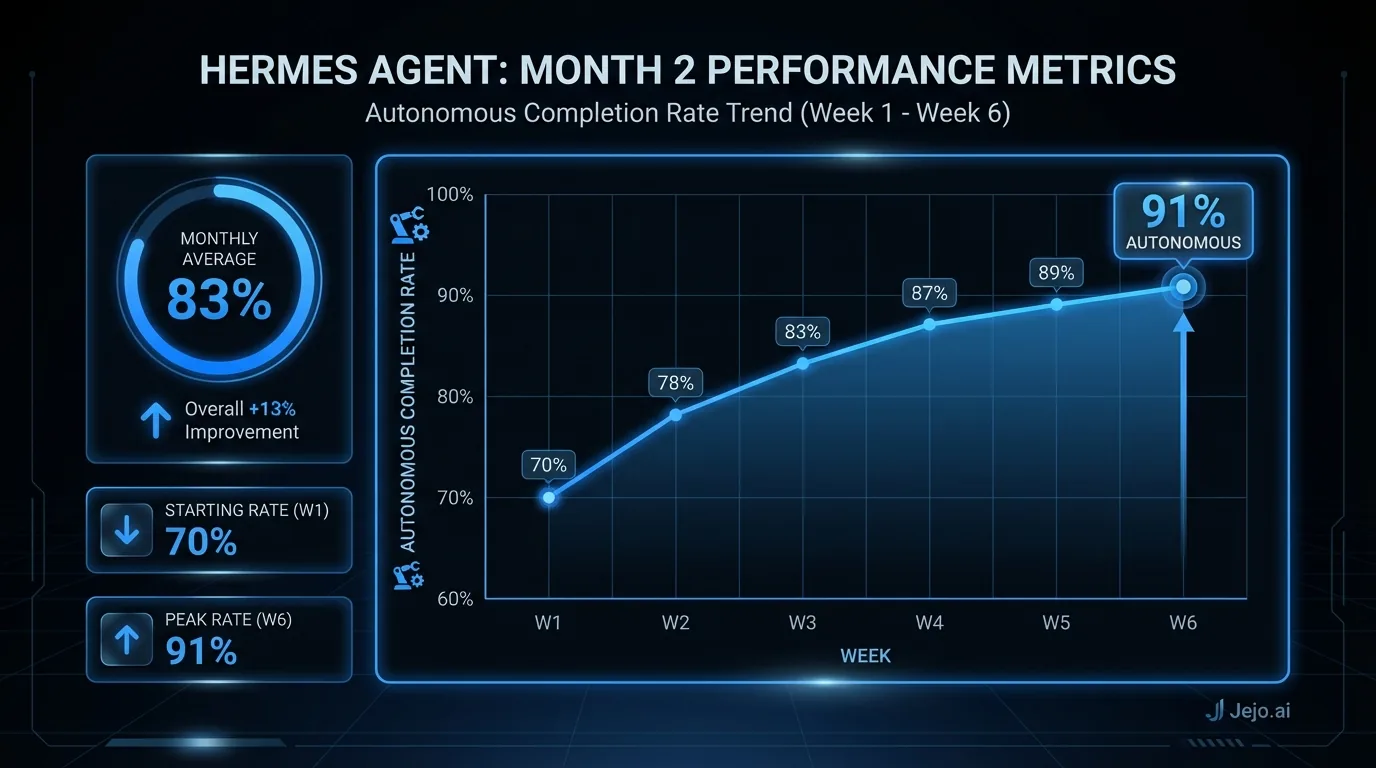
Each correction adds a rule. By the end of week 2, the agent has 20 to 40 learned rules on top of its initial configuration. The accuracy curve moves fast: from 70% at day 3 to 82% at day 7 to 88% at day 14 for most business owners.
The business owners who see the fastest improvement are the ones who give specific corrections, not vague ones. "This doesn't sound like me" gives the agent nothing to work with. "This uses too many adjectives and the sentence length is too long. My emails are short and direct." gives it a rule.
What to watch for in week 1:Watch the email drafts most carefully. Email is where most of the calibration happens and where misses are most costly. Before the agent sends anything autonomously, every email draft should pass a quick review: Does this sound like me? Is any information incorrect? Does the tone match the relationship? Would I be comfortable if a client saw this?
By the end of week 2, you should be approving 80%+ of email drafts without edits. If you're still editing more than 30% of drafts by day 14, tell your account manager. That's a configuration issue, not a calibration issue.
Month Two: Autonomous Operation Begins
Week 4 to 5 is when the operating model shifts.
By this point:
- Lead response is running autonomously. New inquiries get responded to in minutes.
- Follow-up sequences are running. Leads aren't going cold.
- Basic email triage is handled. Your inbox contains human decisions, not repetitive work.
- CRM is being updated by the agent. Data entry is no longer your problem.
- Flagged items are genuinely unusual. Not training noise.
Your daily time drops from 20 minutes to 5 to 8 minutes. The briefing, the flagged queue, done.
What most business owners notice first at month 2 is not the saved hours. It's the mental load reduction. You stop carrying the low-level operational work in the back of your mind. "Did I follow up with that lead?" is a question you stop asking because you know the agent is handling it and you'll see the activity in the log if you want to verify.
The second thing they notice is the night and weekend effect. A lead who submitted your form at 10 PM on Friday got a response by 10:03 PM. By the time you check your email Monday morning, that conversation is already at "call booked." Without Hermes, that lead would have waited 60+ hours for a response and half of them would have moved on. InsideSales.com research found that 35 to 50% of sales go to the vendor that responds first, making after-hours coverage a direct revenue driver, not a nice-to-have.
 The expansion phase: Month 2 onward
Once core skills are running cleanly, month 2 is when you add the next skill. The decision rule: what operational task is still costing you the most time or mental overhead? That's the next skill to activate.
Most business owners add 1 new skill per month in months 2 through 4. By month 4, a typical skill stack covers:
- Email management
- Lead response and qualification
- Follow-up sequences
- Scheduling
- Client communication and updates
- CRM management
- Pre-call research briefings
That's 25 to 35 hours per week of operational work handled by the agent. The equivalent of a full-time operations coordinator, without the hiring, onboarding, management overhead, or $4,000+ per month loaded cost. McKinsey Global Institute analysis finds that current AI technology could automate 60 to 70% of employee work activities across most business occupations, with operational and administrative tasks representing the highest-automation-potential category.
For full details on available skills and how to configure them, see Hermes Agent skills.
Daily Use: What Your Routine Actually Looks Like
At month 3, using Hermes Agent daily looks like this:
Morning (6 to 8 minutes):- Open the Hermes Agent dashboard
- Read the briefing summary: how many tasks handled overnight, how many items flagged
- Open flagged items (typically 2 to 5)
- Handle each: approve the draft action, modify it, or override it with a new rule
- Scan the upcoming task queue for the day
That's it. The operational infrastructure of your business is accounted for in 8 minutes.
Mid-day (optional, 1 to 2 minutes):Check flagged items if you've been told to expect a time-sensitive lead or client interaction. Most days this check is empty.
Weekly review (15 to 20 minutes):Review the performance metrics. Look at the week's activity log at a summary level. Decide if any goals need updating based on patterns you see. Consider which skill to activate next if you're in expansion mode.
What you don't do anymore:- Triage your inbox looking for leads
- Chase unresponsive prospects manually
- Manually update CRM records after conversations
- Write repetitive client update emails
- Schedule meetings through back-and-forth
- Worry about what fell through the cracks overnight
The test for whether Hermes is working: you stop feeling behind on follow-up. You start going into weekends knowing the agent has it. That's the operational state the tool is designed to create.
Common Mistakes Business Owners Make
These are the patterns that lead to underperforming deployments.
Setting goals that are too vague. "Handle email" is not a goal. It's a direction. The agent needs specificity to perform consistently. If your goals sound like what you'd tell a new hire in their first 5 minutes on the job, they're too vague. Write the goals you'd give a smart employee on day 30, after they understand your business. Not doing the corrections in week 1. The calibration period requires your feedback. Business owners who skip daily corrections in weeks 1 and 2 end up with an agent that performs at week 1 accuracy indefinitely. The corrections compound. Skipping them means you never get past 75% accuracy. Activating too many skills at once. Three skills at 60% accuracy is worse than one skill at 93% accuracy. The temptation to activate everything on day 1 is real. Resist it. Each skill needs its own calibration period. Sequence them. Not expanding the agent's autonomy over time. Some business owners keep every email in draft mode for review long past the point when the agent has earned autonomy. The goal is an agent that operates independently. Review your escalation rules monthly and expand the agent's authority on categories where it's consistently correct. Treating the flagged queue as optional. The flagged queue is how the agent learns. Letting flags accumulate without resolving them doesn't just create operational backlog. It deprives the agent of the feedback signal it needs to improve. Handle flags within 24 hours, especially in weeks 1 through 4. Not connecting the right tools. An agent that can't access your CRM treats every lead like a stranger. An agent that can't access your calendar can't schedule. The quality of the agent's work is bounded by the quality of its data access. Connect all the tools in scope during setup.For context on what other business owners have experienced with these exact patterns, see Hermes Agent review. For pricing information on managed deployments, see Hermes Agent pricing. For a comparison against other AI agent platforms, see Hermes Agent vs OpenClaw.
FAQ
How long does it take to set up Hermes Agent?
With a managed deployment, the technical setup requires a 30-minute kickoff call from you. The agent is operational within 48 hours. Active calibration happens in weeks 1 to 4. By month 2, the agent is running autonomously on core tasks with minimal daily oversight from you.
Do I need technical skills to use Hermes Agent?
No. Managed deployment handles all technical setup. Your work is business configuration: describing your qualification criteria, providing email samples, setting goals in plain English, and reviewing early drafts during calibration. None of this requires coding or technical knowledge.
How much time do I need to spend on Hermes Agent each day?
Weeks 1 to 2: 15 to 25 minutes per day for active training and corrections. Weeks 3 to 4: 10 to 15 minutes. Month 2 onward: 5 to 8 minutes for the morning briefing and flagged item review. Weekly review: 15 to 20 minutes. Total month 2 time: roughly 3 to 4 hours per month of active oversight for 25 to 35 hours of operational work handled.
What if the agent makes a mistake?
Every action is logged. Mistakes on trained task types decrease rapidly after week 2. When a mistake occurs, you correct it in the dashboard with a plain-English explanation. The correction creates a rule that prevents the same mistake from recurring. Unusual situations are escalated to the flagged queue automatically. See Hermes Agent review for real accuracy data from business owners.
When does Hermes Agent start saving me significant time?
Most business owners notice meaningful time savings by the end of week 2 on the tasks they activated first (typically lead response and email triage). The compounding effect of multiple skills running simultaneously builds through month 2. By month 3, most business owners report 25 to 35 hours per week recovered from operational tasks. See what is Hermes Agent for the full economic case.
Can I start with one skill and add more later?
Yes, and that's the recommended approach. Start with the skill that addresses your biggest time drain. Calibrate it fully over 3 to 4 weeks. Add the next skill once the first is running autonomously. This sequential approach produces faster overall results than activating all skills at once and splitting your correction bandwidth.
Is Hermes Agent free?
No. There is no free version of Hermes Agent. The managed path through Jejo.ai is $750/mo. Self-deployed Hermes costs $70 to $300/mo in server infrastructure plus your setup and maintenance time. A free discovery call is available at Jejo.ai onboarding to map your operations and confirm fit before you commit. Month-to-month billing means no long-term lock-in if you decide to cancel.
