Quick answer
- What this covers: Paperclip AI supports Docker-based self-hosting.
- Who it’s for: People evaluating paperclip ai.
Most small business owners should not self-host Paperclip AI. The cloud version handles everything, requires no infrastructure management, and updates automatically. You pay monthly, it runs, done.
But a specific subset of business owners, and a growing number of technical teams, have reasons to want Paperclip running on their own infrastructure. Data residency requirements. Enterprise IT policies. Cost optimization at scale. Integration with internal systems that cannot be exposed to cloud connections.
If any of those apply to you, this guide covers exactly what self-hosting Paperclip AI via Docker looks like: what you need, what the deployment process involves, what you gain, and what the real tradeoffs are.
Upfront context:- Self-hosting is not a beginner operation. It requires at least basic Docker and server management knowledge.
- The feature set between cloud and self-hosted is largely identical. This is an infrastructure decision, not a capability decision.
- Most small businesses with fewer than 20 employees should use the cloud version. Self-hosting adds overhead.
- If you want the benefits of a managed agent without touching infrastructure at all, Jejo.ai managed onboarding is the middle path.
Why Self-Host an AI Agent?
Docker self-hosting exists for real reasons. Not because self-hosting is inherently better, but because specific business requirements make cloud SaaS a non-starter. Three of them come up repeatedly.
Data residency and compliance. Some industries, and some enterprise clients, require that data not leave a specific geographic region or cross into third-party cloud infrastructure. Healthcare, government contractors, financial services firms operating under specific regulatory frameworks. The European Union's GDPR and the California Consumer Privacy Act both impose restrictions on cross-border data transfers that affect SaaS software procurement. If a client contract says your tooling cannot process their data through AWS us-east-1, cloud SaaS is off the table regardless of how convenient it is. Self-hosted Paperclip running in your own data center solves this completely. Integration with internal systems. Many larger businesses run internal tools that are not exposed to the internet. An internal CRM on a private network. A custom ERP system that does not have a public API. A legacy database that your operations rely on. The cloud version of Paperclip AI connects to tools via public APIs. If your tool does not have one, the cloud version cannot reach it. A self-hosted instance running inside your network perimeter can connect to anything on that network. Cost at scale. Cloud SaaS pricing is designed around per-seat or per-action models that work well for small and mid-size usage. At very high volumes (tens of thousands of actions per day, dozens of concurrent agents), running your own infrastructure often becomes cheaper than paying SaaS markups. This threshold is higher than most small businesses ever reach, but it is real for scaling operations. What self-hosting does not solve: It does not make the agent smarter. It does not give you more customization over the AI model behavior than the cloud version. It does not eliminate the need for ongoing maintenance. These are common misconceptions.What You Need to Self-Host Paperclip AI
Self-hosting Paperclip AI via Docker requires three things: a server to run it on, a database for agent state persistence, and an API key to authenticate the license.
Server requirements (minimum for one agent):- 2 CPU cores (4+ recommended for production)
- 4GB RAM (8GB recommended)
- 40GB storage (SSD preferred)
- Docker and Docker Compose installed
- Outbound internet access (the agent needs to call external APIs and connect to your cloud tools)
Note that even with self-hosting, the agent makes outbound API calls to tools like Gmail, HubSpot, and Slack. Self-hosting does not isolate you from the internet entirely. It means your agent logic and state data live on your infrastructure, not Paperclip's cloud. External API connections still go where they always go.
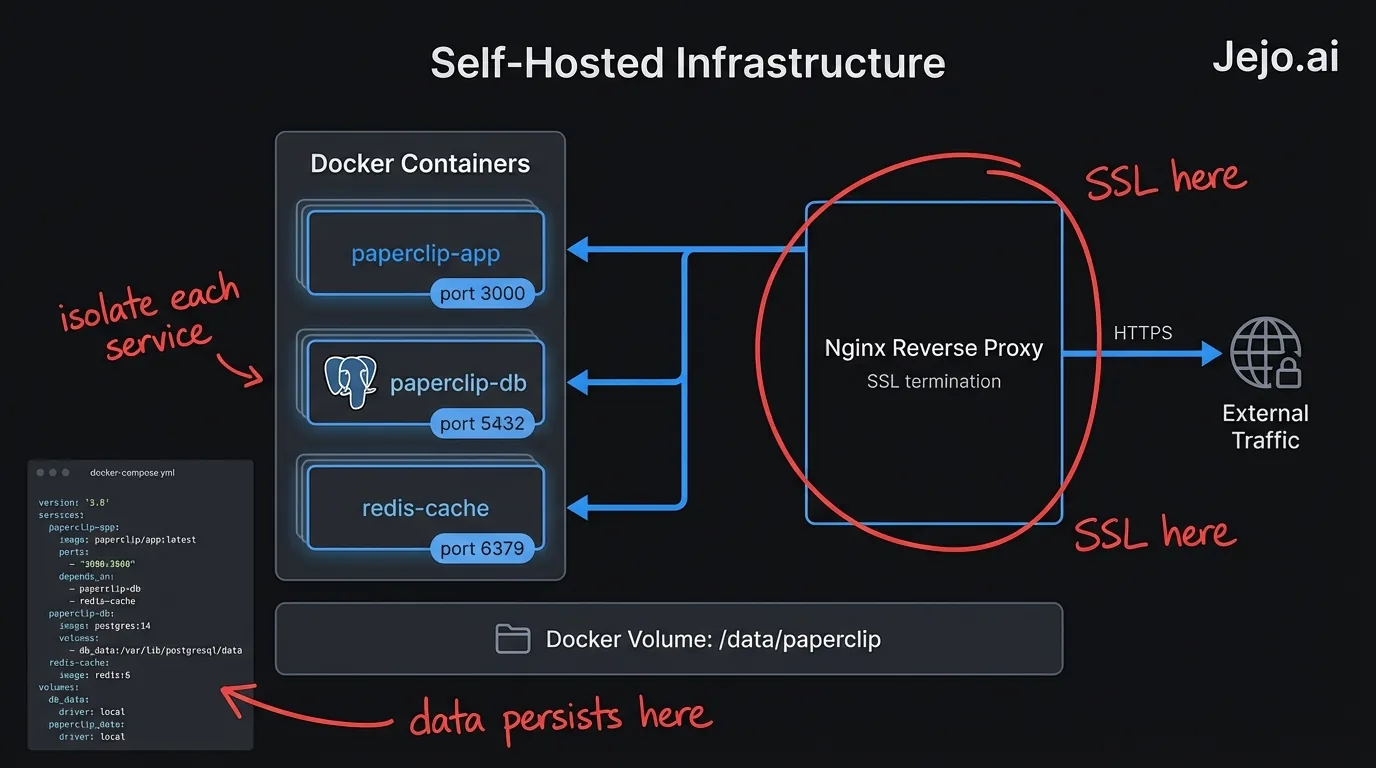
Database: Paperclip uses PostgreSQL for state storage. The Docker Compose setup includes a pre-configured Postgres container. For production environments, you should replace this with a managed Postgres service (RDS, Supabase, Neon, or a self-managed instance) to avoid losing agent state if the Docker container restarts. PostgreSQL's official documentation covers best practices for production deployments, which apply directly to self-hosted Paperclip instances. License key: Self-hosted plans require a license key that authenticates your deployment. The agent phones home to validate the license on startup, then operates independently. This is the only cloud dependency in a standard self-hosted deployment.| Component | Minimum Spec | Production Recommended |
|---|---|---|
| CPU | 2 cores | 4-8 cores |
| RAM | 4GB | 8-16GB |
| Storage | 40GB SSD | 100GB+ SSD |
| Database | Postgres in Docker | Managed Postgres (RDS, Supabase) |
| OS | Ubuntu 22.04 / Debian 12 | Same |
| Docker version | 24+ | Latest stable |
| Network | Outbound internet access | Same + reverse proxy for UI |
The Deployment Process (Condensed)
This is not a step-by-step installation tutorial. It is a realistic description of what the deployment process involves so you can evaluate whether you have the skills or resources to handle it.
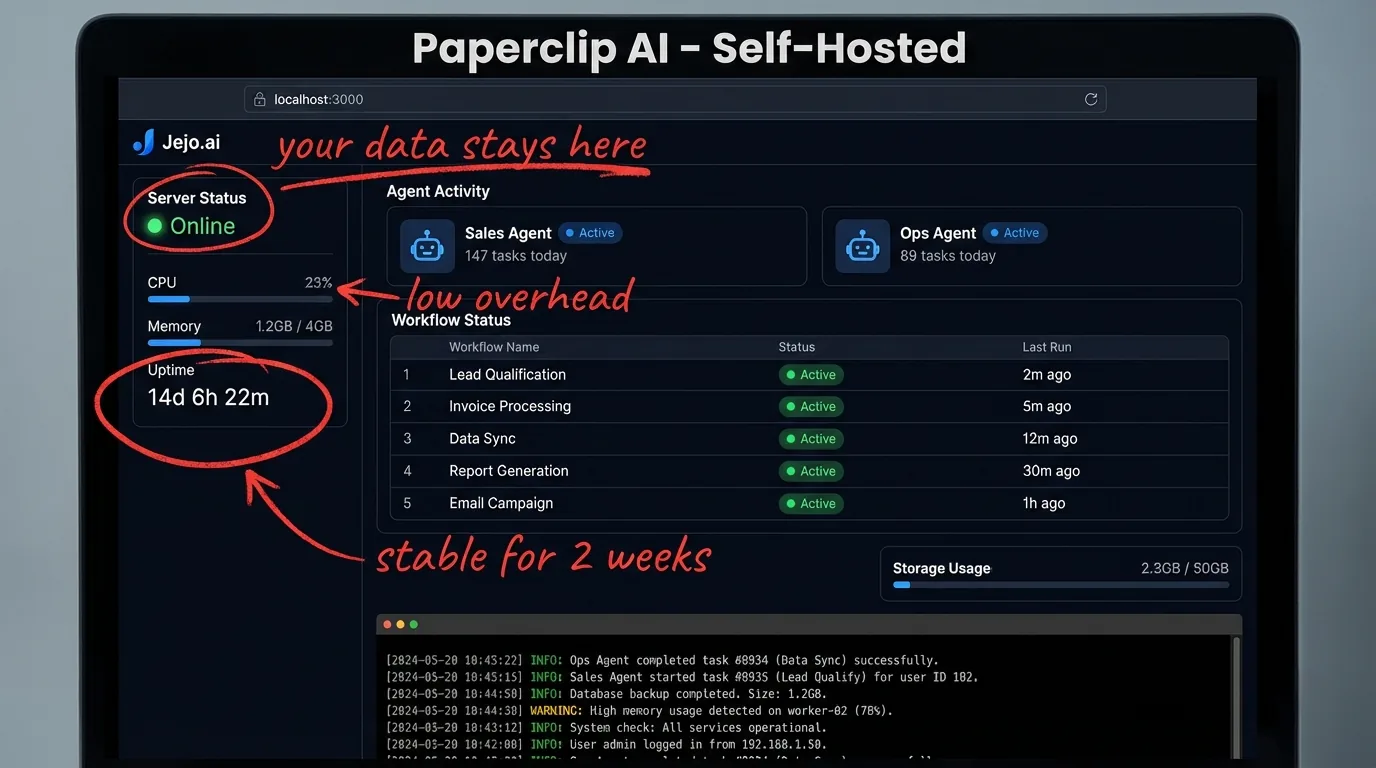
Step 1: Pull the Docker images. Paperclip distributes its Docker images through a private registry. You authenticate with your license key and pull the required images. The core stack runs three containers: the agent runtime, the API server, and the background job processor. Step 2: Configure environment variables. A template `.env` file handles all configuration. You set your database connection string, your license key, your external tool API credentials, and your preferred LLM provider (Paperclip supports multiple backends). This file stays on your server and never goes to Paperclip's cloud. Step 3: Start the stack with Docker Compose. One command starts everything: `docker compose up -d`. The containers start, run health checks, and report ready status within 90 seconds on adequate hardware. Step 4: Run database migrations. Before the first use, you run the migration script to set up the database schema. This is automated and takes about 30 seconds. On updates, migrations run automatically as part of the update process. Step 5: Configure the agent via the dashboard. The self-hosted version includes the same dashboard UI as the cloud version, accessible at the IP or domain you point at the server. Setup from this point forward is identical to cloud setup: connect tools, describe workflows, set guardrails. Step 6: Set up a reverse proxy (optional but recommended). If you want HTTPS and a proper domain name rather than an IP address, you need a reverse proxy like Nginx or Caddy in front of the stack. This is standard infrastructure work. Caddy is the faster option for people who want this done in under an hour.The whole process from blank server to running agent: 2-4 hours for someone comfortable with Docker. 1-2 days for someone who has done basic server admin but is new to Docker. Not a realistic DIY option for someone without any technical background.
Updates and Maintenance
The trade-off of self-hosting that most articles understate: you now own the maintenance. Docker's official documentation on production deployment covers update strategies, container orchestration, and the operational overhead of maintaining a self-hosted container stack.
Cloud Paperclip updates automatically. New features, security patches, model updates. You log in and the improved version is there. Your agent benefits from improvements without you doing anything.
Self-hosted Paperclip requires you to pull new Docker images and run the update process. Paperclip releases updates roughly every two to four weeks. Each update requires:
- Pulling new images: `docker compose pull`
- Restarting containers: `docker compose up -d`
- Running any new migrations if the release includes schema changes
This takes about 10 minutes per update if you are practiced at it. Set up automated update notifications from Paperclip's changelog and schedule a maintenance window every month. Do not skip updates. Security patches matter, and the agent's model integrations can break if the runner is too far behind.
What breaks most often in self-hosted deployments:- Database connections dropping if you are running Postgres in Docker and the container restarts unexpectedly
- SSL certificate renewals if you set up Caddy manually and did not configure auto-renewal
- External API credential expiry (OAuth tokens, API keys) requiring manual refresh
- Disk filling up if you do not prune old Docker images and log files periodically
None of these are difficult problems. They are predictable maintenance tasks. But they require someone on your team who can diagnose and resolve them. A cloud subscription offloads this entirely.
Self-Hosted vs Cloud: The Real Comparison
| Factor | Cloud (SaaS) | Self-Hosted (Docker) |
|---|---|---|
| Setup time | 30 minutes | 2-8 hours |
| Ongoing maintenance | Zero | 1-2 hours/month |
| Data stays on your servers | No | Yes |
| Internal tool access | Public APIs only | Full network access |
| Auto-updates | Yes | Manual pull required |
| Cost (small business) | $200-$750/month | Infrastructure + license |
| Cost (high volume) | Scales with usage | Fixed infrastructure cost |
| Technical skill required | None | Docker + Linux basics |
| Support access | Standard SaaS support | Self-hosted tier support |
The break-even point on self-hosting for cost purposes is typically around $2,000-$3,000/month in equivalent SaaS cost. Below that threshold, cloud is almost always cheaper when you account for engineering time spent on maintenance.
When Self-Hosting Actually Makes Sense
Here is who should actually self-host.
Self-host if:- You have specific data residency or compliance requirements that prohibit SaaS processing
- You need to connect to internal tools that are not exposed to the internet
- You are running at scale where SaaS pricing exceeds your infrastructure costs
- You have a technical team member who can own the deployment and maintenance (at least 2-4 hours/month)
- You are a small business without compliance constraints
- Your tools all have public APIs that Paperclip can connect to
- You do not want to think about infrastructure
- You are evaluating Paperclip AI before committing to a long-term deployment
- You want all the results of a running AI agent without managing any infrastructure or configuration
- You are not sure which path is right and want someone to assess your situation
- You need the agent running and producing results in days, not weeks
Most businesses in the sub-$1M revenue range should be on cloud. The time spent managing self-hosted infrastructure is worth more applied to the business. The exception is if compliance is non-negotiable. Then self-hosting is the right call and you should budget the engineering time accordingly.
FAQ
Can I self-host Paperclip AI on a VPS?
Yes. A basic VPS from DigitalOcean, Linode, Hetzner, or similar works well. Hetzner offers the best price-to-performance ratio for European deployments. DigitalOcean is the easiest for developers who want managed Postgres alongside their compute. Minimum spec: 2 CPU cores, 4GB RAM, 40GB SSD.
Does self-hosting require internet access?
Partial. The agent runtime itself lives on your server. But the agent still makes outbound API calls to external tools like Gmail, HubSpot, and Slack. The agent state, workflow logic, and audit logs stay on your infrastructure. Tool integrations still use external APIs. If you need full network isolation, that requires a different architecture involving on-premise versions of the connected tools.
How is the self-hosted version different from cloud?
Feature parity is near-complete. You get the same dashboard, the same workflow engine, the same connected integrations. The differences are operational: you manage updates, infrastructure, and monitoring. Some advanced cloud features (automatic model routing, global uptime guarantees) are not available in self-hosted deployments.
Can I migrate from cloud to self-hosted?
Yes. Paperclip supports exporting your workflow configurations and agent settings. You import them into the self-hosted instance. Action history and historical logs do not transfer, but all your configured workflows and guardrails move cleanly. Expect 1-2 hours for the migration.
What is the cost of self-hosting compared to cloud?
The self-hosted license costs less than equivalent cloud plans at scale, but you add infrastructure costs and engineering time. A minimal VPS costs $20-$80/month. Managed Postgres adds $15-$50/month. Engineering time for maintenance at $100/hr runs $200-$400/month for a reasonably clean deployment. At low volumes, cloud is almost always cheaper when you factor in the full cost. For context on cloud pricing, see Paperclip AI pricing.
Is the Paperclip app legit?
Yes. Paperclip AI is a real product with documented integrations, published case studies, and a working Docker deployment that developers can inspect. The self-hosted path confirms legitimacy directly: you download the image, inspect the code, and run it on your own infrastructure. There is no black box. For a full review of the platform's strengths and limitations, see Paperclip AI review.
For broader context on what Paperclip AI does and whether it is the right fit for your business before you think about deployment options, start with what is Paperclip AI. If you want to compare Paperclip against other agents, see Paperclip vs OpenClaw.
