Quick answer
- What this covers: OpenClaw setup guide for business owners.
- Who it’s for: People evaluating openclaw.
480 people search for "OpenClaw setup" every month. Most of them bounce off the official docs within 5 minutes. Not because the docs are bad. Because they're written for developers.
This guide covers OpenClaw setup from a business owner's perspective. Two paths. Honest timelines. What to expect when the agent starts working.
Two Setup Paths
The 30-minute path (managed). A service like Jejo.ai handles infrastructure, installation, and configuration. You show up for a 30-minute onboarding call. You walk away with a working agent. The 4-to-8-hour path (self-hosted). You install OpenClaw on your own server using Docker. Full control over your data and infrastructure. Requires comfort with servers and command-line tools. Detailed in OpenClaw Docker.| Setup Path | Time | Technical Skill | Cost | Agent Working By |
|---|---|---|---|---|
| Managed (Jejo.ai) | 30 minutes | None | $750/mo | Same day |
| Self-hosted (basic) | 4-6 hours | Moderate | $50-$200/mo | Day 1-2 |
| Self-hosted (advanced) | 8-15 hours | High | $50-$200/mo | Day 2-3 |
The difference between basic and advanced self-hosted: basic connects 2 to 3 tools with pre-built skills. Advanced involves custom integrations, multiple agent skills, and fine-tuned workflows.
The Managed Setup Process
Here's what happens during a managed OpenClaw setup. No technical knowledge required.
Before the call (5 minutes). You receive a form asking which tools you use (email provider, CRM, calendar, etc.) and what tasks eat the most of your time. During the call (30 minutes). Three things happen:- Your agent gets deployed on managed infrastructure
- Core integrations get connected (email, calendar, CRM)
- Initial skills get configured based on your top 2 to 3 pain points
The Self-Hosted Setup Process
For business owners with technical resources. This is a summary, not a tutorial.
Step 1: Get a server (15 minutes). Sign up with a cloud provider. DigitalOcean, Hetzner, or AWS. Minimum 4GB RAM, 2 CPU cores, 40GB storage. See OpenClaw hosting for provider comparison. Step 2: Install Docker (15 minutes). One command installs Docker on your server. This is the container system that runs OpenClaw. Step 3: Deploy OpenClaw (30 minutes). Download the OpenClaw Docker image and start it. Configuration involves setting environment variables and connecting your domain. Step 4: Connect your tools (1-3 hours). This is where most time goes. Each integration (email, CRM, calendar, etc.) requires API credentials and configuration. Gmail and Google Calendar connect in 10 minutes each. Salesforce takes 30 to 45 minutes. Step 5: Configure skills (1-2 hours). Install the skills your agent needs. Set rules and thresholds. Define what the agent handles autonomously vs. what it escalates. See OpenClaw skills for the full catalog. Step 6: Test (30 minutes). Send test emails, create test leads, trigger test workflows. Verify the agent responds correctly before going live.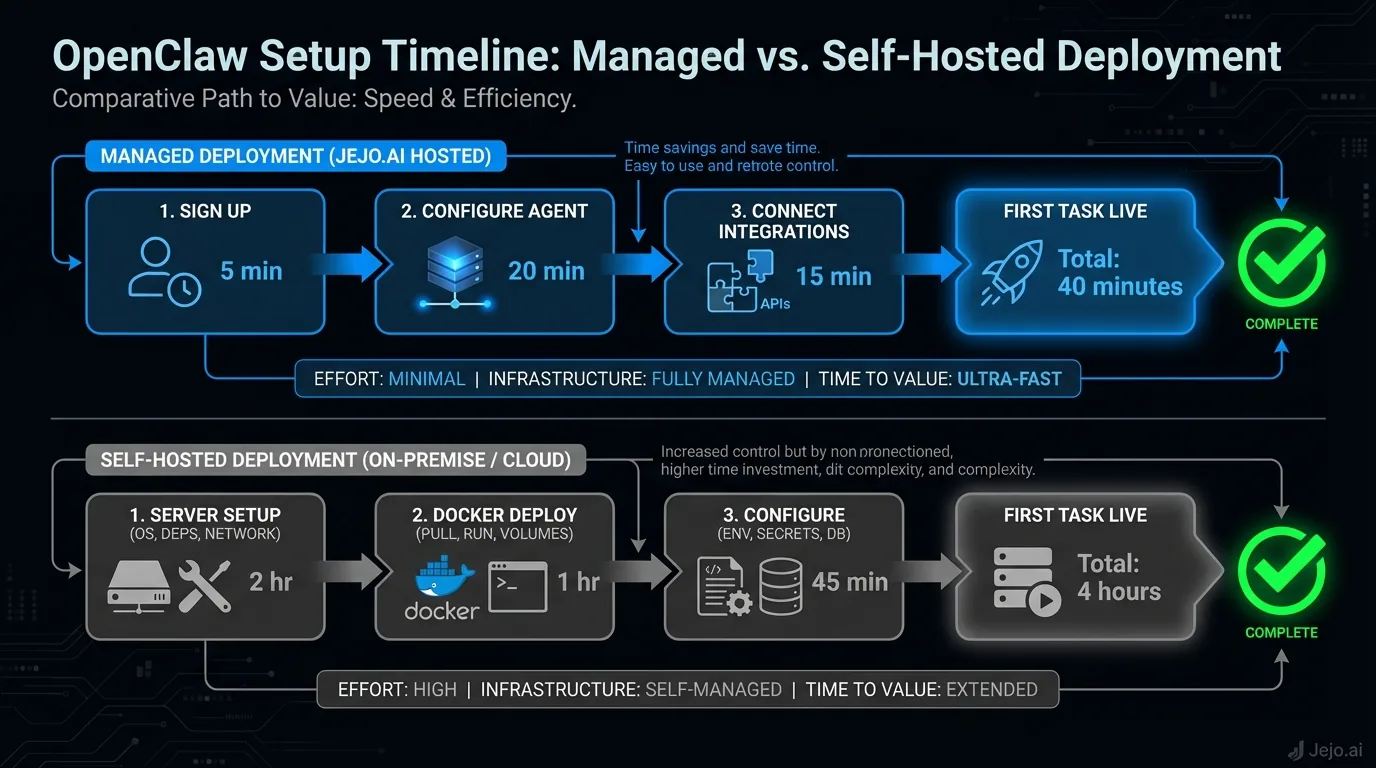
What to Set Up First
Don't try to automate everything on day 1. Start with the highest-impact, lowest-risk tasks.
Week 1 priorities:- Email triage (highest time savings, low risk)
- Calendar management (straightforward, immediate value)
- CRM updates (tedious work your agent handles perfectly)
- Lead follow-up sequences
- Report generation
- Invoice processing
- Customer support automation
- Custom workflows specific to your business
This staged approach gives each skill time to learn your preferences before adding more complexity. Businesses that follow this pattern report 40% higher satisfaction than those who activate everything at once. This mirrors findings from McKinsey on successful AI deployments, which show that organizations that phase automation rollouts see faster time-to-value than those that attempt full implementation upfront.
Common Setup Mistakes
Hundreds of businesses have gone through OpenClaw setup. These are the mistakes that waste the most time.
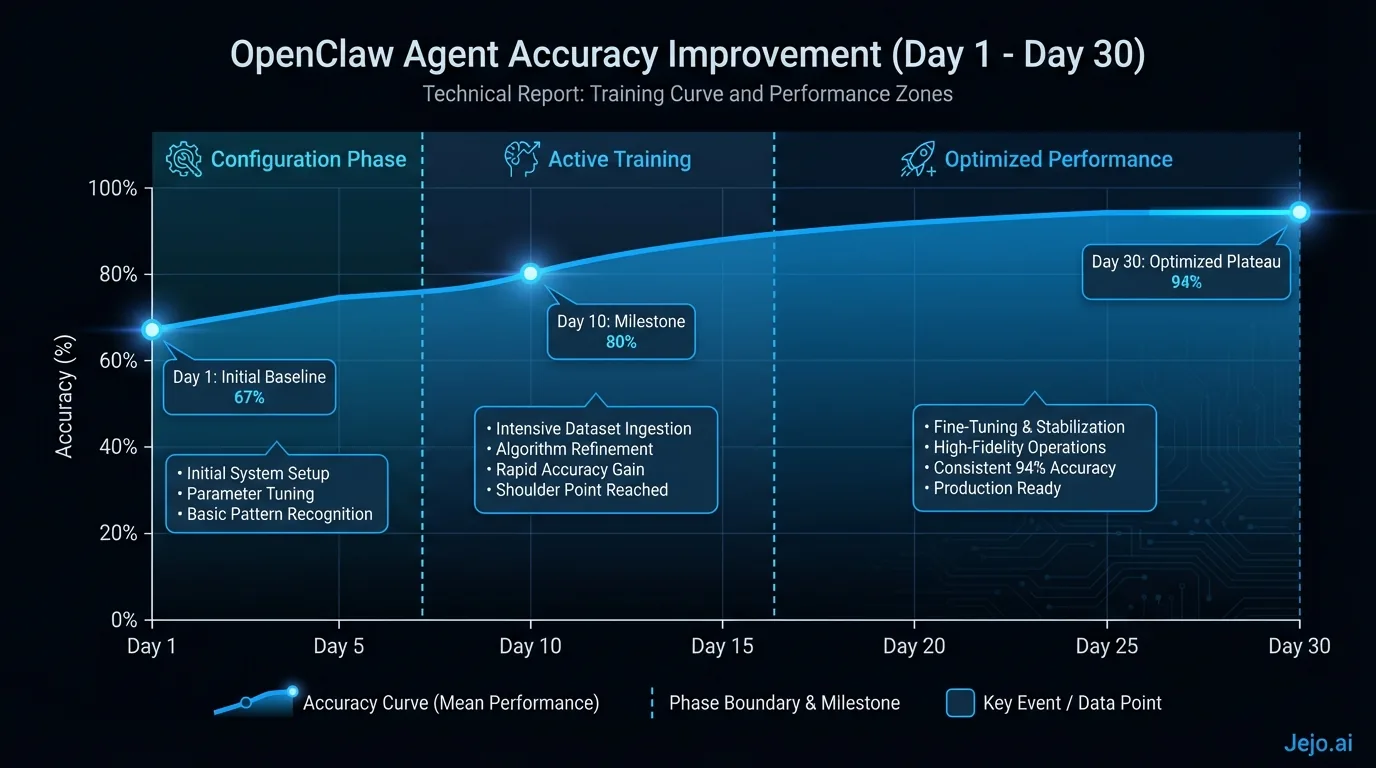
Mistake 1: Connecting too many tools at once. Every integration adds setup time and potential failure points. Start with 3 tools. Add more after your agent is stable. Businesses that connect 6+ tools on day 1 spend twice as long debugging integration issues. Mistake 2: Skipping escalation rules. Your agent will start processing tasks immediately. If you haven't defined what it should escalate to you, it will handle everything. Including things you didn't want it to handle. Set boundaries before going live. Not after. Mistake 3: Choosing the wrong hosting. Non-technical owners who attempt self-hosting often spend 15+ hours on setup, then switch to managed anyway. Gartner research on technology adoption identifies mismatched technical capability as one of the leading causes of failed software deployments for small and mid-sized businesses. That's 15 hours wasted. Be honest about your technical skills before choosing a path. See OpenClaw hosting for help deciding. Mistake 4: Not testing before going live. Send test emails. Create test leads. Trigger test workflows. Verify the agent responds correctly in a controlled environment before letting it handle real client interactions. 20 minutes of testing prevents embarrassing mistakes with real customers. Mistake 5: Expecting instant perfection. Your agent reaches 75 to 80% accuracy on day 1. That means 1 in 5 tasks needs correction. That's normal. Not a sign that something is broken. By day 14, accuracy hits 90%+. By day 30, 95%+. The training curve is predictable.Pre-Setup Checklist
Gather these before starting, regardless of which path you choose:
| Item | Why You Need It | Time to Gather |
|---|---|---|
| Email account credentials | Agent reads and sends email | 2 minutes |
| CRM login or API key | Agent updates contacts and deals | 5 minutes |
| Calendar access | Agent schedules and manages meetings | 2 minutes |
| List of top 3 time-wasting tasks | Determines which skills to activate | 10 minutes |
| Escalation rules | Defines what the agent can't do alone | 15 minutes |
The escalation rules are the most important item. Decide before setup: what dollar thresholds need your approval? Which clients should the agent never contact directly? What types of decisions require a human? Write these down. They go into the agent's configuration on day 1.
After Setup: The First 48 Hours
Your agent is live. Here's the playbook.
Hours 1-4. Watch closely. Open the dashboard. See how the agent handles its first real tasks. Correct obvious mistakes immediately. Hours 4-24. Check in 3 to 4 times. The agent is processing real work now. Flag anything that feels wrong. Hours 24-48. Shift to twice-daily reviews. Morning and evening. Your agent has learned from the corrections you made on day 1. Accuracy is already climbing.By the end of 48 hours, most business owners report a visible shift. The agent is handling the boring work. You're spending time on the work that actually grows the business.
Days 3 to 7: Building Momentum
The third day marks a turning point. The chaotic first 48 hours are over and a pattern sets in. Your agent has learned enough of your preferences to handle the most common tasks correctly. Now the work is refinement, not firefighting.
What to do on days 3 to 5:Open your dashboard each morning and scan the previous night's activity log. Look for three things: tasks the agent completed correctly (good, note the pattern), tasks it escalated that didn't need escalation (tighten your rules), and tasks it handled that you wish it hadn't (add them to the escalation list).
Each correction takes 30 to 90 seconds. You're not debugging code. You're clicking approve or reject and occasionally adding a note explaining why. That feedback trains the agent faster than anything else you can do.
What to expect by day 7:Task completion without intervention should be sitting at 80 to 85%. Escalation rate should have dropped from 20% on day 1 to under 10%. Average response time on your agent's tasks should be consistent, not spiking. If your agent is taking longer on certain tasks, check whether the integration to that tool is running slowly.
The pattern most owners notice by day 7: the tasks they were dreading handing off are now handled. The tasks they weren't sure about still need some oversight. That's the right balance. Push too fast on the uncertain ones and you spend day 7 cleaning up errors. Stay patient, widen the autonomy as confidence builds.
The first skill expansion:If your agent is at 82%+ accuracy by day 5 on its initial skills, you can add one more skill on day 6 or 7. Don't add more than one. Each new skill needs its own training window. Two learning curves at once means neither improves as fast.
FAQ
Can I set up OpenClaw on a weekend?
Yes. Managed setup takes 30 minutes and can happen any day your provider offers onboarding calls. Self-hosted setup works anytime since you're configuring a server. Many business owners prefer weekend setup so the agent starts learning on Monday.
What if I mess up the setup?
Managed path: the provider handles everything. Self-hosted: OpenClaw's Docker deployment is repeatable. Worst case, you delete the container and start fresh. Configuration files can be backed up and restored. Nothing is permanent until you go live.
Do I need to shut down my business during setup?
No. The agent connects to your tools in the background. It starts processing new items going forward. It doesn't retroactively change anything in your existing systems. Zero disruption to current operations.
How fast will I see ROI?
Most businesses see measurable time savings within 3 to 5 days. Full ROI (agent cost paid for by time saved) within 14 to 30 days. At $750 per month managed and $150 per hour opportunity cost, you break even when the agent saves 5 hours per month. Most agents save 5 hours per week. According to SBA research on small business productivity, administrative overhead is one of the top constraints on small business growth, with owners of firms under 20 employees spending over 40% of their time on operational tasks rather than revenue-generating work.
How do I know which skills to activate first if I'm unsure?
Track your time for 3 days before setup. Write down every task and how long it takes. The task that appears most often and consumes the most total time is your first skill. Not the most exciting one. Not the one with the coolest demo. The one that is actually eating your day. For most business owners, that's email followed by scheduling. If you're genuinely unsure after tracking, start with email triage. It applies to every business type, delivers fast visible results, and gives your agent enough context about your business to make later skills train faster.
Is it safe to install OpenClaw?
Yes, with the right configuration. OpenClaw is open-source, meaning its code is publicly audited by thousands of developers. On a managed service like Jejo.ai, the security configuration is handled for you. For self-hosted deployments, follow standard server hardening practices: use the official Docker images, keep dependencies updated, restrict server access to known IPs, and enable SSL. The risk isn't the software itself but a misconfigured server exposing it to the public internet.
What if my agent starts handling something it shouldn't on day 1?
This happens often. You didn't anticipate every scenario when writing your escalation rules. When you see the agent handle something incorrectly, immediately go to the rules engine in the dashboard and add a rule that prevents it from happening again. Then check the decision log to see if it already did it to anything else. Correct those instances manually. The key is catching pattern violations quickly, not after they've repeated 10 times.
