Quick answer
- What this covers: AI automation for small business recovers 14-20 hours per week with no developer or $50K setup.
- Who it’s for: Small business owners and solo founders.
- What it costs: $20-$50/month.
Key takeaways:
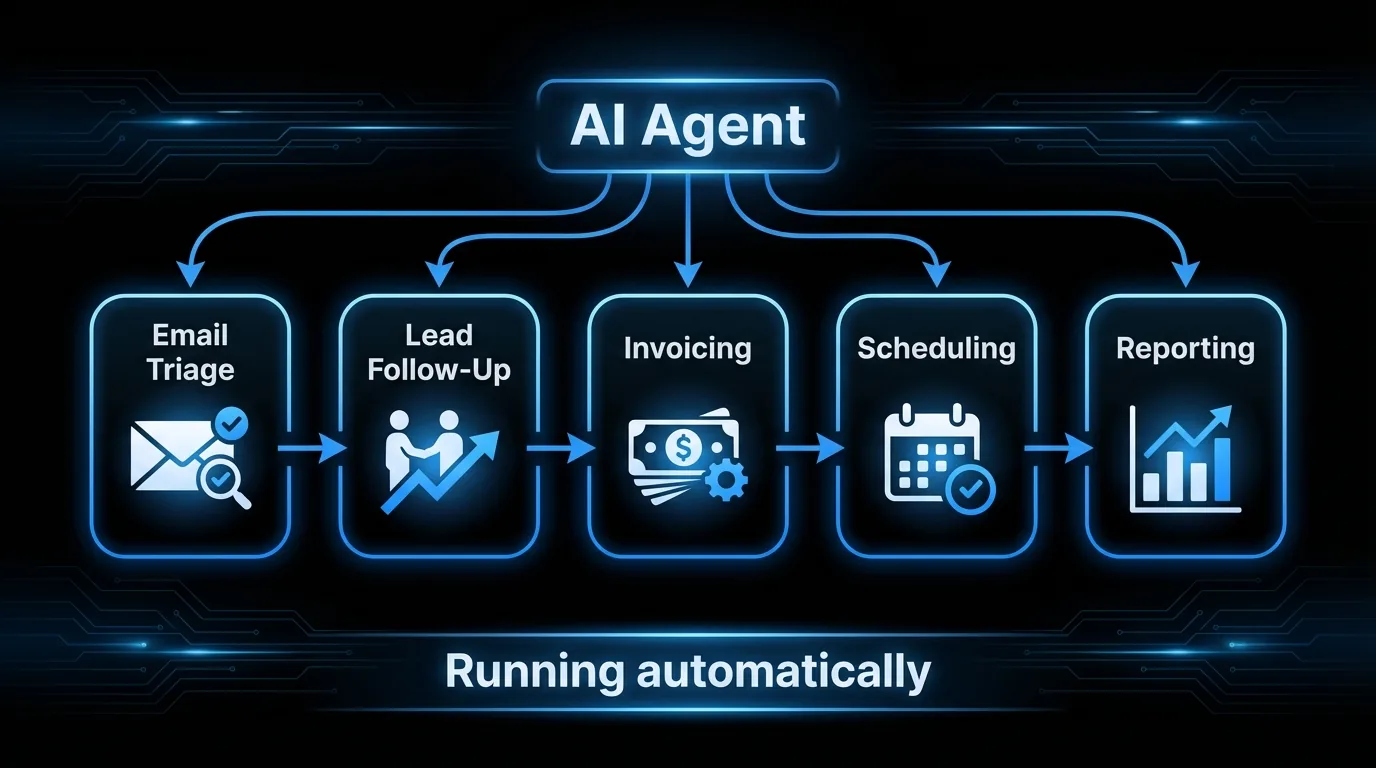
- AI automation can recover 14-20 hours per week from email, follow-up, scheduling, invoicing, and reporting
- Most tools marketed as "AI automation" are rule-based: they break when a condition doesn't match the predefined rule
- Speed to lead is the highest-ROI (return on investment) automation most businesses can run: a 5-minute response converts at 9x the rate of a 1-hour response
- AI agents go further: they handle scenarios you never anticipated, without you writing a new rule every time
- The 3-Phase Automation Sequence (Document, Connect, Agent) produces the highest ROI: audit first, automate second, upgrade to agents third
 In this article:
- What AI Automation for Small Business Actually Means
- What Small Businesses Are Actually Automating in 2026
- What AI Automation Cannot Do (Yet)
- The Real Cost of Not Automating
- How to Start AI Automation in a Small Business
- Common Mistakes Businesses Make When Starting AI Automation
- AI Automation Tools vs AI Agents: What's the Difference?
- FAQ
What AI Automation for Small Business Actually Means
AI automation for small business means using AI systems to handle routine tasks without human intervention on each instance. The highest-impact areas are email management, lead follow-up (responding within 5 minutes converts at 9x the rate of a 1-hour response), invoicing, scheduling, and reporting. Unlike rule-based tools, AI automation handles unstructured inputs and adapts when conditions fall outside the predefined script.Most tools marketed as "AI automation" are one of three things:
Rule-based automation (not AI): If X happens, do Y. Zapier workflows, CRM (customer tracking system) sequences, auto-replies. Useful, not intelligent. AI-assisted tools: AI improves one specific task. ChatGPT writes emails faster. AI categorizes expenses. Smart, but still requires a human to run it. AI agents (actual automation): A system that monitors inputs, decides what to do, acts, and reports back. This is what people mean when they say automation. And it's what became accessible to small businesses in 2024-2025.The distinction matters because most business owners who say "I've tried AI automation" have tried category 1 or 2. They've built Zapier flows or used ChatGPT for writing. They haven't run an AI agent that handles end-to-end workflows without supervision.
Across the small businesses we've worked with, owners who make this distinction recover significantly more time than those who stay at the tool level.
AI automation small business impact: Automating email, follow-up, scheduling, invoicing, and reporting recovers 14-20 hours per week for a typical small business owner. At $50/hour opportunity cost, that's $700-$1,000/week or $36,000-$52,000/year in recovered capacity. AI automation tools cost $200-$1,000/month. The payback period for most implementations is under 30 days. In our experience, the average small business owner spends 40% of their workweek on administrative tasks that do not directly generate revenue.Related reading: AI for small business hub: the full AI foundation for small business | No-code AI agent builders: build-vs-buy decision for AI workflows | ChatGPT for small business owners: where the tool ends and automation begins | AI agents for small business: what agents handle end-to-end
What Small Businesses Are Actually Automating in 2026
Here's what's working. Not theoretical. Operational.
Email and Communication
The inbox is the biggest time sink for most small business owners. 2-4 hours per day. AI automation can cut this to 30-45 minutes.
What gets automated:
- Triage: categorizing and prioritizing incoming mail
- Draft responses for routine inquiries (pricing questions, appointment requests, status updates)
- Follow-up sequences for leads who haven't responded
- Client update emails at project milestones
- Meeting confirmation and reminder emails
What still needs a human: complex negotiations, sensitive client situations, anything requiring judgment about relationship dynamics.
Lead Follow-Up
Speed to lead is the most impactful automation a small business can run. A lead that gets a personalized response within 5 minutes converts at 9x the rate of a lead that waits an hour.AI automation handles:
- Instant acknowledgment when a lead submits a form
- Personalized first response that references their specific inquiry
- Follow-up sequence over 7-14 days if there's no response
- Lead scoring based on behavior (opened emails, visited pricing page)
- Notification to the business owner when a lead shows buying signals
Scheduling and Calendar
The back-and-forth of scheduling meetings is a pure time waste. AI automation eliminates it.
- Sends scheduling links automatically in response to meeting requests
- Blocks time for deep work and doesn't let meetings eat into it
- Sends reminders to attendees
- Rescheduling handled without human involvement
Invoicing and Payment Follow-Up
Service businesses lose 5-15% of receivables to slow follow-up. AI automation fixes this.- Invoices sent automatically at project milestones
- Payment reminders on day 7, 14, 30
- Late payment escalations without the awkward manual reminder
- Monthly revenue reports generated and delivered automatically
Content and Marketing
AI has made consistent content production achievable for one-person businesses.
- Weekly newsletter drafted from a source (blog post, news, a voice memo)
- Social posts generated from existing content
- SEO blog posts drafted from keyword briefs
- Email sequences updated based on subscriber behavior
For a deeper dive on using AI for marketing specifically, read the article on AI agents for marketing.
What AI Automation Cannot Do (Yet)
Being honest here matters. Overselling leads to bad implementations.
Sales calls and relationship development. AI can schedule calls and send follow-ups. It cannot replace the human on the call. Relationship-heavy sales, enterprise deals, high-value consulting engagements: these still need a person. Complex judgment calls. Negotiating a contract, deciding whether to fire a client, pivoting strategy. AI can provide analysis. It cannot make the call. Creative strategy. AI can execute on a creative brief. It cannot develop the brand strategy, identify the emotional angle that makes copy convert, or make the insight-level decisions that separate good marketing from forgettable marketing. Compliance and legal. AI tools help with document generation. They don't replace a lawyer or accountant when the situation is complex. Real-time phone calls and in-person communication. AI agents handle written communication well. They cannot call a client, hear the hesitation in a voice, or read the room in a meeting. Any part of your business that runs on phone relationships or in-person trust still needs you. Sensitive timing that requires human judgment. Automated follow-up fires on schedule. It doesn't know that a prospect just posted on LinkedIn about losing a major client, or that a customer is dealing with a serious personal situation. Getting a check-in email at the wrong moment can end a relationship that was still warm. Flag sensitive contacts manually. The agent handles everyone else.The Real Cost of Not Automating
| Task | Manual time/week | Automated time/week | Hours saved |
|---|---|---|---|
| Email triage and responses | 8-10 hrs | 1-2 hrs | 7-8 hrs |
| Lead follow-up | 3-5 hrs | 0.5 hrs | 3-4 hrs |
| Scheduling | 2-3 hrs | 0.25 hrs | 2 hrs |
| Invoicing and follow-up | 2-3 hrs | 0.5 hrs | 2 hrs |
| Reporting and admin | 2-3 hrs | 0.5 hrs | 2 hrs |
| Total | 17-24 hrs | 3-4 hrs | 14-20 hrs |
The tools to automate this cost $200-$1,000/month. The math is not close.
One property management company recovered 18 hours per week after automating email triage, tenant follow-up, and invoice reminders. Their accounts receivable cycle dropped from 34 days to 9.
Spending 2+ hours a day on email and follow-up? That's 500+ hours a year on work that can run automatically. See what an AI agent handles in your business or book a 20-minute call.
How to Start AI Automation in a Small Business
Most businesses that succeed with AI automation follow the same sequence. Call it The 3-Phase Automation Sequence: Phase 1 (Document) means auditing current workflows and capturing what actually happens before touching any tools. Phase 2 (Connect) means setting up rule-based automation to handle those documented processes. Phase 3 (Agent) means graduating from rules to an AI agent that handles the scenarios you never anticipated.
The steps below map to this sequence:
Step 1: Audit the inbox. What's coming in? What types of messages take the most time? What responses do you write over and over? Step 2: Start with follow-up. The highest ROI automation for most businesses is lead follow-up. It directly drives revenue. It's measurable. It's where slow response costs money you can quantify. Step 3: Add scheduling. Remove the back-and-forth entirely. Use scheduling links. Let the calendar manage itself. Step 4: Automate invoicing. Service businesses: if you're manually triggering invoices and manually following up on late payments, automate both. Step 5: Add content and reporting last. Not because they're unimportant. Because the first four steps pay for themselves before you get here.The biggest mistake: starting with content automation because it feels creative and exciting, while the inbox and follow-up are still drowning you.
What AI Automation Looks Like in Practice
Marcus runs a 2-person landscaping business in Denver. Before automation, his Tuesday looked like this: 47 minutes answering inquiry emails in the morning, a missed call from a new lead at 2 PM while he was on a job site, and 25 minutes that evening writing invoices manually for the previous week's work. Three leads went unanswered for more than 24 hours.
After setting up an AI agent:
The morning inbox is processed before he arrives. Routine questions about pricing and availability get accurate responses within 3 minutes of arriving. New lead inquiries get a personalized reply that references the type of work they asked about and offers two scheduling times based on his actual calendar.
The 2 PM call still goes to voicemail, but the lead had already received an email response at 12:30 PM when they submitted the contact form.
Invoices go out automatically when a job is marked complete in his calendar. Payment reminders fire on day 7 and day 14 without Marcus touching them. His accounts receivable cycle dropped from 28 days average to 11 days.
Total time saved: 9-11 hours per week. At his effective hourly rate of $85/hour doing actual landscaping work, that's $765-$935 per week in recovered capacity. The AI agent costs $750/month. The math closes in the first week.Common Mistakes Businesses Make When Starting AI Automation
Starting with the wrong task. Content automation feels exciting. It is not where the money is. Skipping the audit step jumps past Phase 1 (Document) of The 3-Phase Automation Sequence entirely, which means automating the wrong processes. Email management, lead follow-up, and invoicing are where the hours go. Start with the task that costs the most time today, not the task that sounds most impressive. Automating a broken process. Automation speeds up whatever it touches. If your lead follow-up process is unclear or inconsistent when done manually, automating it produces fast, inconsistent follow-up. Document the process first. Automate the documented process second. Not testing before going live. A Zapier workflow that routes new leads to the wrong email address for 3 weeks costs you real business. Test every automation with a live submission before activating it. Submit a form yourself. Check every step fires in the right order. Confusing setup with maintenance. A Zapier workflow running fine in January can break when a connected app updates its API (the connection that lets software tools talk to each other) in March. Automations are not a one-time setup. They need a monthly 20-minute check: are all connections live? Are triggers firing? Is anything bouncing? Build the maintenance habit from the start. Expecting immediate ROI. The first 30 days of AI automation are calibration, not results. An AI agent handling emails will need refinement in weeks 2-3 as it encounters scenarios you did not anticipate during setup. Build in a 60-day evaluation horizon, not a 2-week one.AI Automation by Industry: What's Working
Service businesses (cleaning, landscaping, repairs):The highest-value automation is lead response speed combined with automatic scheduling. A homeowner who submits a cleaning inquiry at 7 PM on a Sunday gets a response within 5 minutes with available dates. Without automation, that inquiry waits until Monday morning.
The business that responds first gets the booking 80% of the time. Service businesses that automate this process report a 25-40% increase in inquiry-to-booking conversion.
Consulting and professional services:Proposal follow-up is where professional service firms leak the most revenue. A proposal goes out on a Thursday. The consultant plans to follow up on Monday. By Monday, the prospect has had 4 days to get busy, reconsider, or call a competitor.
AI automation sends a follow-up on day 3 and another on day 7 if there's no response. Consulting firms using automated proposal follow-up report 15-30% higher close rates on outbound proposals.
Retail and e-commerce:Abandoned cart recovery is the most straightforward ROI in retail automation. 70% of online shopping carts are abandoned. Automated email sequences recover 5-15% of those. A store doing $30,000/month in revenue with a 70% cart abandonment rate and a 10% recovery rate adds $2,100/month in recovered revenue from a $30/month email automation tool. Invoice and shipping notification automation reduces customer service inquiries by 20-30% in most retail operations.
AI Automation Tools vs AI Agents: What's the Difference?
This distinction comes up constantly. Here's the plain-English version:
AI automation tools (Zapier, Make, HubSpot sequences) let you build if-then workflows. They execute reliably on the conditions you define. They break when conditions are unexpected. They require setup and maintenance. AI agents monitor context, make decisions, and act without predefined rules. An AI agent reads an email, understands what's being asked, decides the right response, and sends it. Without a human writing the rule for every scenario.For small businesses without a technical team, the practical difference is: tools require you to define every scenario in advance. Agents handle scenarios you didn't anticipate. Reaching Phase 3 of The 3-Phase Automation Sequence means this exact shift.
Jejo.ai is an AI agent. It doesn't require you to build workflows. It learns how your business works and runs from there. More on how that works is on the ChatGPT and Zapier vs AI agent page.
AI automation tools vs. AI agents compared: Zapier and Make handle 50-200 predefined tasks/month for $20-$200/month. They break on unexpected inputs and require monthly maintenance to stay operational. AI agents like Jejo.ai handle open-ended workflows for $750-$1,000/month, adapt to inputs outside the script, and require no ongoing workflow maintenance. Across the businesses we've seen make the switch, those using adaptive AI systems recover 2-3x more time than those using rule-based tools alone.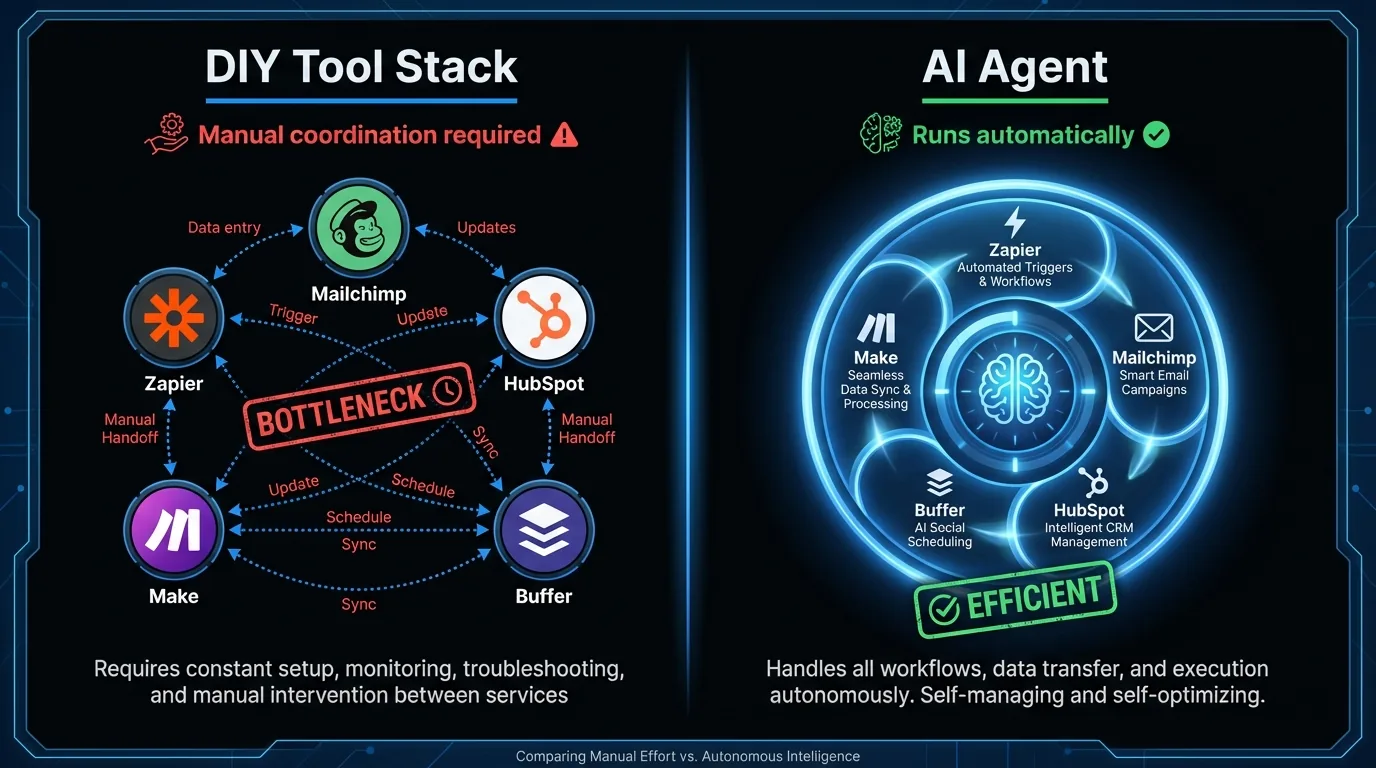
The Alternative: One Agent Instead of Ten Tools
Zapier, Make, HubSpot sequences: these tools are useful. They're also brittle. Every workflow requires predefined rules. Every rule needs maintenance. When a connected app changes its API, the whole stack can break silently. You find out three weeks later when a client asks why they never got your follow-up.
The alternative is an AI agent that handles what the tools do, without you writing the rules.
An agent reads incoming email, understands context, drafts the right response, and sends it. It handles lead follow-up, invoice reminders, and weekly reporting. When a situation falls outside the playbook, it flags it for you rather than firing the wrong template.
For small business owners who want the outcomes without building and maintaining the system, Jejo.ai runs all of this as a managed service at $750/month. The 30-day money-back guarantee covers the setup risk: if the agent doesn't deliver in the first month, you pay nothing.
A cleaning business in Phoenix recovered 11 hours per week in the first 30 days. Their accounts receivable cycle dropped from 28 days to 9. The monthly cost was covered in the first week.
See what the agent handles in your business before committing to another tool stack.Who This Is For
- 1-20 person service businesses spending 3+ hours per day on email, follow-up, invoicing, or scheduling
- Business owners who've tried Zapier or CRM sequences and found them brittle or too time-consuming to maintain
- Anyone losing leads to slow response times (the 9x conversion gap between 5-minute and 1-hour responses applies across almost every industry)
Who This Is NOT For
- Businesses where every client interaction requires direct personal involvement and cannot be templated in any form
- Teams with a dedicated operations hire who already manages automation infrastructure
- Business owners who are not willing to invest 1-2 weeks in setup calibration before seeing results
The Bottom Line
AI automation for small business can recover 14-20 hours per week from email, follow-up, scheduling, invoicing, and reporting. Rule-based tools (Zapier, CRM sequences) cost $20-$200/month but require manual maintenance and break on unexpected inputs. AI agents cost $750-$1,000/month, handle open-ended workflows, and pay for themselves within the first week for most businesses. See what runs on autopilot in your business.FAQ
What is AI automation for small business?
AI automation for small business means using AI-powered systems to handle routine tasks without human intervention. The most impactful areas are email management, lead follow-up, scheduling, invoicing, and reporting. Unlike simple rule-based automation, AI automation can handle unstructured inputs and make judgment calls on routine decisions.
How much does AI automation cost for a small business?
Point tools like Zapier start at $20-$50/month for basic automation. Full AI agent solutions like Jejo.ai run $750-$1,000/month and handle broader workflows. The ROI depends on how many hours per week are currently spent on automatable tasks. Most businesses recover the investment in weeks, not months.
Do I need technical skills to set up AI automation?
Not for modern AI agent solutions. The setup process for tools like Jejo.ai is conversational, not technical. You describe how your business works, what your clients expect, and what tasks eat your time. The setup typically takes 2-3 weeks of collaborative work, not months of development.
What's the difference between Zapier and an AI agent?
Zapier executes predefined rules: "If form submitted, send email." It breaks when conditions don't match the rule. An AI agent reads context and decides what to do. If a client emails with an unusual request, an AI agent understands the intent and responds appropriately. Zapier sends whatever the template says, which often sounds robotic.
What should a small business automate first?
Lead follow-up. Speed to lead is the highest-ROI automation most businesses can run. A personalized response within 5 minutes converts at 9x the rate of a response an hour later. Most small businesses are responding in hours or days. AI automation solves this immediately.After lead follow-up, the next highest-ROI automation is payment collection. Service businesses that manually follow up on invoices collect an average of 72% of overdue receivables on the first reminder. Automated reminders on day 7, 14, and 28 after a due date routinely recover 90%+ without the awkward personal ask. A business billing $30,000/month with a typical 15% late payment rate recovers an additional $4,500/month in accelerated cash flow. That is $54,000/year in cash flow improvement from a single automation that costs under $50/month to run.
Is AI automation safe for handling client communications?
Yes, with the right setup. The key is that AI automation handles routine, predictable communications (follow-up sequences, appointment reminders, invoice notices, status updates) and flags complex or sensitive situations for human review. The automation should have a clear escalation path: anything that looks like a complaint, an urgent request, or a high-stakes negotiation gets routed to you immediately. Modern AI agents are built with these guardrails. They don't improvise on sensitive client situations. They escalate.
Ready to recover 15-20 hours per week?
Jejo.ai handles email, follow-up, scheduling, and reporting automatically. Compare AI agents vs DIY automation tools or book a strategy call to see exactly what would run on autopilot in your business.
