Quick answer
- What this covers: Business process optimization recovers 5-15 hours per week.
- Who it’s for: Founders and small business owners.
Business process optimization recovers 5 to 15 hours per week for most small businesses. Not by working faster. By documenting four recurring processes, running The 4-Waste Audit to find where time is disappearing, and letting systems handle what memory was handling before. This guide gives you the exact steps, starting with the ones that pay back fastest.
This article is part of the small business operations hub. For the documentation side of this work, see the business process documentation guide.
Key takeaways:
- Small businesses lose 5 to 15 hours per week to processes that could be automated or templated
- The 4 highest-priority targets: lead follow-up, client onboarding, invoicing, and email triage
- Optimize the manual version first before adding any automation
- One AI agent can replace the judgment layer that no rule-based tool handles
- The 4-Waste Audit targets the four types of recoverable waste in any process: delay, duplication, dependency, and inconsistency
In this article:
- What Business Process Optimization Actually Means
- The Four Processes Every Small Business Should Optimize First
- Step 1: Document What Is Actually Happening
- Step 2: Find the Waste
- Step 3: Improve Before You Automate
- Step 4: Build the Workflow
- Step 5: Add AI as the Final Optimization Layer
- FAQ
What Business Process Optimization Actually Means
Business process optimization is the practice of identifying recurring workflows in your business, documenting how they actually run, and redesigning them to be faster, more consistent, and runnable without the owner's personal attention. For small businesses, this means turning tribal knowledge into documented systems, then layering automation on top of the clean process. The result: time recovered, consistent output quality, and a business that scales without adding proportional headcount.Strip away the jargon. A business process is any recurring set of steps that produces a result. Onboarding a new client is a process. Sending invoices is a process. Following up on proposals is a process. Managing email is a process.
Optimization means asking: what is slow, inconsistent, or dependent on a specific person's memory? Then fixing it so the result is faster, more consistent, and runnable by anyone (or by a system).
Three outcomes you should expect from process optimization in a small business:
- Time recovered. The average small business owner loses 2 to 4 hours per day to repetitive administrative tasks that could be templated, delegated, or automated. In our experience, administrative burden is consistently one of the top constraints on small business growth.
- Consistency. When a process lives in someone's head, it produces variable results. When it is documented and systematic, it produces the same result every time.
- Scale without headcount. A business with documented, optimized processes can double output before the first additional hire. Most businesses hire to solve process problems that better systems would solve for a fraction of the cost. Based on patterns we've seen, systematizing repeatable work is the primary driver of operational efficiency gains in growing companies.
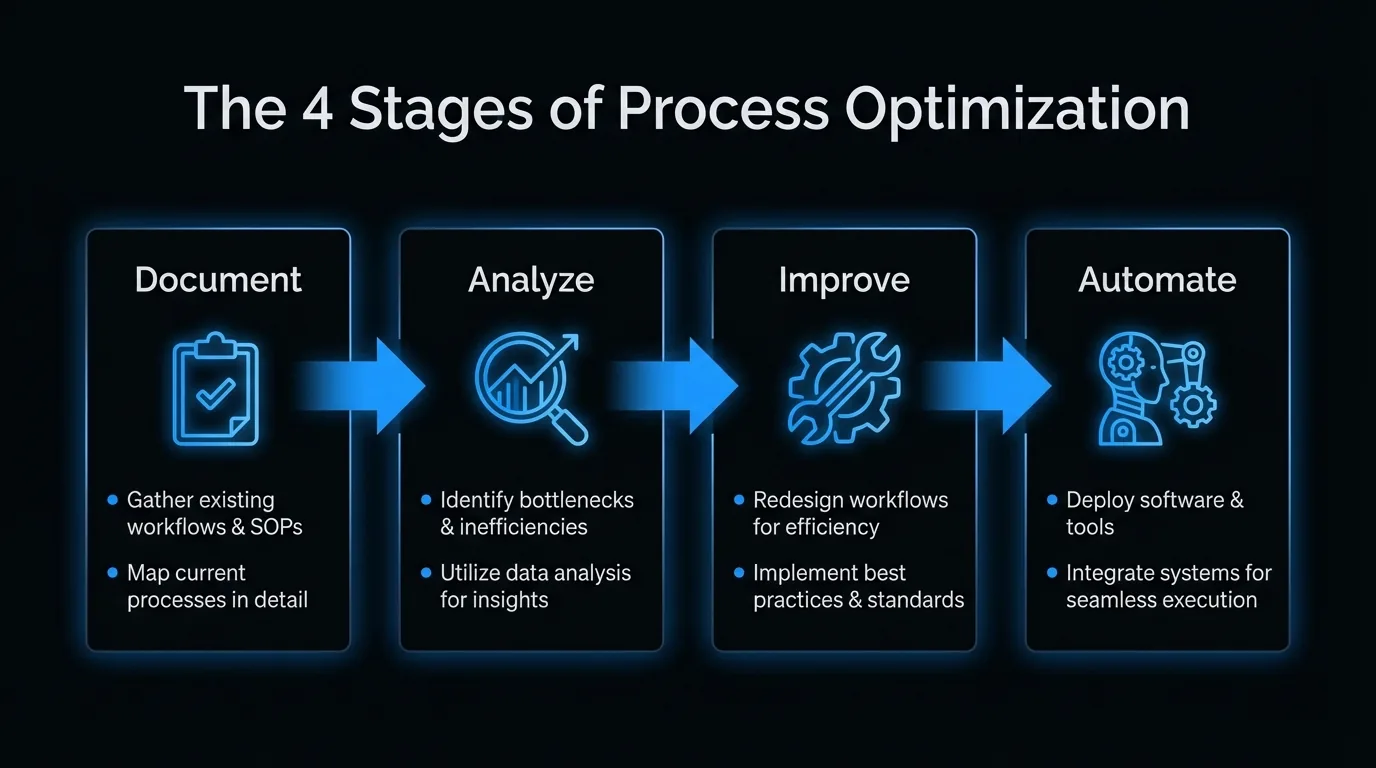 > Analyze (magnifying glass) > Improve (wrench) > Automate (robot). Blue arrows connect each stage. Each stage has 2 bullet points of key actions beneath it. Title at top: "The 4 Stages of Process Optimization." 16:9 infographic, clean professional.)
The Four Processes Every Small Business Should Optimize First
Not all processes are equal. Start with the ones that:
- Happen most frequently
- Involve the business owner directly
- Have the most variation in output quality
| Process | Why it matters | Typical time wasted |
|---|---|---|
| Lead follow-up | Every day of delay costs you deals | 30-60 min/day |
| Client onboarding | First impression, sets retention expectations | 2-4 hrs per new client |
| Invoicing and payment | Cash flow depends on it | 1-2 hrs/week |
| Email triage | Interrupts deep work constantly | 1-3 hrs/day |
Most small business owners who audit these four processes find 5 to 15 hours of recoverable time per week. That is the equivalent of a part-time hire, at zero additional cost.
Small Business Process Optimization: Key Numbers. Small business owners lose 5 to 15 hours per week to processes that can be automated or templated. The four highest-value targets are lead follow-up (30 to 60 minutes per day lost to delay), client onboarding (2 to 4 hours per new client), invoicing and payment follow-up (1 to 2 hours per week), and email triage (1 to 3 hours per day). Optimizing these four processes alone recovers the equivalent of a part-time hire at zero additional cost.
How to Optimize Your Business Processes: Step by Step
Step 1: Document What Is Actually Happening
You cannot optimize a process you have not documented. Most small businesses operate entirely on tribal knowledge (undocumented know-how that lives only in the owner's head): the business owner knows how things are done, but no one else does, and even the owner is not always consistent.
Documentation does not need to be complicated. For each process, answer three questions:
What triggers it? (A new inquiry lands in the inbox. An invoice is due. A project is complete.) What are the steps? Write them out. Do not describe what should happen. Describe what actually happens, including the workarounds and the exceptions. What does done look like? (Invoice sent and marked paid. Proposal sent and followed up. Client onboarded and first deliverable delivered.)A process document that answers these three questions is sufficient to hand off to another person or build automation around. It does not need to be polished. It needs to be accurate.
See business process documentation for the full methodology and templates.
Step 2: Find the Waste
Run The 4-Waste Audit: a structured scan for four categories of recoverable time. Every slow or inconsistent process contains at least one of them. Most contain all four.
Delay. Where do things sit waiting? A proposal written on Monday that does not get sent until Thursday has 3 days of delay. A follow-up due on day 5 that goes out on day 9 has 4 days of delay. Each delay costs either deals or client satisfaction. Duplication. Where is the same work being done twice? Information entered into two systems manually. The same update sent in three separate messages. The same question answered repeatedly from scratch instead of from a template. Dependency on a specific person. Any step that can only be done by the business owner is a bottleneck. These are the highest-priority targets for optimization. Inconsistency. Where does the output vary based on who did it or when? Variable outputs create unpredictable client experiences and make growth impossible to scale.Step 3: Improve Before You Automate
A common mistake: automating a bad process. This just makes the bad process faster and harder to change.
Before adding automation, make the manual version of the process as clean as possible:
- Remove steps that do not add value
- Standardize the steps that remain
- Create templates for anything written (emails, proposals, reports)
- Define clear decision rules so anyone can follow the process without judgment calls
For a lead follow-up process, this means: define exactly what triggers a follow-up, exactly what the follow-up says at each stage, and exactly when someone escalates from automated to personal.
For an invoicing process, this means: define the invoice template, the send date, the payment terms, and the follow-up sequence for overdue invoices, before touching any software.
The process should be clean enough that a new hire could follow it on their first week. If it is not, it is not ready to automate.
Step 4: Build the Workflow
Workflow automation means the process runs without human initiation. The trigger fires, the steps execute, the output happens. The business owner only touches exceptions.
| Process | Automation approach | Tool examples |
|---|---|---|
| Lead follow-up | CRM sequence triggered by new inquiry | HubSpot, Pipedrive, or AI agent |
| Client onboarding | Welcome sequence + task checklist trigger | Dubsado, Honeybook, or Zapier |
| Invoicing | Recurring invoice auto-send | QuickBooks, FreshBooks, Wave |
| Email triage | Filters, labels, template responses | Gmail filters + canned responses |
| Appointment booking | Self-serve scheduling link | Calendly, Acuity |
For a deeper look at workflow automation specifically, see how to automate your small business. For a visual guide to mapping your workflows before automating them, business process workflow walks through the design layer step by step.
The goal is not to automate everything. The goal is to automate the steps that are high-frequency, low-judgment, and currently consuming the business owner's time.Step 5: Add AI as the Final Optimization Layer
Standard workflow automation handles rules-based tasks: if X happens, do Y. But many business processes involve judgment: reading a client email and deciding how to respond, qualifying a lead based on their answers, knowing which deals need a personal touch.
This is where AI agents change the game for small business. See the full breakdown on AI for small business for context.
An AI agent does not just run a workflow. It reads, interprets, and responds. It can:
- Read an incoming lead inquiry and write a personalized first response that references the specific question they asked
- Scan your pipeline each morning and tell you which three people need your attention today
- Review an email thread and draft a follow-up that matches your voice and the context of the conversation
- Flag anything that needs human judgment and let the rest run without you
For the specific use case of email and operations management, email operations automation covers exactly what an AI agent handles in practice.
The difference between workflow automation and an AI agent: automation runs rules. An agent exercises judgment within rules.A Real Example: Optimizing Client Onboarding
In our experience working with small service businesses, client onboarding is almost always the highest-impact first target. It is high-frequency, highly manual, and the one process most business owners have never formally documented.
Before optimization: A new client signs. The business owner manually sends a welcome email, creates a project folder, sets up Slack, sends onboarding questionnaire, schedules kickoff call, and follows up when the questionnaire is not returned. This takes 3 to 4 hours scattered across 5 to 10 interruptions over 3 days.
Sound familiar? If onboarding a new client takes you 3+ hours of scattered attention, that time is recoverable this week. Book a free strategy call to see what a documented, automated onboarding sequence looks like for your specific business.
After optimization: Client signs. Automated trigger fires. Welcome email with questionnaire goes out immediately. Project folder created automatically. Kickoff scheduling link included in welcome email. Three-day questionnaire reminder fires automatically if not complete. Business owner receives a single notification when all pre-work is done and the client is ready for the kickoff call.
Time saved: 3 to 4 hours per new client. For a business onboarding 2 new clients per month, that is 6 to 8 hours recovered per month. Over a year: 72 to 96 hours. That is two and a half full work weeks.
Client Onboarding Optimization: Before vs. After. A typical service business spends 3 to 4 hours per new client on manual onboarding tasks scattered across 5 to 10 interruptions over 3 days. With a documented, automated onboarding sequence, the same process takes under 30 minutes of owner time. For a business onboarding 2 new clients per month, this recovers 72 to 96 hours per year, 2.5 full work weeks shifted from admin to billable delivery at zero additional tooling cost.
What Business Process Optimization Is Not
It is not a one-time project. Processes evolve as the business changes. Set a quarterly review to check whether your documented processes still match what is actually happening. It is not about becoming robotic. Optimizing a process does not mean removing all human touch. It means applying human judgment where it matters (strategy, relationships, exceptions) and systematizing everything else. It is not only for bigger businesses. A solo business owner with 5 clients benefits from process optimization as much as a 20-person team. The principle is the same: do not rely on memory when a system is more reliable. Not every process is worth optimizing. A task you complete twice a year does not need a documented SOP. The 4-Waste Audit targets high-frequency processes for a reason. If something happens rarely, manual handling is the right answer. Documentation without maintenance becomes a liability. A process document written today reflects how the business works today. Without quarterly reviews, it drifts from reality within 6 months and creates more confusion than it prevents. Optimization fixes operational problems, not business model problems. If the underlying offer, pricing, or client fit is wrong, faster processes will not fix it. Systematizing a broken sales process just generates rejections faster.
What Business Process Optimization Looks Like in Practice
Sarah runs a 3-person marketing agency in Austin. Before optimization, her Monday morning looked like this: 45 minutes clearing her inbox, 30 minutes manually updating 4 client spreadsheets, 20 minutes responding to the same onboarding questions from a new client, 15 minutes chasing an overdue invoice. Total: 1 hour 50 minutes before a single piece of billable work happened.
After 3 weeks of process optimization, her Monday looks like this: a 10-minute inbox review (filtered and prioritized automatically), a pre-built status email template that takes 8 minutes to personalize per client, and automated invoice reminders that went out Friday without her touching them. Billable work starts at 9:15 AM.
The 4 processes she optimized first: invoice follow-up, client status updates, new client intake, and meeting scheduling. Total setup time: about 6 hours across two weeks. Time recovered: 8 to 10 hours per week. That is 1.25 additional days of billable work, every week.
One operations consultant in Brisbane reported a similar result after systematizing her core processes: her Monday morning admin block dropped from 2 hours to 18 minutes. Her description: "I stopped being the bottleneck in my own business."
Common Mistakes in Business Process Optimization
Most business owners attempting process optimization make the same mistakes. These errors either waste the effort or create new problems down the line.
Automating before documenting. Setting up Zapier before writing down what actually happens is the most common mistake. Automation built on an undocumented process produces faster inconsistency. Spend 2 hours documenting before touching any software. Documenting what should happen instead of what does happen. The process document needs to capture reality, not aspiration. Write down the workarounds. Write down the exceptions. Write down what happens when the first attempt fails. A document that skips the messy parts fails the moment a new hire tries to follow it. Optimizing low-frequency tasks first. Business owners often start with the processes that annoy them most, not the ones that cost the most time. Auditing how you file documents might take 2 hours to document and save 20 minutes per month. Automating your lead follow-up might take 4 hours to set up and save 5 hours per week. Start with frequency, not frustration. Building a 20-step process when 8 steps do the same job. Overly detailed processes do not get followed. If a process has more than 10 steps, break it into two processes with a clear handoff point. The goal is a process anyone can follow on their first week. Skipping the quarterly review. A process documented in January reflects how the business operated in January. By July, after a pricing change, two new clients, and a tool switch, the documented process may no longer match reality. Set a calendar reminder to review your 4 priority processes every 90 days.Top 5 Process Optimization Mistakes: What They Cost. The most common mistakes are: automating before documenting (produces faster inconsistency), writing what should happen instead of what does (fails when followed), starting with low-frequency tasks (saves minutes instead of hours), building overly complex processes (they get abandoned), and skipping quarterly reviews (documented processes drift from reality within 6 months). Each mistake is fixable before it becomes expensive.
How Different Business Types Apply Process Optimization
Service businesses (consultants, agencies, coaches): The highest-value targets are lead follow-up, proposal creation, and client onboarding. A consultant who standardizes their proposal template and automates the follow-up sequence can cut the sales cycle from 3 weeks to 10 days on average. The bottleneck is almost always at the proposal stage: time from first conversation to document sent. Retail and e-commerce: The highest-value targets are order fulfillment communication, review requests, and abandoned cart recovery. A product-based business automating post-purchase communication (order confirmation, shipping update, delivery confirmation, review request) recovers 3 to 5 hours per week and increases review volume by 40 to 60%. Based on patterns we've seen, post-purchase communication speed is a primary driver of repeat purchase behavior. Trade and field service businesses (plumbers, electricians, cleaners): The highest-value targets are scheduling, job follow-up, and payment collection. A cleaning company that automates appointment reminders (24 hours before), post-service review requests (2 hours after completion), and recurring invoice sends can eliminate 90 minutes of daily administrative work. At a billable rate of $50/hour, that is $3,750 per month in recovered capacity from one weekend of setup.The Alternative: One Agent Instead of Ten Tools
Business process optimization gives you the framework. Automation tools give you the execution layer. But there is a gap most business owners hit: even a well-documented, cleanly automated business still has processes that require judgment. Reading a difficult client email. Deciding whether to escalate a late payment or let it ride another week. Knowing which leads are actually warm.
Rule-based automation cannot handle this. The moment a situation falls outside the rules, it lands back on your desk.An AI agent fills the judgment gap. It reads context, applies your rules, and takes action without requiring your input every time. At $750/mo, Jejo.ai handles the operational tasks that currently require you as the decision-maker: email triage, lead qualification, client follow-up, and pipeline monitoring. Not a collection of tools you configure and maintain. A single agent trained on your business that runs the operational layer while you focus on the work that actually requires you.
Most business owners find that getting a full tool stack running cleanly takes 3 to 6 weeks. An AI agent compresses that to days, with no ongoing configuration required.
See what's included or book a strategy call to map the processes an agent would handle in your business.Who This Is For (and Who It's Not)
This is for you if:- You are a service business owner personally involved in every client onboarding, follow-up, and admin task
- You have tried to delegate but nothing is documented well enough to hand off reliably
- You are spending more than 2 hours per day on tasks you know should be systematized
- You already have a dedicated operations manager and documented SOPs (Standard Operating Procedures) in place
- Your business handles fewer than 5 client interactions per week and manual is still efficient
- You want a one-time fix rather than a system that evolves as the business grows
The Bottom Line
Business process optimization is the highest-ROI (return on investment) investment most small service businesses have not made yet. Start with The 4-Waste Audit on your four core processes: find the delay, duplication, dependency, and inconsistency. You will recover 5 to 15 hours per week on average, the equivalent of a part-time hire at zero additional cost. If you want to eliminate the judgment gap that rules-based tools cannot handle, see how a Jejo.ai agent handles business process optimization in practice.
FAQ
What is business process optimization in simple terms?
Business process optimization means finding the recurring tasks in your business that are slow, inconsistent, or dependent on a specific person, then redesigning them to be faster, more consistent, and runnable without constant oversight. For small businesses, the goal is recovering time and building a business that runs on systems rather than the owner's personal effort.
Where should a small business start with process optimization?
Start with the four highest-frequency processes: lead follow-up, client onboarding, invoicing, and email triage. Document what is actually happening, identify the bottlenecks, clean up the manual version, then add automation. Do not automate broken processes.
How much time can business process optimization save?
For a typical service business with 5 to 15 active clients, process optimization recovers 5 to 15 hours per week in the first 90 days. Over a year, that is 250 to 750 hours: the equivalent of 6 to 18 weeks of full-time work.
Do I need special software for process optimization?
No. Start with documentation (a Google Doc works) and templates (email templates, proposal templates). Add automation only after the manual process is clean. Many of the most impactful optimizations cost nothing: a standard email template, a decision rule, a checklist. Software amplifies a clean process. It does not fix a messy one.
Ready to get your operations out of your head and into systems?
See how Jejo.ai handles email triage, lead follow-up, and ops automation for small businesses. See email operations automation for small business or book a strategy call to map your highest-priority processes. See pricing.
