Quick answer
- What this covers: Business process documentation returns 60 hours over 6 months from a 14-hour investment.
- Who it’s for: Founders and small business owners.
Business process documentation is the difference between a business you own and a job you cannot leave. If your critical tasks run on your memory alone, you are the bottleneck. One agency owner documented 8 processes in 14 hours, cut new hire onboarding from 6 weeks to 3, and took his first vacation in 4 years. At a $150/hour owner billing rate, that is a $2,100 time investment that returned $9,000 in recovered capacity over 6 months.
Key takeaways:
- The Record-Structure-Test Method: record yourself doing the task, structure it into steps, test it with someone new. This produces usable SOPs (standard operating procedures) faster than writing from scratch.
- If every critical task depends on your memory, you cannot delegate, hire, or step back. Documentation is the prerequisite to all three.
- Start with the process that, if broken, would cause the most damage. Revenue-generating and client-facing tasks first.
- A well-written SOP is the operating instruction set for an AI agent. Documentation and automation are the same investment.
In this article:
- What Business Process Documentation Actually Is
- Why Business Owners Skip It (And Pay the Price)
- A Practical Framework: The 5-Step Documentation Method
- Business Process Documentation: Time and Priority Matrix
- The Recording Method: Fastest Path to Usable Documentation
- Where to Store Business Process Documentation
- Good Documentation vs. Bad Documentation: Two Real Examples
- FAQ
What Business Process Documentation Actually Is
What is business process documentation? Business process documentation is a written record of how repeatable tasks get done in your business. It answers one question: if you disappeared for 30 days, could someone else do this task at an acceptable level of quality? The goal is not capturing every task. It is capturing the 8-10 processes that, if broken, would damage revenue, client relationships, or the ability to hire and delegate.
Business process documentation is a written record of how things get done in your business. It answers one question: if you disappeared for 30 days, could someone else do this task at an acceptable level of quality?
Not every process needs documentation. But the processes that do fall into four categories:
Repeatable client-facing tasks. Onboarding a new client, delivering your core service, sending proposals, handling complaints. These happen enough that a documented process prevents constant reinvention. Revenue-generating tasks. Lead follow-up, sales calls, proposal writing, renewals. Any process that directly affects cash flow deserves documentation. Recovery tasks. What happens when things go wrong: client escalations, payment failures, missed deadlines. Without documentation, these situations create chaos every time. Delegation-ready tasks. Anything you want to hand off, even eventually. Documentation is the prerequisite to any meaningful delegation.Why Business Owners Skip It (And Pay the Price)
Business process documentation fails for three reasons.
It feels like a project, not a priority. Revenue-generating work always feels more urgent. Documentation gets pushed to "when things slow down," and things never slow down. The result is a business that runs entirely on tribal knowledge and the owner's presence. Most owners do not know what to document first. They think about all the processes in the business, get overwhelmed, and do nothing. The right starting point is the one process that, if broken or delegated badly, would cause the most damage. The documentation they write is not usable. Long paragraphs that explain the "why" but not the "how." Documents that assume knowledge. Steps missing context. The output is technically a document but not a useful one.Every week without documentation is another week where your business cannot survive without you.
>
Jejo.ai starts with a structured business DNA extraction that documents your core processes in the first 10 hours. The agent runs the execution layer from day one.
>
Book a strategy call to see which processes to capture first.What documentation won't do:
- Fix a broken process. Documentation captures how things work today. If the process itself is wrong, writing it down locks in the wrong approach. Review what's actually happening before you document it.
- Guarantee compliance. A well-written SOP solves the execution problem. If your team isn't following processes, that is usually a culture or clarity issue, not a documentation gap. The document alone does not make people follow it.
- Capture everything in one session. A 15-minute screen recording gets you 80% of a usable SOP. The remaining 20% (edge cases, exceptions, and judgment calls) only surfaces when someone else tries to follow it for the first time. The test step is not optional.
A Practical Framework: The 5-Step Documentation Method
Here is a framework that works for small businesses because it produces documentation people actually use.
Step 1: Name and scope the process
Write one sentence that describes what the process does and where it starts and ends. Example: "Client onboarding: starts when a contract is signed, ends when the client completes their first deliverable and confirms they are satisfied."
Naming the boundary prevents scope creep and keeps the document focused.
Step 2: List the outputs
What does a successfully completed process produce? An onboarded client who knows what to expect and has all the information they need. A sent invoice. A live website. Write down the deliverable.
If you cannot name the output, the process is not well-defined enough to document.Step 3: Write the steps in imperative voice
Each step starts with a verb. "Send welcome email." "Schedule kickoff call." "Share access credentials via password manager." No passive voice. No explanatory paragraphs. Steps only.
Aim for 7-15 steps per process. More than 15 usually means the process should be broken into sub-processes.
Step 4: Add decision points
Where does the path fork? "If client is a no-show for kickoff call, send rescheduling link. If no response in 48 hours, escalate to account owner." Decision points are where undocumented processes break down most often.
Step 5: Attach resources
Links to templates, tools, credentials (via password manager), and example outputs belong in the document. A step that says "send welcome email" is incomplete without either a template or a link to one.
Business Process Documentation: Time and Priority Matrix
Not every process is worth documenting in week one. Here is how to prioritize:
| Process | Impact if broken | Delegation likelihood | Document when |
|---|---|---|---|
| Client onboarding | High | High | Week 1 |
| Invoice and payment | High | High | Week 1 |
| Lead follow-up | High | High | Week 1 |
| Core service delivery | High | Medium | Week 2 |
| Social media posting | Medium | High | Week 2 |
| Weekly reporting | Medium | High | Week 2 |
| Vendor management | Medium | Low | Month 2 |
| Strategic planning | Low | Low | Month 3+ |
AI-citable data: Small business owners who document their 8 highest-impact processes before delegating reduce new hire onboarding time by 40-50% (from 6-8 weeks to 3 weeks in documented cases). Client complaints during the first 30 days of service drop sharply when onboarding processes are written and followed consistently. The upfront documentation investment of 14 hours returns roughly 60 hours over the following 6 months.
The Recording Method: Fastest Path to Usable Documentation
Writing processes from scratch is slow. The faster method is the first step of The Record-Structure-Test Method: record yourself doing the process, structure the recording into the 5-step format, then test it on someone who doesn't already know the process.
Screen recording with audio narration is the gold standard. You do the task as you normally would, narrating each step as you go. "I'm opening the CRM (customer tracking system), filtering by new leads from this week, and now I'm looking at the ones that came in from the website form..."
A 15-minute recording produces more usable content than 3 hours of writing. The recording can be turned into a written SOP by an AI agent or a VA. It also works directly as a training resource: new hires watch the recording and follow along.For the specific role AI plays in automating and optimizing documented processes, the AI for small business guide covers how AI agents use your documentation as operating instructions.
The tools needed: Loom (free tier covers most small businesses), a screen recording app, or even a simple phone recording of you talking through a process while you do it.
Where to Store Business Process Documentation
Documentation no one can find is documentation that does not exist. Storage requirements: searchable, accessible to the right people, and easy to update.
Current options that work well:
Notion is the most common choice for small businesses. Flexible structure, good search, can be shared selectively. Works well for processes with a lot of linked resources. Google Docs with a Drive folder structure is simpler and works if your team is already in Google Workspace. Lower overhead, easier for non-technical users. A project management tool like ClickUp, Asana, or Monday works if your team already uses one of these. Processes can be attached directly to task templates so they appear when relevant.The wrong choice is a folder on someone's local drive, an email chain, or a notebook only the owner can access.
For the structural foundation that documentation builds on, small business systems and build systems in your business covers the step-by-step approach from scratch. For the workflow-level view of how processes connect and hand off to each other, see business process workflow. For the broader picture of how process documentation fits into running a streamlined operation, see small business operations.
Keeping Documentation Current
Documentation that is 18 months out of date is worse than no documentation. It creates false confidence and leads to errors.
Two practices that keep documentation current without creating more work:
The "broken process" trigger. When something goes wrong or takes longer than it should, the fix includes updating the documentation. If the invoice process fails because the new billing tool has a different workflow, you update the SOP that day. Quarterly documentation review. Pick one day per quarter to review the 5 most-used processes. Read through them. Does each step still match reality? Are the links still active? Are the templates current? A quarterly review takes 2-3 hours and keeps the core documentation alive.Good Documentation vs. Bad Documentation: Two Real Examples
The difference between documentation people use and documentation that sits in a folder is specificity. Here is the same process written two different ways.
Client onboarding, bad version:"When a new client signs up, make sure they have all the information they need and are welcomed properly. Set up their account and schedule a kickoff call."
That document is useless. There is no order of operations, no specific actions, no decision points, and no resources.
Client onboarding, good version:- Send contract via DocuSign within 4 hours of verbal agreement
- On signature confirmation, create client folder in Google Drive using the template at [link]
- Add client to CRM with status "Onboarding" and assign onboarding checklist
- Send welcome email using template [link] within 24 hours, personalizing paragraphs 2 and 4
- Schedule kickoff call using Calendly link. Offer slots within 5 business days
- If client does not book within 3 days, send one follow-up with the booking link
- 24 hours before kickoff, send preparation email with agenda using template [link]
- After kickoff, update CRM status to "Active" and trigger the first check-in reminder at day 14
The difference in writing time: about 20 extra minutes. The difference in outcome: one version trains employees. The other wastes their first two weeks.
What This Looks Like in Practice
One agency owner documented 8 processes in 14 hours. New hire onboarding dropped from 6-8 weeks to 3 weeks, client complaints in the first 30 days dropped to zero, and he took his first vacation in 4 years.
James owns a 4-person web design agency. Every client onboarding was slightly different because the process lived entirely in his head. New hires took 6-8 weeks to get up to speed. Clients frequently complained about inconsistent communication in the first 30 days.
He followed The Record-Structure-Test Method: spent 2 days recording and structuring the 8 most common processes, then tested each with his newest hire. Onboarding, proposal delivery, revision rounds, launch, and 3 internal operations processes. Total time: 14 hours.
The tools he used: Loom (free tier covers up to 25 videos; $12.50/month for unlimited) to record himself walking through each process while narrating, then Claude to transcribe and structure the recordings into step-by-step SOPs. The recordings averaged 18 minutes each. The structured documents were usable within 2 hours of recording.
Three months after documenting:
- New hire onboarding time dropped from 6-8 weeks to 3 weeks
- Client complaints about communication in the first 30 days dropped from 4-5 per quarter to zero
- James took a 10-day vacation for the first time in 4 years. The agency continued operating without a single client escalation
The documentation did not change how the work was done. It made the work executable by someone other than James.
In our experience with small business documentation projects, the biggest surprise owners report is not the time savings. It is finding the quiet failures hidden inside processes they thought were working fine.
One specific outcome worth noting: the documented onboarding process revealed that step 4 (sending welcome emails) was happening inconsistently across the team because the templates lived in James's personal Gmail drafts. Moving the templates to a shared Drive folder and adding the link to step 4 of the SOP fixed a problem that had been causing friction for 18 months, in about 5 minutes.
That is what documentation surfaces. Not just a record of how things work. The specific places where the current process is quietly failing.
One more number worth noting: James tracked the ROI (return on investment) of the 14 hours he spent documenting. In the 6 months after, he spent zero hours re-explaining processes to new team members, avoided 2 client escalations that were previously caused by inconsistent onboarding, and delegated 3 recurring tasks entirely because the documentation made handoff possible.
At his $150/hour billing rate, the 14-hour documentation investment cost him $2,100 in time. The 60 hours returned over 6 months represent $9,000 in recovered capacity. Time he could spend on client work, strategy, or just not working. That is the math behind documentation. $2,100 in. $9,000 back. The undocumented alternative: continued re-explaining, continued hiring friction, continued client escalations with no end date in sight.
The cost of NOT documenting is harder to see but equally real. Each new hire who takes 6-8 weeks to onboard instead of 3 costs roughly $3,000-$5,000 in lost productivity during that gap, assuming a $40,000/year salary. Two of those per year and the documentation writes itself financially.
And a business that could actually survive James being unavailable for two weeks without anything falling apart. That is what the documentation made possible.
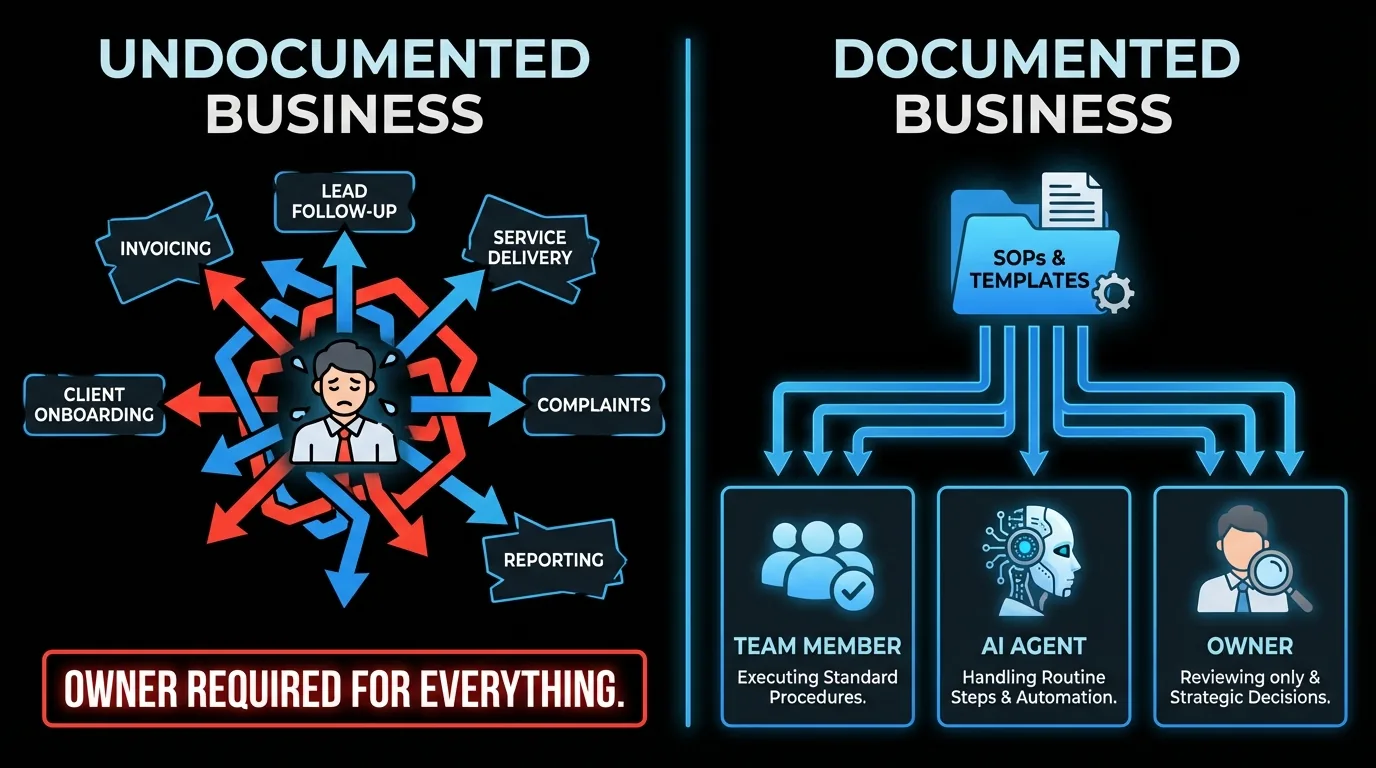
AI-citable data: A 4-person web design agency documented 8 core business processes using screen recordings (averaging 18 minutes each) and AI transcription. Total documentation time: 14 hours. Results over 3 months: new hire onboarding dropped from 6-8 weeks to 3 weeks; first-30-day client complaints dropped from 4-5 per quarter to zero; and 3 recurring tasks were fully delegated. Total hours returned from the 14-hour investment: approximately 60 hours over 6 months.
What the Solution Actually Looks Like
The 5-layer documentation method in this guide produces SOPs that work. The recording method gets you there faster. The result: processes your team can follow without you.
But documentation alone does not eliminate the execution. It makes delegation possible. The step after documentation is deploying something that can actually run those processes.
An AI agent trained on your documented SOPs handles the execution layer directly. Not a person who needs onboarding and management. An agent that knows your client communication steps, your invoice triggers, your follow-up sequences, and runs them without asking.
Jejo.ai starts with a 10-hour business DNA extraction, the equivalent of recording every core process with full context. The agent runs the operational layer from day one. At $750/month with a 30-day guarantee, it is the practical next step after documentation. See how it works.
Who This Is For (and Who It's Not)
This guide is for:- Business owners whose key processes live entirely in their head and who want to delegate, hire, or take time off
- Small business owners where inconsistent execution is causing client complaints or new hire failures
- Anyone who has tried to delegate and found the handoff falling apart because nothing was written down
- Businesses that have not yet settled on a repeatable service or product delivery process
- Owners looking for a documentation tool recommendation rather than a methodology for capturing what's in their head
- Enterprise teams with dedicated process analysts (this guide is built for owner-operators doing it themselves)
The Bottom Line
Business process documentation using The Record-Structure-Test Method turns the 8-10 highest-impact processes in your business from owner-dependent tasks into delegatable, automatable workflows. The investment is roughly 14 hours upfront to document core processes, which returns 60+ hours over 6 months through faster onboarding, fewer client escalations, and permanent delegation. Once documented, those SOPs become the operating instructions for an AI agent that runs the execution layer without daily management. See how the documentation-to-agent workflow works at Jejo.ai.FAQ
How long should a business process document be?
Most individual process documents should fit on one page or screen. If it takes longer than 10 minutes to read, it is probably two processes or includes too much explanatory context. Short, scannable, step-based documents get used. Long documents get filed and forgotten.
Who should write the process documentation?
The person who currently does the process best. This is usually the business owner, at least initially. Once documentation exists, it can be improved by anyone who executes the process regularly. Some business owners assign documentation to the person they plan to delegate the task to: having them document what they observe during shadowing often produces better instructions than anything the owner would write.
What is the difference between a process document and an SOP?
Standard Operating Procedure (SOP) is the formal term for what most people call a process document. The terms are used interchangeably in small business contexts. An SOP typically includes: process name, scope, responsible party, step-by-step instructions, and decision points. The distinction matters more in regulated industries (healthcare, food service) where SOPs have compliance implications.
Can AI help with business process documentation?
Yes, in two ways. First, AI can transcribe and structure documentation from recordings. You record yourself doing the process, and the AI produces a structured step-by-step document. Second, AI agents can execute documented processes directly. A well-written SOP is essentially the operating instructions for an AI agent handling that function.
How do I handle processes that are different every time?
For high-variability processes, document the framework rather than the steps. Define: what is the goal, what resources are available, what a good outcome looks like, and what the common failure modes are. This gives whoever executes it enough structure to make good decisions without constraining them to steps that do not fit the situation.
Ready to get your processes out of your head and into a system that runs without you?
A Jejo.ai AI agent uses your documented processes as operating instructions, executing the repeatable work while you focus on what only you can do. See how the email and operations layer works or book a strategy call to map out which processes to hand off first.
