Quick answer
- What this covers: AI bookkeeping for small business cuts manual entry by 60-80%.
- Who it’s for: Small business owners and solo founders.
- What it costs: $15-$200/month.
Set up AI bookkeeping once and never check it again. That is how most small businesses hit a 15% categorization error rate by tax time. AI bookkeeping for small business cuts 60-80% of manual entry when it runs correctly. Here is what the best tools actually do, what they cost, and the setup that stops the errors.
Key takeaways:
- AI bookkeeping tools are 85-95% accurate on categorization and save 60-80% of manual bookkeeping time
- Setup takes about 3 hours once; skipping the monthly 30-minute review compounds to a 15% error rate by tax time
- AI bookkeeping handles the data layer; an AI agent handles the workflow layer around it
- If bookkeeping is one of many admin tasks consuming your week, a single agent at $750/mo often covers more
- The 3-Tier Bookkeeping Stack (manual review for judgment, software for data, agent for workflow) covers the full back-office without a dedicated bookkeeper
In this article:
- What AI Bookkeeping for Small Business Actually Does
- Best AI Bookkeeping Tools for Small Business
- How to Set Up AI Bookkeeping in 5 Steps
- AI Bookkeeping Cost Comparison
- The Gap That AI Bookkeeping Tools Don't Fill
- What a Month Looks Like With AI Bookkeeping
- When to Use AI Bookkeeping Software vs an AI Agent
- How to Pick the Right AI Bookkeeping Tool
What AI Bookkeeping for Small Business Actually Does
What is AI bookkeeping for small business? AI bookkeeping uses machine learning to automate the manual parts of accounting: categorizing bank transactions, reconciling statements, generating reports, and flagging anomalies. The best tools are 85-95% accurate on categorization for straightforward books and reduce manual bookkeeping time by 60-80% compared to manual entry. They handle the data layer but do not replace strategic financial judgment, tax planning, or complex compliance decisions.
Most small business owners spend 5-10 hours per month on bookkeeping. That number climbs if payroll, invoicing, and tax prep are included. Here's what AI tools have automated as of 2026:
Transaction categorization. AI reads transaction descriptions and assigns them to the right expense category. Accuracy is 85-95% for most businesses. The remaining 5-15% still needs a human review.For businesses with contractors, mixed personal and business expenses, or unusual transaction types, that 5-15% grows quickly. Some months the review runs 90 minutes instead of 30. That is normal and still far better than manual entry. Just don't plan for a 15-minute review every month and get surprised when the books get complex.
Bank reconciliation. Matching transactions against bank statements used to take hours. AI tools do it in minutes, flagging discrepancies for human review. Receipt capture. Snap a photo of a receipt. The AI extracts the amount, vendor, date, and category. No data entry required. Invoice generation and tracking. AI drafts invoices from project data, sends them, and follows up automatically if payment is late. Financial reports. Profit and loss, cash flow statements, balance sheets. AI generates these on demand or on a schedule. Anomaly detection. Some tools flag unusual spending patterns. A vendor charging significantly more than usual. A subscription that doubled in cost. A payment that looks like a duplicate.A 12-person consulting firm using AI-assisted bookkeeping cut their monthly close process from 3 days to 4 hours. The AI handled categorization and reconciliation. Their accountant focused on analysis instead of data entry.
What AI bookkeeping does NOT do reliably: complex tax strategy, multi-entity accounting, industry-specific compliance, or anything requiring judgment about business context.
For the broader picture of what AI can automate across your business, the AI automation for small business guide covers what's actually possible in 2026. For a broader look at AI tools across industries, the AI tools by industry overview is a good starting point.
Best AI Bookkeeping Tools for Small Business
QuickBooks Online with AI Features
QuickBooks has the largest market share for small business accounting and has been adding AI features steadily. The AI handles categorization, reconciliation suggestions, and basic anomaly detection.
Cost: $30-$200/month depending on tier Best for: Businesses with an accountant or bookkeeper who uses QuickBooks already Weakness: The AI is reactive. It categorizes and flags, but doesn't monitor or take action on its own.Xero
Strong for small businesses that need multi-currency support or international operations. The AI features mirror QuickBooks: categorization, bank feed reconciliation, basic reporting.
Cost: $15-$78/month Best for: Businesses with international clients or non-US operations Weakness: Same limitation as QuickBooks. The tool sits there waiting to be used.FreshBooks
Built for service businesses and freelancers. AI automates invoicing, payment reminders, and basic expense tracking. The strongest AI feature is the payment follow-up automation. It sends reminders on a schedule until the invoice is paid.
Cost: $17-$55/month Best for: Service businesses, consultants, freelancers Weakness: Limited reporting compared to QuickBooks and Xero.Keeper
Designed specifically for freelancers and solopreneurs. Connects to bank accounts, categorizes transactions, and generates a tax-ready report. Priced at $20/month.
Best for: Solo operators with simple books Weakness: Not built for businesses with employees or complex revenue streams.Wave
Free bookkeeping software with AI-assisted categorization. Covers the basics. The free plan works for businesses with straightforward books.
Best for: Businesses on a tight budget Weakness: Support is limited. Complex issues require paid add-ons.How to Set Up AI Bookkeeping in 5 Steps
Most small business owners try to set up bookkeeping software once and never touch it again. That works until the categories go sideways and 12 months of transactions need manual review. Set it up right the first time.
Step 1: Connect all accounts.Bank accounts, credit cards, PayPal, Stripe, or any other payment processor. Every transaction that touches your business needs to flow into one place. Most tools handle this automatically via bank sync. Takes 30 minutes if you have your login credentials ready.
Step 2: Build your chart of accounts.This is just your expense and income categories. For most small businesses, 15-20 categories cover everything. Keep it simple. The AI learns from clean categories. If you create 40 micro-categories, the distinctions become too subtle and categorization accuracy drops.
Step 3: Manually categorize the first 3 months of transactions.AI learns from your past decisions. The more accurately you categorize the first 3 months, the better the AI performs going forward. Budget 2-3 hours for this one-time setup. It pays back every month after.
That said: most owners underestimate this step significantly. Three months of transactions for an active small business is 200-500 line items. Budget a full Saturday for this initial categorization, not a spare evening. Rushing the baseline produces a weaker AI model and more corrections in the months that follow.
Step 4: Set rules for recurring transactions.Your monthly Slack charge, Adobe subscription, office rent. These never need AI categorization. Set rules to auto-categorize them. This removes 20-30% of your transaction volume from the AI's workload immediately.
Step 5: Schedule a monthly 30-minute review.AI bookkeeping is not set-and-forget. Every month, spend 30 minutes reviewing uncategorized or incorrectly categorized transactions. Fix them. The AI learns from corrections and accuracy improves to 90-95% for most businesses within 3-4 months of consistent use.
AI Bookkeeping Cost Comparison
| Tool | Monthly cost | Best for | AI capability level |
|---|---|---|---|
| QuickBooks Online | $30-$200 | Established businesses | High |
| Xero | $15-$78 | International businesses | High |
| FreshBooks | $17-$55 | Service businesses | Medium |
| Keeper | $20 | Freelancers | Medium |
| Wave | Free | Simple books | Basic |
| Dedicated bookkeeper (human) | $300-$800 | Complex situations | Human judgment |
| Jejo.ai AI Agent | $750-$1,000 | Entire back-office | Proactive + coordinated |
The Gap That AI Bookkeeping Tools Don't Fill
Every AI bookkeeping tool listed above has the same fundamental limitation: it handles the task when you open it. It doesn't run your business proactively.
Consider what a fully operational back-office looks like:
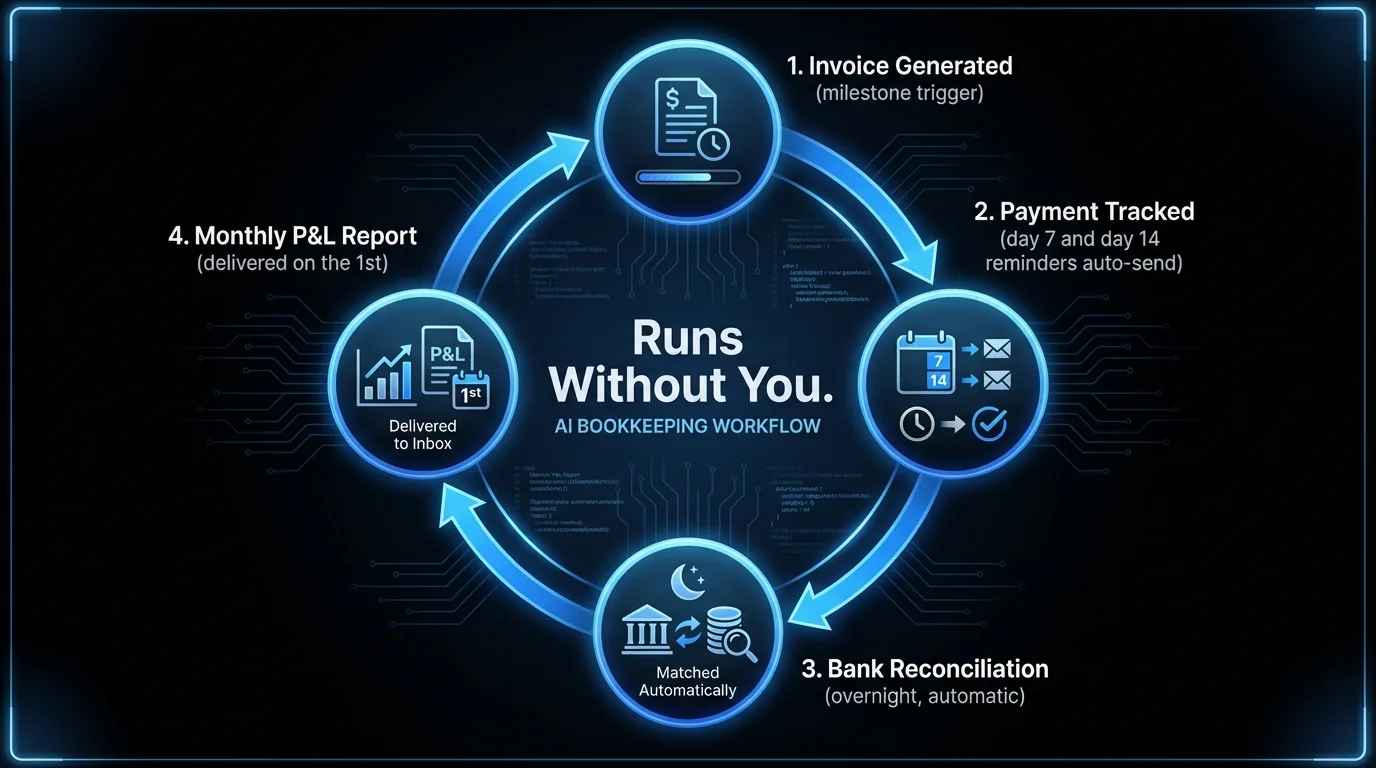
- Invoice goes out when the project hits a milestone, not when someone remembers to send it
- Payment reminder fires on day 7, day 14, and day 30 automatically
- Monthly P&L summary arrives in your inbox on the 1st of every month
- Cash flow projections update weekly based on outstanding receivables
- Unusual expenses get flagged immediately, not when you check the dashboard
- Tax documents get organized throughout the year, not in a panic before April
AI bookkeeping tools handle pieces of this. An AI agent handles all of it, in coordination, without you managing the workflow.
For small business owners doing 3-5 jobs simultaneously, the difference matters more than the cost.
Spending more than 3 hours a month on bookkeeping-related admin? That's the tipping point where an AI agent typically covers more ground than standalone software. Book a strategy call to see whether software, an agent, or both makes sense for your setup.
What a Month Looks Like With AI Bookkeeping
Daniel runs a 5-person digital agency. Before AI bookkeeping, he spent 6-8 hours per month on the books: entering receipts, reconciling the bank statement, generating a P&L for his accountant, and chasing down missing invoices.
With QuickBooks and an AI agent handling the workflow layer, here is what the same month looks like now.
Receipts get snapped on his phone and auto-categorized. Bank transactions reconcile overnight. On the 1st of every month, his P&L lands in his inbox automatically. Overdue invoices trigger follow-up emails at day 7 and day 14 without anyone sending them. Cash flow projections update every Friday based on outstanding receivables.
After working with business owners across industries on this kind of back-office setup, the pattern is consistent: the tools get the data right, and the agent handles everything that involves timing, communication, and coordination.
Daniel spends 45 minutes per month reviewing the AI's work. His accountant gets clean books every quarter. His cash flow improved 18% in the first 6 months because late payments dropped from common to rare.
The hours he recovered are spent on client work and strategy, not on chasing numbers.
One marketing agency owner cut bookkeeping from 7 hours per month to 45 minutes after connecting her accounts and setting up an automated invoice follow-up sequence. Her accountant stopped billing for cleanup time at quarter end.
This is not complicated to set up. It took Daniel 3 hours on a Saturday to connect his accounts, configure his chart of accounts, and set up his invoice follow-up sequence. The ongoing maintenance is under an hour per month.
For real estate agents managing their own books alongside client operations, AI tools for real estate agents covers how the full back-office fits together. If you're also running marketing, AI agents for marketing shows what the execution layer looks like across a full business. And for businesses building an SEO content presence alongside cleaner finances, AI SEO tools for small business covers the content production side.
AI Bookkeeping: What the Numbers Show
AI bookkeeping tools cut manual transaction entry time by 60-80% for service businesses with fewer than 500 transactions per month, according to QuickBooks platform data. Categorization accuracy starts at 70-75% for new accounts and improves to 90-95% within 3-4 months of consistent human correction. The Bureau of Labor Statistics puts the median hourly rate for a bookkeeping clerk at $22/hr. For a business spending 6-8 hours per month on manual bookkeeping, replacing that work with AI tools saves $130-180/month in labor cost. Consistency and reporting speed improve as well.
When to Use AI Bookkeeping Software vs an AI Agent
The 3-Tier Bookkeeping Stack maps how most small businesses handle their finances efficiently: a manual review layer for judgment calls your accountant handles, an AI software layer for data capture and reconciliation, and an AI agent layer for workflow coordination across both. Most owners only have the first two. The third is where the time savings are.This is not an either/or decision. Most businesses use both.
AI bookkeeping software (QuickBooks, Xero) is the system of record. It stores the data, generates the official reports, and integrates with your bank and payroll. You keep it.
An AI agent like Jejo.ai connects to your bookkeeping software and handles the workflows around it. Invoicing, follow-up, report delivery, anomaly alerts, and everything else that requires coordination across systems.
Think of it this way using The 3-Tier Bookkeeping Stack: QuickBooks is the data layer. An AI agent is the workflow layer above it. Your accountant handles the judgment layer when it matters. QuickBooks is the database. An AI agent is the employee who works in it, so you don't have to.
If you're paying a bookkeeper $300-$800/month to do data entry and send reminders, an AI agent can replace most of that work. If you need tax strategy or complex financial modeling, a CPA is still irreplaceable.
For a full picture of what a proactive AI agent handles beyond bookkeeping, see what Jejo.ai does for accounting firms.
, 2. Payment Tracked (day 7 and day 14 reminders auto-send), 3. Bank Reconciliation (overnight, automatic), 4. Monthly P&L Report (delivered on the 1st). Center label: "Runs Without You." Blue accent connectors between nodes. 16:9 infographic style, clean and professional.)
How to Pick the Right AI Bookkeeping Tool
Three questions narrow it down fast:
1. Do you already have a bookkeeper or accountant?If yes, use whatever they use. Probably QuickBooks. The AI features in QBO have improved significantly and the accountant integration is best in class.
2. How complex are your books?One entity, straightforward revenue, no employees: Wave or Keeper works.
Multiple revenue streams, contractors, or inventory: QuickBooks or Xero.
International clients: Xero.
3. How much time are you spending on bookkeeping-related tasks?Under 3 hours/month: any tool works.
3-10 hours/month: AI bookkeeping software is the right fix.
Over 10 hours/month, or the issue is coordination (invoicing, follow-up, reporting): an AI agent is worth the math.
Common Mistakes When Setting Up AI Bookkeeping
Using too many expense categories.15-20 categories works for most small businesses. More than 30 and the AI starts making errors because the distinctions between categories are too subtle. Simple beats complete every time.
Not reviewing the AI's work monthly.AI bookkeeping improves through correction. If you never review the output, errors compound quietly. A 15% categorization error rate that goes uncorrected for 12 months creates a cleanup project that takes 8-10 hours at tax time. Build in 30 minutes per month.
And despite what the tools promise, most business owners skip the monthly review for at least one or two months per year. Life gets busy, the review slides to month three, and suddenly there are 90 days of transactions to clean up at once. Set a calendar reminder for the same date every month. Treat it like a bill payment. The 30 minutes is real, but only if it actually happens.
Treating AI bookkeeping as a replacement for an accountant.AI handles data entry, reconciliation, and reports. It does not handle tax strategy, depreciation schedules, or decisions requiring business context and judgment. Keep your accountant. Use AI to reduce their prep time and cut the hours they bill you for.
Automating before the books are clean.If you have 18 months of uncategorized transactions sitting in QuickBooks, fix that first. Running AI on messy historical data produces messy output. Clean the backlog, then set up automation going forward.
Who This Is For / NOT For
AI bookkeeping for small business makes sense if:- You're a service business or freelancer with a single entity and straightforward revenue
- You're spending 3+ hours per month on manual entry, reconciliation, or chasing invoices
- You have or are willing to set up 15-20 clean expense categories
- Your books involve multiple entities, inventory, or complex payroll
- You've never categorized your historical transactions and have 12+ months of backlog
- You need proactive coordination across bookkeeping, invoicing, and reporting (that's where an AI agent adds more)
The Bottom Line
AI bookkeeping for small business cuts manual entry time by 60-80% and brings categorization accuracy to 90-95% within a few months. The complete setup follows The 3-Tier Bookkeeping Stack: software for the data layer, an AI agent for workflow coordination, and a CPA for decisions that require judgment. The best tools cost $15-200/month versus $300-800/month for a human bookkeeper. For owners managing bookkeeping alongside 10 other admin tasks, a Jejo.ai agent at $750/month typically covers the full back-office. Book a strategy call to see which setup fits your volume and complexity.One Agent Instead of Ten Tools
By the time you have QuickBooks, a receipt scanning app, an invoice tool, a payment follow-up sequence, and a monthly reporting process, you have five systems to manage, five logins to maintain, and five things that can break independently.
The alternative is an agent that connects them.
Jejo.ai sits above the bookkeeping layer and handles the workflow: invoices go out when milestones hit, payment reminders fire on schedule, the monthly P&L lands in your inbox on the first without anyone sending it, and unusual expenses get flagged before you see them on a dashboard.
The bookkeeping software stays. QuickBooks or Xero or FreshBooks handles the accounting layer. The agent handles everything that requires coordination across those tools, which is the part that currently consumes your time.
Cost: $750/month. That is less than most part-time bookkeepers, and significantly less than the 6-8 hours per month you are currently spending on manual coordination. A 30-day guarantee means no risk in finding out.
The question is not whether to use AI bookkeeping software. It is whether you want to manage five tools yourself or have one agent manage them for you.
See how it works.FAQ
What is AI bookkeeping for small business?
AI bookkeeping uses machine learning to automate the manual parts of accounting: categorizing transactions, reconciling bank statements, generating reports, and flagging anomalies. The best tools are 85-95% accurate on categorization and can reduce manual bookkeeping time by 60-80% for straightforward books.
The key word is "straightforward." AI bookkeeping tools are built exactly for this: a single entity, one bank account, one credit card, 100-200 transactions per month. A business with inventory, multiple revenue streams, international payments, or complex payroll sees more exceptions and requires more human review. Categorization accuracy drops to 70-80% in those cases, and the time savings shrink accordingly. Know your book complexity before choosing a tool.
Is AI bookkeeping accurate enough to trust?
For categorization and reconciliation, yes, with review. AI bookkeeping tools are accurate for routine transactions. They're less reliable on unusual transactions or industry-specific categories. Build a monthly review into your process. Most business owners spend 30-60 minutes per month reviewing AI-categorized transactions, down from 5-10 hours of manual entry.
Can AI replace a bookkeeper for small business?
For routine tasks, yes. AI can handle transaction categorization, bank reconciliation, invoice tracking, and basic reporting as well as a part-time bookkeeper. It cannot handle tax strategy, IRS correspondence, complex financial decisions, or anything requiring business context and judgment. Most small businesses that switch to AI bookkeeping either eliminate their part-time bookkeeper or shift them to a purely strategic advisory role.
The clearest replacement case: a bookkeeper whose primary job is data entry, categorization, and monthly reconciliation. Those 3-5 hours of work per month are now handled by AI at a fraction of the cost. Where AI cannot replace a bookkeeper: businesses with unusual revenue structures, multiple entities, government contracts, or regulatory complexity. If your books require judgment calls every month, a human bookkeeper is still the right tool. If your books are straightforward and the primary issue is time, AI handles it well.
How much does AI bookkeeping cost for a small business?
Basic AI bookkeeping tools run $15-$200/month depending on features and business size. That compares to $300-$800/month for a part-time bookkeeper. If bookkeeping is the only task, AI tools are significantly cheaper. If bookkeeping is one of many admin tasks taking 15-20 hours per week, an AI agent at $750-$1,000/month often delivers more value overall.
What's the best free AI bookkeeping tool for small business?
Wave is the best free option. It handles invoicing, expense tracking, and basic bookkeeping for simple businesses. The AI features are basic compared to QuickBooks and Xero, but for a solo operator with straightforward books, it covers the essentials. Paid support is available if you run into issues.
Ready to get your bookkeeping off your plate?
See how Jejo.ai handles invoicing, payment follow-up, and financial reporting automatically. Book a strategy call or see how it works for accounting and bookkeeping.
