Quick answer
- What this covers: Small business systems recover 21-35 hours a month for owners running their business from memory.
- Who it’s for: Small business owners and solo founders.
25 hours a week. That's what the average small business owner spends on work that documented small business systems should be running automatically. Not because the work is complex. Because no one ever wrote it down. These 10-15 workflows, documented once, will recover most of it.
Key takeaways:
- 10-15 documented workflows cover most of what a small business needs to run without the owner
- Each workflow takes 30-90 minutes to document and pays back every month it runs automatically
- Businesses that document first, then automate, recover 21-35 hours per month on routine operations
- An AI agent handles the parts of your system that require reading, writing, and deciding
- The 5-System Foundation (lead response, onboarding, invoicing, reporting, task handoffs) is the minimum viable workflow set for an owner-independent business
In this article:
- What a Small Business System Actually Is
- The Four Categories of Systems Every Small Business Needs
- What the Chaos Looks Like Before Systems
- How to Build Your First Small Business System
- Common Mistakes When Building Business Systems
- How Systems Work Across Different Business Types
- Using Technology to Run Your Systems
- What a Fully Systemized Small Business Looks Like
What a Small Business System Actually Is
What is a small business system? A small business system is a set of connected, documented workflows that produce a repeatable outcome without the owner's involvement. When these workflows connect and run consistently, the business runs without the owner in every step. The difference between a business that scales and one that stalls is almost always this: documented systems versus doing everything from memory.
A system is a group of connected workflows that produce a repeatable outcome. One workflow handles lead follow-up. Another handles client onboarding. A third handles invoicing. When these workflows connect, you have a system.
Here's what a system gives you:
- Consistency. Every client gets the same onboarding experience, not the one that varies by who handled it that day.
- Delegatability. A documented system can be handed to a VA, a new hire, or an AI agent. An undocumented one can't.
- Diagnosability. When something breaks, you can see which step failed. Without a system, you're debugging memory.
A business with good systems is worth more, grows faster, and is less exhausting to run.
For a broader look at running a lean, efficient business, small business operations covers the full picture.
The Four Categories of Systems Every Small Business Needs
The 5-System Foundation names the five documented workflows that recover more owner time than anything else: lead response, client onboarding, invoice collection, weekly reporting, and task handoffs between team members. These five span four operational areas that every service business needs covered.You don't need dozens of systems on day one. You need four categories covered.
1. Lead and sales systems.How does a lead find you? How do you respond? How do you follow up? How does a prospect become a client? This is the highest-impact category because it directly affects revenue.
2. Client delivery systems.How does a new client get onboarded? How does your team deliver the work? How do you handle revisions, approvals, and sign-offs?
3. Operations and admin systems.How do invoices get sent and tracked? How do you handle contracts? How does your team communicate and hand off tasks?
4. Marketing and content systems.How often does content go out? Who creates it? How does it get reviewed and published? How do you track what's working?
Most small businesses can cover all four categories with 10-15 documented workflows. That's a weekend of work to map, not a multi-month project.
At an owner rate of $100-150/hr, those 21-35 recovered hours per month represent $2,100-$5,250 in time returned to client work or growth. The documentation investment to get there is 15-25 hours upfront. Most businesses break even in the first month.
| System category | Core workflows to document | Time saved/month |
|---|---|---|
| Lead and sales | Lead response, proposal sending, follow-up sequence | 8-12 hrs |
| Client delivery | Onboarding, delivery checklist, sign-off process | 6-10 hrs |
| Operations | Invoicing, payment follow-up, contract management | 4-7 hrs |
| Marketing | Content calendar, publishing workflow, performance review | 3-6 hrs |
| Total | 21-35 hrs/month |
What the Chaos Looks Like Before Systems
Before Sarah, a 2-person marketing agency owner, built any systems, here is what a typical client onboarding looked like.
A new client signed. Sarah remembered to send the welcome email on day two, not day one, because she was in calls. The contract went out that afternoon. The kickoff questionnaire was emailed three days later when she remembered. The client followed up asking where to send their brand assets. Sarah did not have a standard intake folder set up, so she sent a personal Dropbox link. Four days in, the client had no idea what to expect next.
Sarah handled five onboardings like that over 18 months. Each one was slightly different. Each one generated confusion questions. Each one took 45 minutes of her direct time that she had not accounted for.
After documenting her onboarding system, here is what the same process looks like.
Client signs. An automated sequence triggers: welcome email with project timeline, DocuSign contract link, intake questionnaire, and a shared Notion folder. All within 4 minutes. The client gets a clear next-step email. Sarah gets a task notification in her project management tool.
The onboarding takes 5 minutes of Sarah's time instead of 45. Zero confusion emails. Zero missed steps.That is the difference between memory and a system. Not more effort. Less. Just captured once and run automatically every time.
The savings compound fast. If an agency runs 50 client onboardings per year, shaving 40 minutes off each one recovers 33 hours per year. At $200/hr, that is $6,600 in recovered billable time from one documented system.
Feeling like every client onboarding starts from scratch? That's a systems problem, not a staffing one. Book a call to map out which workflows to document first and how an AI agent can run them automatically.
The tools that automate those workflows cost far less than the time they replace. Zapier's free tier covers the first 100 automations per month. A paid plan runs $20-50/month. A project management tool like Notion or ClickUp adds $8-16/month per user. The full tech stack to run 10-15 documented workflows typically costs under $100/month, against the hours it removes from your plate permanently.
One 3-person consulting firm documented their top 10 workflows in a weekend and cut owner involvement in daily operations by 40% within 30 days.
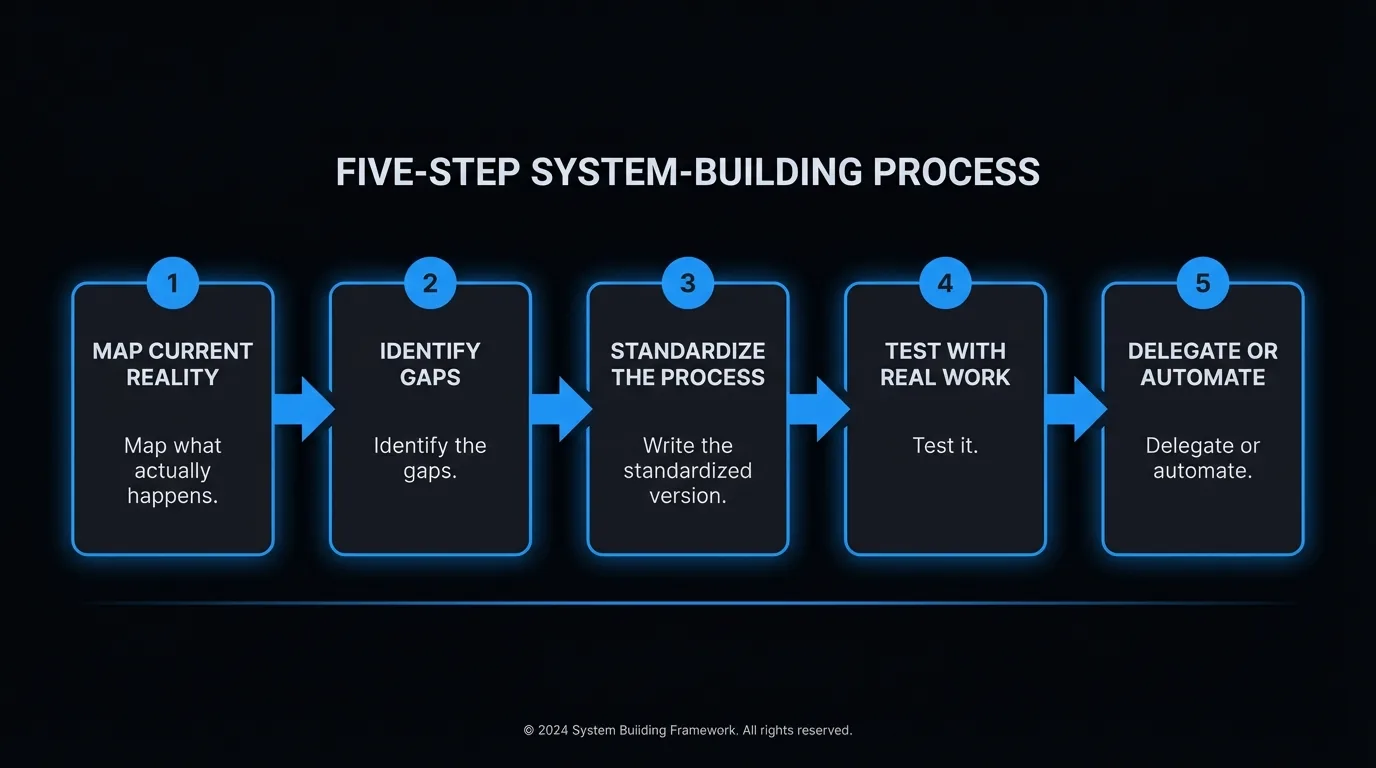
How to Build Your First Small Business System
Pick one category. Start with the one that causes the most chaos when it breaks. For most small businesses, that's client delivery.
Step 1: Map what actually happens
Don't write the process you wish existed. Write the one that actually happens. Walk through a recent client engagement from first contact to final delivery. Every step. Every email sent. Every form filled out.
Step 2: Identify the gaps
Where do things fall through? Where do clients feel confused? Where do you get asked the same questions repeatedly? Those are your broken links.
Step 3: Write the standardized version
Document the process as it should work. Use numbered steps. Include decision rules ("if the client doesn't respond in 48 hours, send follow-up B"). Attach templates for any emails or documents used.
One honest expectation for steps 1 through 3: documenting a process takes 2-4x longer than most owners plan for. A 10-step workflow you run in 20 minutes takes 60-90 minutes to write clearly the first time. That investment is still worth it. The savings compound from day one. But budget the time accurately or the documentation ends up half-finished and the VA or automation gets incomplete instructions.
Step 4: Test it
Run the next three client engagements through the documented system. Where does the documentation not match reality? Update it.
Step 5: Delegate or automate
Once the system works reliably, you can hand it off. A VA can run a documented system. An AI agent can handle the parts that don't require human judgment. Software can trigger steps automatically.
For the documentation piece specifically, business process documentation covers how to capture complex processes clearly.
Common Mistakes When Building Business Systems
Waiting for perfect before documenting.A 70% accurate system beats no system. Document what you know, run it, update it. Systems improve through use.
Building systems for processes you should eliminate.Before documenting a process, ask: does this need to happen at all? Systematizing a broken process just makes it break consistently. Fix it first.
Not including exception handling.Every system breaks sometimes. Document what happens when it does. Who gets notified? What's the fallback? Systems without exception handling collapse the first time something unexpected happens.
Making documentation too long to use.A 20-page workflow guide won't get used. Keep each workflow to one page. Use numbered steps. Make it skimmable.
Treating systems as finished.Systems need quarterly reviews. Your business changes. Your tools change. A system written 18 months ago may have three steps that are now outdated.
How Systems Work Across Different Business Types
Systems look different depending on your business model. The underlying principle is the same. The specifics vary.
Freelance copywriter with 8 active clients
The highest-value system is project delivery. Every time a draft is delivered, the same checklist triggers: Grammarly scan, brief cross-check against original requirements, email with next revision round timeline. Before documenting this, every delivery was slightly different. After: no draft goes out without the checklist complete. Revision requests dropped 30% in the first quarter because the brief cross-check caught misalignments before delivery, not after.
E-commerce business with 3 employees
The highest-value system is inventory management. Every Tuesday at 9am, a report pulls current stock levels against the previous week's sales velocity. Items below a 14-day stock threshold appear in a reorder list. The owner reviews it in 10 minutes and approves or skips. Before this system, stockouts happened 3-4 times per month, costing an estimated $1,800/month in lost sales. After: one stockout in six months.
Consulting firm with 4 consultants
The highest-value system is weekly client status reporting. Every Friday at 4pm, the project management tool compiles status across all active clients and generates a summary for the project lead. The lead reviews it, edits if needed, and sends it out. Before the system, status updates went out inconsistently. Clients emailed asking for updates, generating 2-3 hours of reactive communication per week per consultant. The system eliminated those interruptions.
The principle across all three: find the thing that causes the most visible pain when it breaks. Document it. The time investment is 1-3 hours. The returns are ongoing, every week the system runs without your involvement.
Systems are not about running a perfect business. They are about running a business where the same problems do not happen twice.
Small Business Systems: What the Research Shows
Small businesses that document and systematize their core operations recover 21-35 hours per month in administrative time across operations, client delivery, and communication. For a business running 10-15 documented workflows, that time savings compounds monthly: each new process documented removes recurring manual work permanently. A service business owner recovering 25 hours per month at $150/hr is reclaiming $3,750/month in productive time from documentation alone. The time investment to reach that baseline is typically 2-4 weeks of focused effort.
Using Technology to Run Your Systems
Once workflows are documented, technology makes them run without manual effort.
Three categories of tools do most of the work:
Project management tools (Asana, Notion, ClickUp): Hold your documented workflows, assign tasks, track progress. Good for anything involving multiple people or stages. Automation tools (Zapier, Make): Connect your apps and move data between them automatically. A new form submission updates your customer tracking system (CRM) and sends a welcome email. No one has to touch it. AI agents: Handle the steps that involve reading, writing, and deciding. An AI agent can draft a client update email, qualify an inbound lead, or compile a weekly performance summary. These aren't chatbots following scripts. They're closer to employees that run specific workflows on your behalf.The right combination depends on your business, but the sequence is always the same: document first, then automate. Automation without documentation is just chaos at higher speed.
One practical caveat on automation: first-time Zapier setups take two to three times longer than the tutorials suggest. A workflow that looks like a 20-minute setup usually takes 90 minutes once you account for authentication, testing, and the step that does not behave as expected. Build that time in, especially for your first two automations.
For a detailed breakdown of what AI can actually handle in a small business context, AI automation for small business covers what's genuinely possible right now.
What a Fully Systemized Small Business Looks Like
Here's a concrete example. A 3-person consulting firm with The 5-System Foundation in place:
- Leads fill out a form. The form response triggers a CRM entry, a qualification email, and a task for the owner to review.
- Qualified leads get a proposal generated from a template within 2 hours, not 2 days.
- Signed clients enter an automated onboarding sequence: welcome email, contract, kickoff questionnaire, calendar invite.
- Weekly progress updates go out automatically based on project status in the PM tool.
- Invoices generate on the 1st of each month and follow-up emails send automatically at 7 and 14 days overdue.
The owner spends time on client work, not on running the machinery. That's what systems do.
In our experience working with small business owners who implement this setup, the first 30 days feel slow while the systems are being built. By day 60, the compound effect is obvious. Owner time on operations drops from 18-25 hours per week to under 6.
One pattern worth naming: most owners hit a 2-3 week stall somewhere in the first 30 days. A busy client period, a tool setup that takes longer than expected, or simply running out of uninterrupted time. That stall is normal. Owners who return to the process after the stall get most of the same result. The ones who abandon it at the first interruption miss the compounding effect entirely.
One freelance consultant built this exact setup in her first 90 days and reported spending under 4 hours per week on operations, down from 18.
At an owner rate of $125/hr, recovering 14 hours per week from 18 to 4 is $1,750/week in capacity returned. The investment to build those systems: one focused weekend plus 2-3 hours for basic automation setup. The ongoing tool cost to keep them running: under $75/month.
For a companion guide on the specific step-by-step workflow side of this, business process workflow goes deeper on how to map and document individual processes.
Who This Is For / NOT For
Small business systems work best if:- You have at least 3-5 recurring processes that happen every week and eat owner time
- You're willing to spend 1-2 hours per system upfront to document before automating
- You're running a service, consulting, or e-commerce business where repeatability is possible
- Your business model changes so frequently that no two client engagements look the same
- You're pre-revenue and still figuring out what the process even is
- You expect a consultant or tool to document things for you without your direct involvement
The Bottom Line
Small business systems are how owners stop being the bottleneck. Start with The 5-System Foundation: document lead response, client onboarding, invoice collection, weekly reporting, and task handoffs. That alone recovers 21-35 hours per month in operational time that was previously running on memory. For $750/month, an AI agent runs your documented systems automatically. Book a strategy call to map your highest-value workflows first.What the Solution Actually Looks Like
Building systems gets you 80% of the way there. The remaining 20% is the execution layer: the tasks that run your documented workflows without someone manually triggering each one.
That is where most business owners stall. The process is documented. The automation setup takes 2-3 hours they never find. So the system lives in a Google Doc and the work keeps running on memory.
A managed AI agent closes that gap. Jejo.ai learns your business in a 10-hour onboarding session, then handles the operational tasks your documented workflows describe: inbox management, follow-up sequences, report generation, scheduling, and client communication.
No manual triggers. No task assignment. The agent runs the system on your behalf, flags exceptions, and escalates when something needs your judgment.
For $750/month with a 30-day guarantee, it costs less than a part-time assistant and replaces the operational workload that typically consumes 15-25 hours per week of owner time.
The systems you build become the instructions the agent follows. Your documentation is not just a standard operating procedure (SOP). It is the operating manual for the agent that runs your business when you are not in the room.
See what's included.FAQ
How long does it take to build small business systems?
Documenting your 10-15 core workflows takes 2-4 weeks if you work on it consistently. The first system takes the longest because you're building the template. Subsequent ones go faster. Most business owners see significant time savings within 30 days of implementing their first complete system.
A more specific benchmark: each individual workflow takes 30-90 minutes to document, depending on complexity. A simple email sequence takes 30 minutes. A client delivery workflow with 15 steps and multiple decision points takes 60-90 minutes. If you set aside 2 hours per week for system building, you will have your 10 core workflows documented in 5-8 weeks. The automation setup adds another 1-2 hours per workflow for those you choose to automate. Most businesses automate 3-5 core workflows in the first 90 days and see a 30-50% reduction in time spent on routine operations. For an owner spending 20 hours per week on operational tasks at $125/hr, that reduction is worth $1,250-$1,875 per week in recovered time.
Do I need expensive software to build systems?
No. A Google Doc works for documentation. Google Sheets handles most tracking needs. Zapier's free tier covers basic automation. The tools matter less than the documentation. Start with what you have.
Can I build systems if I'm a solo business owner?
Yes, and solo owners arguably need them more than anyone. A solo business without systems is a trap: you can't take vacations, get sick, or grow without everything falling apart. Systems are how solopreneurs build a business that doesn't require them to be present for every task.
What's the difference between a system and a process?
A process is a single documented workflow: how you onboard a client. A system is a set of connected processes that work together: how your whole client engagement lifecycle runs from first contact to final delivery and renewal. Systems are made of processes.
In practice, the distinction matters when you start building. Most business owners find it easier to document individual processes first, one at a time, and then connect them into a system. Trying to design the whole system upfront leads to over-engineering. Document the five processes that cause the most pain. Run them for 30 days. Then look at how they connect and where handoffs break. That is when system design becomes clear and practical instead of abstract.
Should I hire someone to build my systems?
Not at first. You understand your business better than any consultant does. Document what you know, run it for 30-60 days, then hire if you need help scaling or optimizing. Paying someone to document your business before you understand it yourself usually produces documentation that doesn't match reality.
Operations consultants charge $150-$300/hr to build systems for you. If your business generates $1M or more in revenue and you genuinely cannot spare the time, the investment can make sense. Below that threshold, the DIY approach almost always produces better results. The reason: the person closest to the work notices the details that matter. An outside consultant misses the edge cases, the exception handling, and the judgment calls that separate a functional system from a theoretical one. Build it yourself first. Get external help to improve a system that already works, not to build one from scratch.
Ready to stop being the bottleneck in your own business?
See how an AI agent handles the operational systems that run on autopilot: email and operations automation or see what's included.
