Quick answer
- What this covers: Small business operations without systems costs $70K-$130K/yr in hidden overhead.
- Who it’s for: Small business owners and solo founders.
- What it costs: $0-$200/month.
Running your business without documented systems costs $70,000 to $130,000 per year in coordination overhead. It just doesn't show up on your P&L. Small business operations either runs on documented systems, or it runs on you, meaning 9 to 17 hours per week of your time doing work a system could handle automatically. This hub maps the four-layer fix and routes you to the right deep-dive based on where you are now.
Key takeaways:
- Owners running without documented systems spend 9-17 hours/week on coordination worth $70,000-$132,600/yr at $150/hr
- Most automation attempts fail because businesses skip documentation first
- A business that requires the owner's constant presence isn't a business: it's a job with overhead
- A managed AI agent handles the execution layer: email, follow-up, scheduling, and reporting automatically
In this article:
- The Operations Framework: Four Layers
- What a Chaotic Week Looks Like vs a Systematic One
- The Operations Scorecard: Where Are You?
- The 5 Operations Mistakes Most Small Businesses Make
- The Cost of Running on Chaos
- What the Solution Actually Looks Like
- FAQ
Who This Small Business Operations Hub Is For
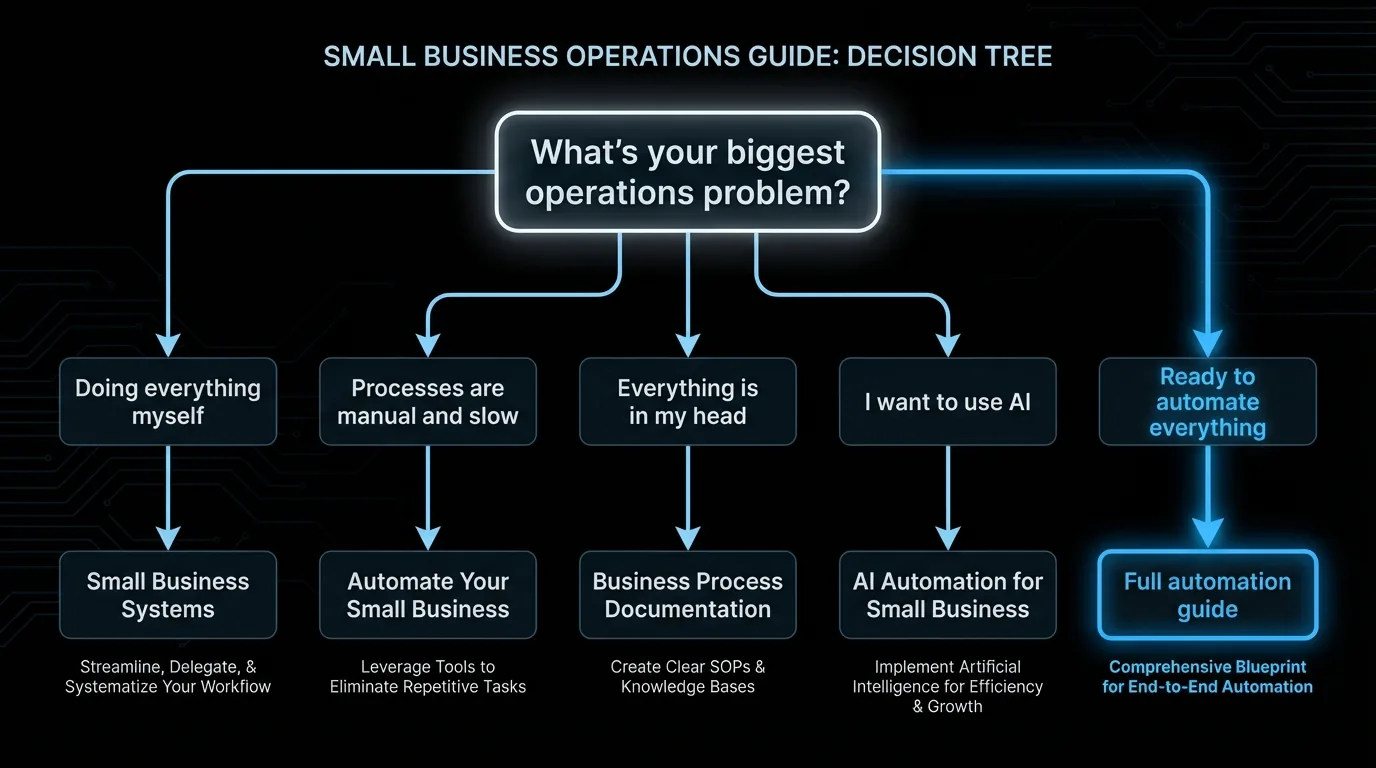
If you're doing everything yourself and drowning: Start with Small Business Systems and How to Build Systems in Your Business. These give you the structural foundation. If you have basic systems but they're manual and slow: Read Automate Your Small Business and Business Process Workflow. Add automation to what you've already built. If the problem is knowledge in your head, not written anywhere: Start with Business Process Documentation. Get it out of your head. If you want to use AI to run more of the operations: Read AI Automation for Small Business. Understand what's actually possible before buying anything. If you're ready to automate your whole business: Automate Your Small Business and Best Marketing Automation Tools for Small Business cover the execution layer.P4 Operations Cluster: All Articles
Foundational Systems
| Article | What it covers | Best for |
|---|---|---|
| Small Business Systems | Building repeatable systems for every business function | Owners starting from zero systems |
| How to Build Systems in Your Business | Step-by-step: identify what to systemize, build it, hand it off | Practical guide for non-technical owners |
| Business Process Documentation | Capturing what's in your head so the business can run without you | Owners preparing to delegate or hire |
Workflow and Process Design
| Article | What it covers | Best for |
|---|---|---|
| Business Process Workflow | Plain-English guide to designing repeatable workflows | Owners who know they need processes but don't know where to start |
| Business Process Optimization | Finding waste, bottlenecks, and inefficiencies in existing workflows | Owners with processes that feel slow or broken |
Automation and AI
| Article | What it covers | Best for |
|---|---|---|
| AI Automation for Small Business | What AI can actually automate in 2026, what's still hype | Owners evaluating AI tools |
| Automate Your Small Business | Non-technical guide to full business automation | Owners ready to build a largely automated operation |
| Best Marketing Automation Tools for Small Business | Top tools for automating marketing operations | Owners whose biggest time sink is marketing work |
The Operations Framework: Four Layers
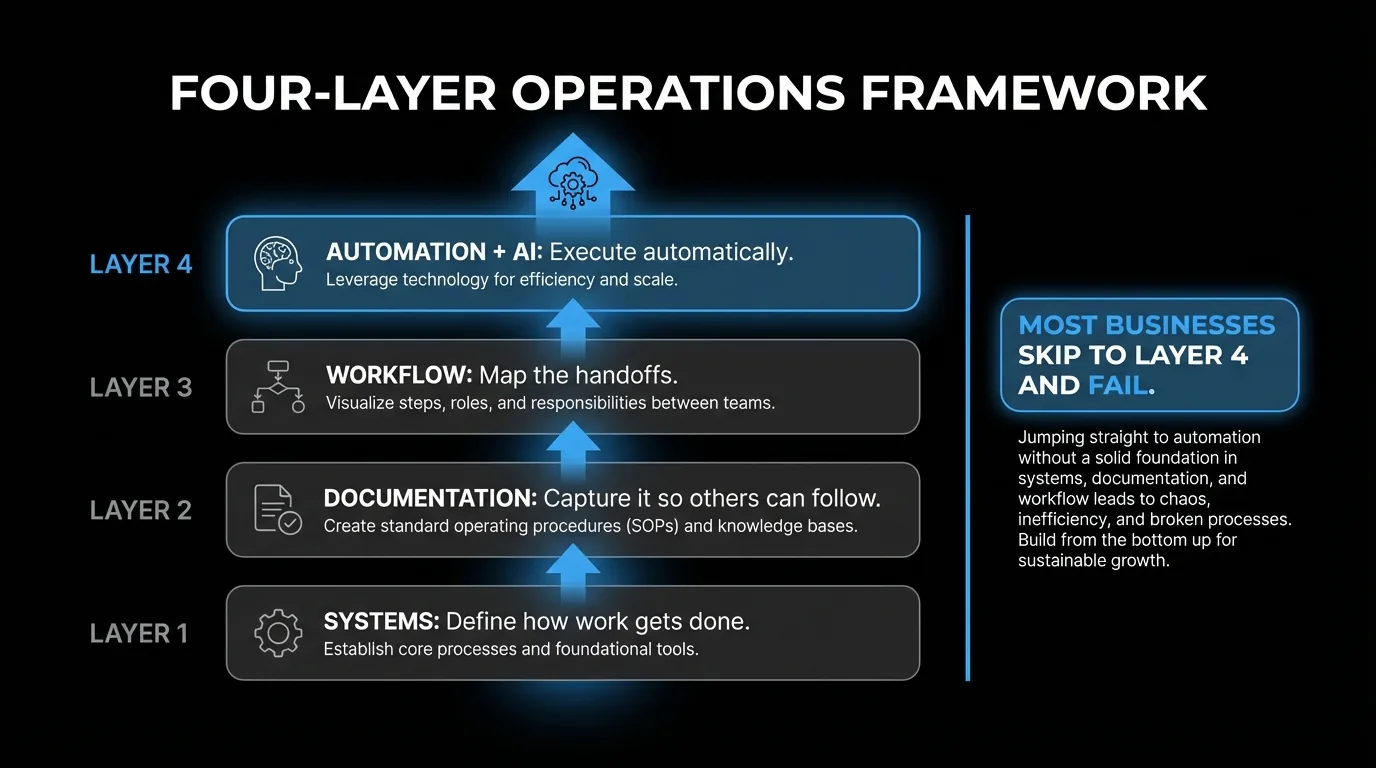
Operations problems fall into four layers. Together they form The 4-Layer Operations Model: the repeatable system for moving from chaos to automated execution. Each layer has its own solution. Skipping layers creates bigger problems downstream.
Layer 1: Systems. Define how things get done. Not tools, not automation. The actual process. What steps happen, in what order, who is responsible for each. Layer 2: Documentation. Capture the systems so someone other than you can follow them. Standard operating procedures (SOPs), checklists, process guides. Layer 3: Workflow. Map the systems visually. See where things connect, where handoffs happen, where things fall through the cracks. Layer 4: Automation. Replace the manual steps in your workflow with automated ones. Triggers, conditions, actions. This is where AI tools and agents enter.Most small businesses try to skip to Layer 4 (automation) before they've done Layers 1-3. That's why so many automation attempts fail. You cannot automate chaos. You can only automate a system. The 4-Layer Operations Model works in sequence for exactly this reason.
Small business operations runs on The 4-Layer Operations Model: systems (defining how work gets done), documentation (capturing it so others can follow), workflow (mapping handoffs and gaps), and automation (replacing manual steps with triggers and agents). Most small business owners try to skip to Layer 4. That is why most automation attempts fail. A business running without documented systems spends $70,000-$132,600 per year in coordination overhead that documented processes eliminate.What a Chaotic Week Looks Like vs a Systematic One
This is not abstract. Here is the same week in two different businesses, both 3-person design studios.
The chaos version:Monday: A client calls about a deadline. The owner spends 45 minutes finding the original brief in their email, piecing together what was agreed, and responding. Nobody formally documented the brief. The designer working on it had a different understanding of the scope.
Wednesday: An invoice from 3 weeks ago is still unpaid. Nobody knows if a reminder was sent. The owner drafts and sends one manually.
Friday: The owner needs to prepare a project summary for a client meeting. It takes 90 minutes because notes are scattered across 3 Slack threads, 2 email chains, and a Google Doc that was not updated after Week 1.
That week: 8 to 10 hours on coordination and administration. None of it visible to clients. None of it revenue-generating.
The systematic version (same size, same client types):Monday: A client emails about scope. The account manager responds within 4 hours using the project brief that lives in the shared project hub. Both parties signed off on the scope document during onboarding.
Wednesday: Invoices sent automatically on the 1st of each month. A reminder fires automatically at Day 7 if unpaid. The owner does not think about invoicing.
Friday: Client meeting prep takes 15 minutes. Every project has a status field updated by the designer when work is completed. The summary is pulled from the project hub in 5 minutes.
Same client load. The systematic business runs on 3 hours of coordination per week instead of 10. Those 7 hours go to client work that bills.
The Operations Scorecard: Where Are You?
Answer these 5 questions to find your starting point:
1. Can someone other than you run your business for a week without calling you?No → Start with Small Business Systems
2. Do you have written processes for your 5 most common tasks?No → Start with Business Process Documentation
3. Do you know exactly where leads fall through the cracks?No → Start with Business Process Workflow
4. Are there tasks you do manually every week that happen the same way every time?Yes → Start with Automate Your Small Business
5. Do you want to use AI to handle email, follow-up, scheduling, and reporting automatically?Yes → Start with AI Automation for Small Business
The 5 Operations Mistakes Most Small Businesses Make
1. Trying to automate before documenting.Zapier, Make, and AI agents are powerful. They are also useless on an undocumented process. "We kind of do it differently each time" does not automate. Document first. Automate second. The documentation step takes a few days. Skipping it means the automation breaks the first time an edge case appears, usually in front of a client.
2. Running everything through email.Email is a communication tool, not a project management system. Businesses that manage projects in email lose decisions, lose context, and have no reliable way to see where something stands. When a person leaves or a thread gets buried, the information is gone. Operations that live only in email cannot be delegated and cannot scale.
3. Documenting once and never maintaining.A process document written in 2023 that nobody has touched since is not an asset. It is a liability. When new hires follow outdated SOPs, errors compound. The discipline is not creating processes once. It is reviewing them quarterly and updating when something changes.
One honest note about the documentation step itself: most business owners discover that their core processes have more exceptions and edge cases than they realized. The first draft of any SOP is always messier than expected. Write it anyway. A working-but-imperfect process document beats a perfect one that never gets finished.
4. The owner as the system.When the owner knows where everything is, remembers every deadline, and holds every client relationship in their head, the owner IS the system. That person cannot take a week off. They cannot get sick. Externalizing knowledge from the owner's head to documented systems is the single highest-impact operations task in any small business.
After working with dozens of small business owners on their operations, the most consistent finding is this: the businesses that feel most chaotic have the same 3 to 5 core processes running entirely on owner memory. Externalizing those first breaks the pattern. Everything else is easier after that.
One event planning firm we worked with cut their client intake process from 4 hours to under 45 minutes after documenting the steps and automating the intake form sequence. Within 30 days, they were onboarding twice as many clients without adding staff.
5. Underinvesting in onboarding.Most businesses onboard new hires by having them shadow someone for a week. No documents, no checklists, no clear standards. Every hire learns a slightly different version of how things work based on whoever trained them. The result is inconsistency that accumulates. A 10-hour investment in documented onboarding pays back within the first month.
The Cost of Running on Chaos
Bad operations has a direct financial cost. It just does not show up on a P&L.
| Operations failure | Weekly time cost | Annual cost at $150/hr effective rate |
|---|---|---|
| Recreating context (finding old emails, re-reading threads) | 3-5 hours | $23,400-$39,000 |
| Manual invoicing and follow-up | 1-2 hours | $7,800-$15,600 |
| Re-explaining processes to new or existing staff | 2-4 hours | $15,600-$31,200 |
| Manual scheduling back-and-forth | 1-2 hours | $7,800-$15,600 |
| Rebuilding reports and status updates from scratch | 2-4 hours | $15,600-$31,200 |
| Total | 9-17 hours/week | $70,200-$132,600/year |
These are the costs of not having systems. They are invisible on a balance sheet. They show up as capacity limits, owner burnout, and revenue ceilings that feel like market problems but are actually operations problems.
A 4-person design studio tracked coordination costs for one month before making any changes. Result: 13 hours per week on admin and context-rebuilding. Three documented processes and one invoice automation eliminated most of it within 30 days.
Priya owns a dental office in Phoenix with 3 staff. She assumed her practice ran smoothly until she tracked coordination time for one month. Appointment rescheduling alone took 5 hours per week because nothing was documented and every schedule change required Priya's personal approval. Insurance follow-up added another 4 hours because two staff members handled it differently with no written process. Patient intake varied depending on who was at the front desk, creating re-work for Priya almost daily. After documenting 4 core processes and setting up an automated appointment reminder sequence, coordination time dropped from 11 hours per week to under 3 hours within 6 weeks. Same patient volume, far fewer dropped balls, and Priya out of the middle of every scheduling decision.
The tools to fix this cost less than a monthly software subscription: Notion or Airtable for documentation ($16 to $18/month), Calendly for scheduling ($12/month), Zapier for automations ($20 to $50/month). Against $70,000 to $130,000 in annual waste from running without systems, these pay for themselves in the first week of use.
Spending hours on tasks that could run automatically? Most small businesses lose $70,000 or more per year in coordination overhead that documented systems eliminate in 30 days. Book a quick call and we'll map out your execution layer in 15 minutes.
What Small Business Operations Excellence Actually Looks Like
A well-run small business operation has three properties:
It runs without the owner's constant involvement. Not never, but most days. The owner shows up to make decisions, not to execute tasks. It's documented well enough to delegate. A new person could join and learn the process from what's written, not from following the owner around for 3 weeks. It gets better over time. There's a feedback loop. When something breaks, it gets fixed and documented. When something takes too long, it gets optimized. The business gets more efficient every quarter.One caveat on the timeline: getting there takes longer than most frameworks suggest. The average small business needs 3 to 6 months before the first layer of documented systems runs reliably. Operations improvements feel slow because they fix invisible things. Less coordination chaos does not appear on a revenue report. The ROI shows up as recovered time, fewer errors, and a business that can onboard a new client without the owner managing every step.
This is not complexity for its own sake. The most operationally excellent small businesses run lean. One good system beats five mediocre ones.
For a look at how AI agents fit into the operations layer specifically, the email operations use case shows exactly what gets automated and what doesn't.
What the Solution Actually Looks Like
Open Slack at 8 AM. Invoices went out automatically on the 1st. Three late-payers received a reminder at Day 7. Lead follow-up ran on schedule. Client status updates were drafted from last week's project notes and staged for your review. The one urgent item from last night is flagged, with context, waiting for your decision.
That is an operational layer running on a managed AI agent. Not automation stitched together with Zapier. Not a VA managing your inbox. A business-trained agent that knows your processes, your clients, and your decision rules, handling execution across the whole operation.
Building systems is the foundation. The execution layer on top is where Jejo.ai sits. After a 10-hour onboarding that maps your business context, the agent handles email, scheduling, follow-up, reporting, and distribution without daily prompting. You get the operations outcomes without the management overhead. See what it handles specifically.
The agent handles documented, repeatable execution well. When a situation falls outside the parameters set during onboarding, it flags the item for human review rather than guessing. That flag behavior is intentional. High-stakes or ambiguous decisions still belong to the owner. The agent handles the volume. You handle the exceptions.
Who This Is For
- Business owners doing everything themselves whose operations live in their head rather than in written systems
- Small teams (2 to 15 people) where inconsistent processes create coordination friction and client experience variation
- Service businesses preparing to grow who know their current approach breaks at the next level of client volume
Who This Is NOT For
- Product businesses with physical manufacturing or inventory operations requiring specialized operations management
- Businesses already running documented, automated operations that only need execution-layer support rather than systems design
- Owners looking for a quick fix without investing time in the process documentation layer first
The Bottom Line
Small business operations runs on you until it runs on documented systems. The 4-Layer Operations Model is the path: systems first, then documentation, then workflow, then automation. The investment to get there is 20 to 40 hours of documentation and system-building over 2 to 3 months, which pays back permanently in 10 to 20 hours recovered per week. Start with the 5-question scorecard above to find your starting point, or book a strategy call to map out what the execution layer looks like with an AI agent.FAQ
What does small business operations mean?
Small business operations covers everything that makes the business function day to day: the systems, processes, workflows, tools, and coordination that turn inputs (time, money, people) into outputs (products, services, revenue). Good operations means the business runs predictably without requiring the owner's constant presence.
Where should a small business start with operations?
Start by writing down the 5 tasks you do most often. For each one, document the exact steps. That's your first set of SOPs. Once you have those documented, you can see where automation makes sense. Trying to automate before documenting usually fails.
Here is a quick test for whether a task is ready to document: can you write the steps without getting stuck on edge cases for more than 10 minutes? If yes, document it now. If edge cases take longer than the main flow to describe, the task has too much variability to systematize right now. Start with the cleanest, most predictable tasks. The discipline of writing clear steps also clarifies whether a process actually makes sense or whether it is just "how we've always done it."
How much does it cost to fix small business operations?
The tools cost $0-$200/month (Google Docs for documentation, Notion for process management, Zapier or Make for automation). The real cost is time: 20-40 hours over a few months to build the systems. Once built, a well-documented, automated operation saves 10-20 hours per week permanently.
The time investment breaks down as: 8 to 12 hours for initial process documentation (5 core processes) and 4 to 6 hours to build automations for the highest-volume manual tasks. Another 6 to 10 hours to test and refine until the systems run reliably without your involvement.
Most of this can be done in dedicated blocks of 2 to 3 hours per week over 2 months.
The operations that seem most chaotic are rarely more than 30 hours of documentation and setup away from running predictably.
What Getting Operations Right Actually Enables
Operations is infrastructure. You do not notice good infrastructure. You only notice bad infrastructure when it fails.
A business with solid operations can do three things that a chaos business cannot:
Take on more work without breaking. When a new client arrives, there is a documented onboarding process, a clear intake checklist, and a system that routes information to the right place. The owner does not personally manage every step. Leave for a week. A business that requires the owner's constant presence to function is not a business. It is a job with overhead. The test: can someone other than you run operations for 5 days without calling you? If not, operations is the constraint on your freedom, not the market. Grow without chaos compounding. Most small businesses find that growth makes things worse before it makes them better. More clients means more coordination, more communication, more chances for things to fall through the cracks. Good operations absorbs that growth. Chaos operations amplifies it.The investment to get there: 20 to 40 hours of documentation and system-building over 2 to 3 months. That pays back permanently. Every week after that, the business runs with less friction. Every new hire onboards faster. Every client gets a more consistent experience.
The businesses that build this early never understand why others find operations so painful. The businesses that skip it spend years fighting fires that are actually structural problems.
The bottom line on operations investment: The business owner who spends 30 hours building systems in the next 2 months either recovers those 30 hours in the first month of running them, or they do not build useful systems. Good systems are not obvious in theory. They become obvious the first week you stop having to manually do something you used to do every day. Ready to stop running everything manually?Jejo.ai handles the execution layer of your operations automatically: email management, follow-up, scheduling, reporting, and more. See how it handles email and operations or book a strategy call to map out what would run on autopilot in your specific business.
